
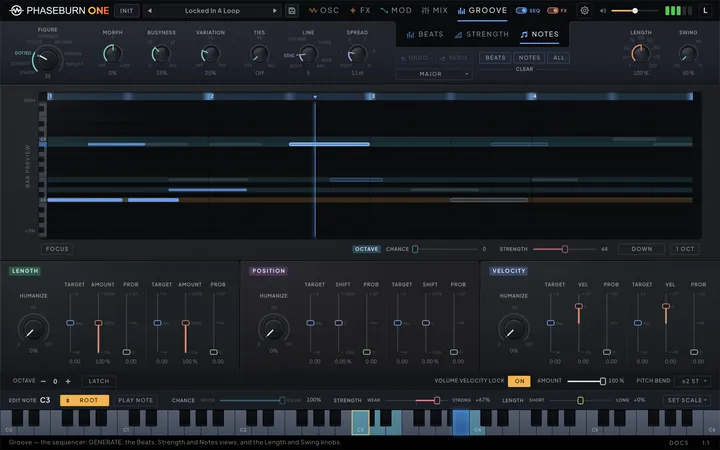
Phaseburn One’s sequencer does not play back a pattern you drew — it rolls dice you have weighted. You decide how likely a note is at every point in the bar and which pitches are in the running; the instrument performs a fresh take every bar. The whole system lives on the Groove page — its one outlying control, the SEQ switch, rides on the Groove nav tab itself — and all of it feeds the one voice built from the Phase-Locked Loop (PLL), VECTOR, MORPH and sub sources covered in the oscillators chapter (Chapter 2 — Oscillators).
One bar, one page
Learn where the three decisions live, and the rest of this chapter reads itself. The sequencer is one page — Groove — and one band runs the full width of its top. At its left sits the GENERATE card: the Figure dial with its Morph knob, then Busyness, Variation, Ties, the Line dial and Spread, covered in the GENERATE chapter (Chapter 8 — Generate). At its right sit the Length and Swing knobs that time the whole sequence. Between them, hanging under the GROOVE tab in the header as that tab’s second level, is the view switcher — Beats, Strength, Notes — and under it the groove’s own actions: Undo and Redo with the Scale menu beneath them, and the three clears, Beats, Notes and All, with their CLEAR caption beneath. The band never changes shape, so turning GENERATE and reading what it wrote never leaves the page, and leaving Groove and coming back returns you to the view — and the beat division — you were working on. Loading a preset is the one thing that moves that division for you: the grid opens on the first row the incoming pattern uses — 1/4 for a line on quarters, 1/16T for a triplet figure — so a fresh sequence never greets you with an empty row. A sound-only load (KEEP SEQ) keeps both the grid and your place in it.
The three views share one frame. Across the top of every editor runs the same ruler — the beat numbers, a playhead that moves while the sequencer runs, and a strip shaded by the strength map — and under every editor sit the same LENGTH, POSITION and VELOCITY modules, whose sliders decide how long notes ring, where they land and how hard they hit. Beats comes first and opens by default — the grid is where a pattern is built. It decides when: the probability grid with its 152 slots, beat links and ties, and a row beneath the grid carrying the family and division buttons that choose the row you are editing, then Limit, Fill, Fill Force and Vary. Strength decides how much each moment matters: the map of every bar position’s relative weight — beat one strongest in most grooves — that the probability, length and velocity systems target, with Template, Lock and the Velocity slider in the row beneath. Notes shows what plays: the bar preview, the bar the dice actually rolled, with Focus and the Octave gamble in the row beneath.
The pitches are edited on the keys. While Groove is open, the keyboard strip under the page grows a note-edit row — the selected key, Set Root, the Play Note / Play Seq menu, the key’s Chance, Strength and Length, and Set Scale — and its keys become the note pool (see Choosing notes (Chapter 7 — The Sequencer)). Those keys are also the side you play: the piano shows the temporary root a held key is playing from, snapping back on release.
Starting belongs to your hands; while the DAW plays, time belongs to it. A held note runs the sequencer and transposes it, and keys struck together run it while feeding it the chord as its pool (see What your keys do (Chapter 10 — MIDI & Your DAW)). With the DAW stopped, the phrase starts from step 1 on your attack and stops with your release. While the DAW plays, the bar runs on the DAW’s bar lines and your key joins the bar in progress (see Playing it live (Chapter 7 — The Sequencer)). Above the keys sits the SEQ switch on the Groove nav tab, visible and clickable from every page. Switching it off takes the whole Groove page with it: the page veils over behind a card naming the switch, the instrument stops rolling bars of its own, while the oscillators’ Voicing controls on the OSC page — Skip and Paraphony included — keep acting on the notes you send, Paraphony still drawing from the note pool on this page, moved to the key you play. Everything outside that page keeps running: the transport lock, the step modulators, tempo-synced LFOs and the MIDI notes you send. That is the setting for driving Phaseburn One from MIDI in your host. It is per-instance plugin state, saved into the project and recalled with it, untouched by preset loads — a track you drive from the piano roll stays that way through every patch you try (the cog menu’s New instances start with column decides how new instances start). Switching it off mid-bar releases the sounding sequencer note cleanly without cutting held MIDI notes. While the DAW plays, the bar keeps counting silently with the switch off, so switching it back on mid-bar comes in on the bar in progress with a freshly rolled bar — nothing from the part already gone fires. On the Modulation page — which the veil does not cover — the NOTE STRENGTH module dims and wears a small SEQ OFF tag while the switch is off and nothing else can drive it; with Velocity As Strength on it stays lit, because played notes feed it then (that setting travels with the preset and has no panel control in this build — see Input modes (Chapter 10 — MIDI & Your DAW)). The Groove page’s own LENGTH, VELOCITY and POSITION modules no longer carry that tag — the page-wide veil says it for them. The running sequencer emits real note events into the same voice your keyboard plays — there is no separate sequencer sound.
The bar the grid draws is always four quarter notes long. An odd host meter masks its tail rather than stretching it — a sixteenth has to stay a sixteenth — so 3/4 and 6/8 both play the grid’s first three quarter notes and never reach the fourth, 7/8 plays three and a half, and meters longer than a 4/4 bar clamp back to the whole grid.
One distinction is worth knowing early. The Length and Swing knobs, every slider in the LENGTH, POSITION and VELOCITY modules, and GENERATE’s Figure dial and Ties knob are real host parameters your DAW can automate, and they appear in the table at the end of this chapter. The bar’s contents are not: the beat slots, the beat links and ties, the note pool, the strength map and the phrase settings are pattern data. They travel with the preset and with your saved project, they can be rewritten in one gesture by GENERATE, Vary, Fill, Fill Force and the clears, and they are undoable — but they are not automation targets, and they do not appear in your DAW’s parameter list.
Chances, not steps
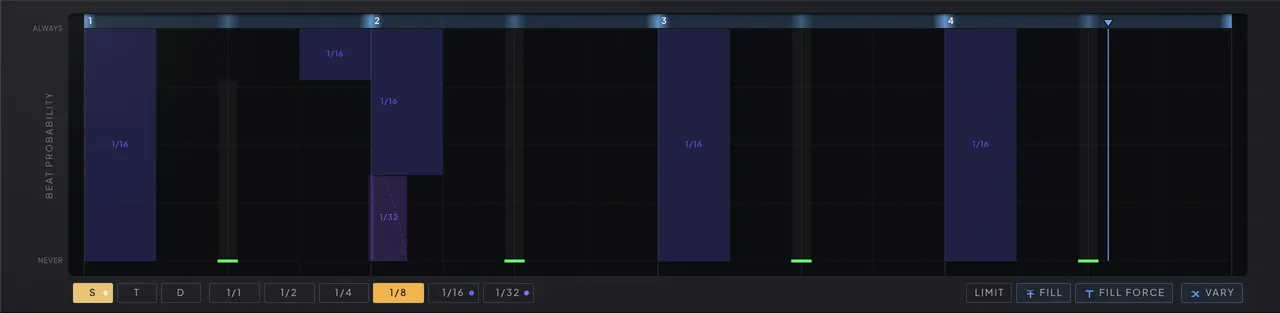
Program a line by deciding how much you want each hit, not whether it happens. The Beats tab — the grid names itself BEAT PROBABILITY down its left edge — edits one bar as a single grid of chances, one row at a time: in the row beneath the grid, the S, T and D buttons pick a family — straight, triplet or dotted — and the division buttons beside them pick which of that family’s rows you are editing. Every other row that holds anything stays visible as translucent shapes hanging from the top of the grid, so you can see what else claims each moment. Each shape is captioned with the division it belongs to — 1/16, 1/8T, 1/4D — and clicking one takes you straight to that row to edit it. Where several rows claim the same stretch the shapes stack, one band per contributing beat, so a mixed moment is still legible band by band; a band too small for its caption still highlights on hover and names itself in the help bar. The straight family runs six rows — one slot for a whole-note hit, two halves, four quarters, eight eighths, sixteen sixteenths, thirty-two thirty-seconds — sixty-three slots. The triplet family adds four rows, half- to sixteenth-note triplets — forty-five slots. The dotted family adds five rows, each holding as many dotted notes as can start inside the bar — forty-four slots, with odd counts like eleven dotted sixteenths because a dotted note is half again as long. That makes 152 slots, all live whether displayed or not, all competing for the same bar.
Raising a slot raises the odds that a note begins at that moment with that duration. Only a slot at exactly zero is off; anything above zero is a contender, however faint. When several slots want the same moment — the bar’s first sixteenth shares its downbeat with the first eighth, the first quarter and the whole note — one weighted draw picks a winner, and the winner plays out its full duration, silencing every other slot until it ends. Phaseburn One plays one voice, and the lottery is how that voice arbitrates 152 claims.
One moment, in plain numbers: put the bar’s first quarter-note slot at an 80% chance and the half-note slot above it at 10%, and leave everything else on that downbeat empty. Eight bars in ten now open with the quarter. One in ten the half note wins instead, and because a winner occupies its whole duration it rings straight through the second quarter’s territory. And in the tenth or so that remains, nothing fires — the downbeat is a rest. That is the entire grid in miniature: every start time is one draw among the divisions that want it, with silence taking whatever chance is left over. You never program the outcome, only the odds — and you can watch each draw land in the read-only bar preview on the Notes view, which shows the whole bar the moment it is rolled (see The bar preview (Chapter 7 — The Sequencer)).
Chance is a shared budget, not a private one. A slot that loses a draw still spends its share: until the span it wanted to fill has passed, its chance stays subtracted from the budget of every later draw. The grid balances itself — piling chance into one row drains the effective odds of the moments around it — which is why a groove keeps its character even when every row is busy.
Edits are reversible. Undo and Redo, under the view switcher, walk one history shared by all three Groove views, up to 32 steps back: slot chances, links and ties, the strength map and its lock, the pool and every note edit, and every move of GENERATE except the Ties knob, which your host undoes as the parameter it is, and a controller learned on a GENERATE knob, whose moves add no step. Each gesture — a lane drag, a link, a tie, a Fill, a clear, one whole turn of a GENERATE control — is one step, and each step restores only what its action changed, so a run of Vary presses is something you can walk out of without losing a pool edit made in between. The history starts empty after a preset load, INIT and a project reload — your host restoring the instrument’s state, which also covers switching projects and the host’s A/B compare — so Undo never brings back the previous project’s beats or notes; a sound-only KEEP SEQ load keeps it (see Vary and undo (Chapter 8 — Generate)).
In an odd host meter the stretch of grid past the end of the bar sits behind a dimmed panel, cut off by a line captioned OUT OF BAR, and its lanes grey out with it. Those slots keep whatever chance they hold — GENERATE always composes a full 4/4 bar, so its closing figures often land there — but nothing behind the cut is ever reached.
A fresh bar is rolled at every bar line, and an edit does not wait for the next one: change a slot, a link, a tie, the pool or the strength map, or move GENERATE, and the bar in progress plays on from the playhead with the same dice and the new contents — nothing sounding is cut or struck again, and what already played stays. Every slot names itself after its row and position — “1/1 Beat 1” is the whole-note slot, “1/16 Beat 3” the third sixteenth, “1/8T Beat 1” the first eighth-note triplet — and the help line reads that name and the slot’s chance out while you drag it. Because a clear, Fill, Fill Force, Vary, a GENERATE move and a link or tie edit each land as a single change, the engine can never catch a grid halfway through one.
Fill a row, or push past its room
Fill a whole row in one click, or drag one beat higher than the bar has room for and let the other rows make way. Three controls in the row under the Beats grid do it — Limit, Fill and Fill Force, grouped just before Vary.
Every moment of the bar has one budget of chance (see Chances, not steps (Chapter 7 — The Sequencer)), so a beat is only as likely as the room the other rows leave it. Limit decides what happens when you want more. Lit, a slider stops at that room and nothing else on the grid moves. Unlit — the way the editor opens — every slider reaches ALWAYS, and pushing past the room shrinks the overlapping beats of the other rows in proportion to make space. On an otherwise empty grid, put the whole-note beat at 60, push the first eighth to 100, and the whole note drops to 27; push the eighth all the way to ALWAYS and the whole note falls to NEVER. Pull the slider back down while you are still on that row and the others return exactly as they were. The shrunken values become the grid for good when you leave the row (for another division or family, another Groove view or another page), turn Limit on, make any other grid edit (Undo or Redo, Vary, a clear, Fill, Fill Force, a link or a tie), let GENERATE write a new groove or load a preset. Limit is a working setting, not part of the patch: it is never saved, and the editor always opens with it off.
Fill raises every beat of the row you are on to the room the other rows leave it, and never lowers one — the quickest way to make a division as present as the bar allows without touching anything else. Fill Force goes all the way: every beat of the row at ALWAYS, every other row cleared and every link and tie removed, so the grid becomes that one division and nothing else. Each is a single Undo step.
Beat links
Build ratchets and fills that only exist when their anchor plays. A beat link is a forward connection between two slots, set on the Beats view: hover a beat and a small L button appears beneath the grid under each later beat of its division — click one to link it, click it again to unlink. Whenever the source actually wins its draw, the target is forced to play too, regardless of the target’s own roll. Links chain — connect A to B and B to C, and one lucky anchor drags a three-hit figure out with it.
The sharpest use is a target with zero chance of its own. A slot at zero never plays by itself, but as a link target it fires every time its source does — a ratchet that exists purely as a consequence. Give the source a middling chance and the figure appears in some bars and not others, always complete when it does. Generated fills work the same way: the beat generator writes its end-of-bar figures as links (see Vary (Chapter 8 — Generate)), so a fill arrives as one gesture instead of a scatter of independent gambles.
You edit one division at a time, but you see every link at once. An endpoint that lives in another division is drawn on the grid you are on as a semi-transparent ghost — at its true position in the bar, in its own division’s color — joined to its partner by a dashed arc that bows clear of the bars. Hover any linked slot and its whole chain lights up, ghosts included, so a sixteenth hanging off a quarter reads without switching rows.
One thing a link cannot do is put two beats on the same instant. Divisions overlap by design — the 1/8, the 1/16 and the 1/32 all start together on the downbeat — and “always plays” has no meaning if it points at two of them at once. So while you are choosing a target, any position already spoken for by the chain you are building is struck through and refuses the click, and the help bar names the beat that holds it. Pick the other one, or unlink the first.
Links reward restraint: they resolve recursively, so long chains turn a single win into a cascade that eats the rest of the bar — short chains of two or three beats stay groove-shaped. A forced beat enters the bar like any other note, so everything downstream still applies: it reads the strength map, rolls its own pitch from the pool, and takes length and position modifiers like its neighbors.
Links can slide, too — the global way. Push the Length knob in the Groove header band past full so consecutive notes overlap, light LEGATO on the OSC page’s Voicing tab, and every overlapping pair slurs, a linked pair included: the second hit glides out of the first without a new attack, along the legato path described in Glide and legato (Chapter 2 — Oscillators). An anchor with a zero-chance target one division later then becomes a ratcheting figure that appears only in some bars and always slurs the same way. To slide one particular hit without touching Length or Legato for the rest of the bar, tie it instead (see Ties (Chapter 7 — The Sequencer)).
Ties
Hold one beat and let the next hit slide out of it, leaving the rest of the bar as it is. Any beat can be tied: hover it on the Beats view and a small TIE pill appears beneath it — click the pill to tie the beat, click again to untie it. A tied hit holds for its whole slot, whatever the Length knob says. If another hit starts exactly where that slot ends, it slides in: no new attack — the envelopes, the transient and the sub carry straight through — while the pitch glides to the new note. If nothing starts there, the tied hit simply releases at its slot end.
The Voicing tab’s LEGATO slider times the slide — its time, or its note value when synced — whatever the interval, and with LEGATO off a tie still slides, over 60 milliseconds. Either way a tie’s slide follows the EXP curve, whatever the curve button under GLIDE says. GLIDE itself never times a tie, and a tie into the same pitch simply holds. The incoming hit brings its own velocity and strength but restarts nothing else: the LFOs, the step modulators and the Skip and Paraphony dice carry on as they were.
A slide still answers to the dice. The hit that would land at the slot end has to win its own draw, so a tie onto a chancy beat slides in some bars and only holds in others. Ties never cross the bar line: a tie on the bar’s last slot holds to the bar line, and the next downbeat attacks again. They travel with the preset and the project, and older files load with none.
The grid shows every tie as a resting arc under its beat, in its division’s color: solid when a hit surely lands at its end, dimmed when that depends on a chance, a half arc when nothing is there and the beat only holds. Ties in other divisions show faintly. Hover an arc and the help bar names where it lands — “1/8 Beat 3 tied → 1/8 Beat 4”, with the chance when there is one. GENERATE’s Ties knob adds ties of its own on top of yours, drawn dashed and with a dashed pill; press a dashed pill to make that tie yours (see the GENERATE chapter’s Ties (Chapter 8 — Generate)).
Clear Beats, Clear All and Fill Force remove ties, and a fresh groove from GENERATE starts without them, though a Figure you edited keeps its own. Vary, Fill and a Limit-off push keep them, and Undo and Redo restore them with the grid. Sent out as MIDI, a slide plays the new note before releasing the old, so a mono synth on the receiving end slides too (see Driving other instruments (Chapter 10 — MIDI & Your DAW)).
Strength and dynamics
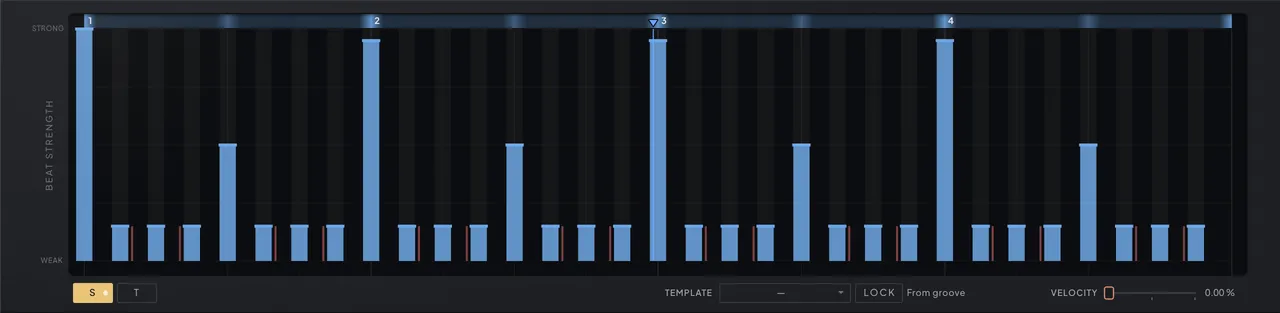
Give the bar a spine of accents, then let every other decision lean on it. The Strength tab — the grid reads BEAT STRENGTH down its left edge — holds one map of the bar: 96 positions, fine enough to give every straight and every triplet slot its own cell — edited in a straight view of thirty-two positions or a triplet view of twenty-four, with the other view shown as reference lines. Unless you lock it, GENERATE writes it along with every groove it plays — the figure’s strong hits at the top, its other hits at the bottom (see Three planes from one figure (Chapter 8 — Generate)). Draw it by hand, or paint one of eight clean metric maps from the Template menu in the row under the grid: Downbeats, Backbeat, Offbeat, Half-Time, Three-Three-Two, Dotted Quarters, Triplet and Even. Beside it, Lock keeps the map you see: while it is on, GENERATE and Vary never rewrite it, and any hand edit or template pick turns it on by itself. A caption next to Lock says where the map came from — From groove, Template with the template’s name, Edited, From preset or Empty — and the Groove’s Undo steps strength edits, template picks and lock changes back.
Before the mechanics: what is strength for? It marks certain beats with a value, and the rest of the instrument reads the marks. Paint beat one strongest — the usual choice — and you can tell the root note to prefer strong beats, so the phrase keeps landing home on the downbeat while other pool notes fill the gaps. Aim the NOTE STRENGTH modulation route at a filter and every accented hit pushes the cutoff harder than a ghost does. Point a length modifier at Weak with some probability and weak beats randomly clip short while the accents ring on. None of this is loudness by itself: velocity follows the map only as far as the dedicated VELOCITY slider on this tab hands it over, so a map can drive selection, modulation and length while every note still lands at an even level.
Strength is a ranking, not a velocity curve. It is the relative strength of each beat position — beat one strongest in most grooves, the backbeats next, the gaps between them weakest — and most of what reads it does not read it as loudness at all; it targets it. Aim a modifier at strong beats and it fires only where the map reads high, aim it at weak beats and it works the ghosts. Five separate systems consult the ranking this way: note selection (pool notes can prefer strong or weak beats), octave randomization (which can be gated to strong beats), the length and position modifiers’ targeting, and the velocity modifiers. A sixth consumer, the NOTE STRENGTH modulation route (see Velocity and note strength (Chapter 4 — Modulation)), skips the ranking altogether and feeds each note’s raw painted cell straight into a sound parameter for the note’s duration. Each note reads exactly one cell — the nearest one to its grid start, measured before swing and humanization shift it — so timing feel never changes which strength cell a note obeys.
You can watch the ranking work from any view. The ruler across the top of every Groove editor carries the map as a strip, and the strip answers whatever you are aiming. Move a Weak/Any/Strong control — a Target slider in the LENGTH, POSITION or VELOCITY modules, a pool note’s Strength, the Octave gamble’s Strength — and the strip lights the bar positions that control’s current value reaches (a leaning shades them by how much it favors each), among those where an enabled beat can start; at the centre, Any, it lights them all. Move a Short/Any/Long control — the VELOCITY module’s length-keyed Target or a pool note’s Length — and the strip draws the spans of the groove’s enabled slots instead, lit by their length: fully Long the longest, fully Short the shortest. The light fades two seconds after your last move.
Contrast is what gives the map meaning, but the targets never lose a timid map: every weak/any/strong target — length, position and velocity alike — is judged against the map’s own quietest and loudest cells among the beats that can actually play, stretched to the full range. Turned fully to Weak, a target reaches only the beats sharing the map’s weakest playable value; fully to Strong, only the beats sharing its strongest; between Any and an extreme its reach narrows linearly, so the knob sweeps from “every note” down to “just those beats”. A perfectly flat map carries no ranking at all, and every target simply matches every note. The pool’s leanings and the Octave gamble read the same stretched ranking but weigh rather than cut: a leaning favors its end and fades toward the other, and only at full does it turn exclusive. The one reader of raw cell values is the NOTE STRENGTH route, so a map hovering around the middle barely moves its destination — which is why the templates are shaped with clear strong and weak tiers and GENERATE puts every hit it writes at one end of the range or the other.
Dynamics come from two places, and they stack. The VELOCITY slider beside Lock is the literal route: at 0% every note starts from the same flat hit, and as you raise it each note’s velocity slides toward a straight reading of its own strength cell, until at 100% the map you drew is the dynamic shape of the bar. It is the only control that hands strength to loudness directly — a flat map has no shape to hand over, so notes there land on a single mid velocity rather than falling silent.
The two velocity modifier slots in the VELOCITY module below the grid then work on top of whatever that leaves, at any slider setting, so accents keep breathing from bar to bar even when velocity is following the map exactly. One keys off beat strength, the other off note length; each has a weak/strong/any target, an amount above or below the base hit, and a probability. Amounts randomize “up to” the value you set. The length-keyed slot ranks each note by its slot’s own length among the slots the groove has enabled — a half note is long beside sixteenths and short beside whole notes — so Length, the length modifiers and ties never move a rank, and a groove of one division matches the target wherever it points.
Choosing notes

Decide which pitches are allowed to happen — and when each one is welcome. The note pool holds every note you enable, each with a chance, a strength leaning and a length leaning. The root note is always present and serves as the fallback, so the line can never paint itself into silence. Every factory preset is made to play right around C3 — middle C — so one hand position auditions each one as its author heard it; the root itself can be any note, and a sound that lives in another register is put there with the preset’s OCTAVE. For each note the sequencer reads how strong and how long its beat is among the bar’s own, weighs every pool note — its chance shaped by how well this moment suits its leanings — and draws. A note leaning toward strong beats keeps its full weight on the accents and fades toward the ghosts; pushed all the way, it plays only on the strongest positions. A neutral note is indifferent. This is how one pool produces lines with grammar: stable tones land on the spine, passing tones fill the gaps.
You edit the pool on the keyboard under the page, on every Groove view. Press a key and the note-edit row above the keys names it — Edit Note and the key’s name — and shows its Chance, Strength and Length. Chance runs from NEVER, which takes the note out of the pool, to EQUAL, an equal footing with every other full-chance note; Strength runs from WEAK to STRONG and Length from SHORT to LONG, neutral at the centre. Set Root makes the selected key the root, and the whole pool moves with it, keeping its shape. While the sequencer can play, the keys wear the pool as a tint — the higher a key’s chance, the stronger — with the root outlined and the scale shaded. A plain press follows the Play Note / Play Seq menu in the row: Play Note sounds just that pitch, Play Seq plays the key the way the keyboard strip does under every other page, running the phrase from it. Hold Shift and the keys become chance faders instead: the height of a press sets that key’s chance, and dragging up or down keeps adjusting the same key until you let go — the top and bottom tenth of a key land exactly on full chance and on zero. Every edit, a slider move or a Shift stroke, is one Undo step.
The pool is octave-aware. The same pitch can sit in it at several octaves with independent settings — a low copy weighted toward grounding bass duty, an upper copy saved for climactic moments — so register becomes part of the probability story. On top of that, the Octave gamble in the row under the Notes view’s bar preview can shift the chosen note after selection: Chance sets how often it tries, Strength leans it toward strong or weak beats the way a note’s leaning does, one button restricts the move to Down, Up or Up & Down, and the next caps the jump at 1, 2 or 3 octaves. A preset can also lean the octave moves toward long or short notes; the row has no control for that leaning, and a preset saved with one keeps playing it. A chord you hold on a keyboard replaces the pool, so your pool has no say while you hold it.
The SKIP and PARAPHONY sliders on the OSC page’s Voicing tab run a different gamble — individual oscillators sitting out a note or playing a different pool note than the voice — covered in Oscillator independence (Chapter 2 — Oscillators), along with the Pitchbend and Key Tracking switches beside them. They reach the notes you play yourself as well as the sequencer’s, and unlike everything else on this page they keep rolling when the SEQ switch is off — the pool on this page keeps feeding PARAPHONY too, moved to the key you play.
Filling the pool
Let GENERATE voice the pool, then make it yours without losing it to the next knob turn. GENERATE fills the pool for you: its Line decides how the notes move around the root, Spread opens them across octaves, and the Scale menu under the view switcher sets the pitch material, each re-voicing the pool the moment it moves — see The pitch side (Chapter 8 — Generate). Two actions lay out a fresh pool by hand instead. Set Scale, the menu at the right end of the note-edit row, lays out the scale you pick — the root at full chance, the scale’s other notes in the root’s octave at half — and the Scale menu follows it; Clear Notes, under the view switcher, empties the pool back to the root alone, at full chance with no leaning. Either one clears every earlier note edit. Busyness and Variation then leave that fresh pool as laid out, notes you draw on it follow Busyness like any you add, and on the root alone a Scale pick or a Spread change brings GENERATE’s voicing back.
Your edits survive GENERATE. Add a note, remove one, or change a note’s chance or leanings, then turn Busyness, Variation, Spread, Line, the Figure dial or Morph, or press Vary: the edit stays, and at the settings where you made it the pool is exactly what you set. Busyness thins the melody as well as the rhythm — a note you add plays from the Busyness you added it at, or lower by its chance, so turning Busyness down lets the less likely notes go first and turning it back returns them exactly — and a note you remove stays out under every Line until you set it again. When an edit leaves a pool that fits a different scale, the Scale menu shows it — Custom Scale when no single scale names it — without re-voicing anything. How Line, Scale and Spread treat your edits, and how a preset’s own pool answers the knobs, is covered in Your note edits survive the knobs (Chapter 8 — Generate). Undo, or reloading the preset, is the way back to any earlier pool.
The bar preview
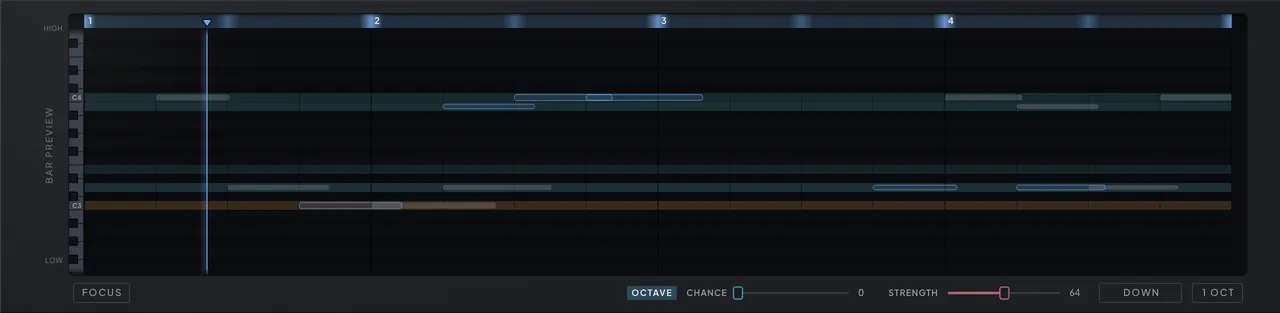
The Groove page’s Notes view is given to the bar preview — a piano-roll view of what the engine actually decided, its rail reading HIGH, BAR PREVIEW and LOW down the left edge where the Beats and Strength grids carry theirs, under the same ruler. It is read-only: pitches, timing and lengths belong to the probability engines, and the pattern itself is edited on the Beats view and on the keys under the page. Focus, first in the row beneath, trims the view to the rows the engine can actually sound, so a sparse pool fills the height. The whole bar is rolled the moment it begins, and the preview shows it immediately: every chosen note appears as a hollow outline at its pitch, position and length, and turns solid as the playhead sweeps past it. You see the dice land before you hear the result, then watch the line confirm it. When the bar turns over, the old one lingers as a grey ghost and melts away while the new roll draws in; stop the sequencer and the last bar freezes, dimmed, for inspection.
Nothing in the grid responds to clicks. Only the small keyboard down its left edge — the keyboard strip turned on its side — takes the pointer, and only to let you hear a pitch: press a key to audition it, drag along the keys to hear each in turn, and watch the keys light up with the pitches the preview is sounding. What the grid does instead is close the loop with the settings around it. Rows glow with each pool note’s chance, so the pitches the dice favor are literally brighter; the root row is amber; when octave randomization is on, its landing rows carry a dashed guide, and you can watch notes jump register exactly where the guides said they might. Louder notes draw more opaque, and notes rolled on stronger beats draw taller. Oscillator independence shows its hand here too: when PARAPHONY sends an oscillator to a different pool note, a slim teal bar appears on that pitch’s row for the note’s duration, tethered to the main note by a dotted stem — the chord the gamble built, drawn as it sounds. Each satellite carries a small label naming the oscillator that drifted there — PLL, VEC, MOR or SUB, joined like VEC·MOR when several land on the same pitch — dim until the note sounds and omitted on bars too slim to label. The label always sits clear of the bar it names, flipping to its left near the right edge rather than printing over the teal. Wider notes also carry four small dots reporting each oscillator’s fate (lit plays the voice note, teal drifted, hollow sat out to SKIP). These marks only appear as each note fires, because that is when the engine rolls them: the outlines ahead of the playhead genuinely don’t know yet. The view scrolls vertically — it auto-centers on your pool, and small amber arrows point at anything sounding beyond the visible rows. Raise a note’s Chance and its row brightens; lean it toward Long and it turns up on the longer notes — the preview is where those abstractions become visible rhythm.
Style patterns
A patch can let the line break into arpeggios, rollers and stabs nobody programmed. After a bar’s notes are chosen, the phrase engine can seize runs of consecutive beats and overwrite their pitches with an idiom — a stutter, a climbing arpeggio, a snap to the octave and back. You do not pick the idiom: every bar rolls its own vocabulary, so one bar phrases in one dialect and the next may take another.
The panel has no controls for the phrase engine in this build. A preset saved with phrases switched on keeps playing them exactly as saved — how often a phrase starts, how ornate it may get and how many beats it may take are part of the patch — and every other patch plays the pitches the pool drew. A running phrase always completes before a new one may start, and phrases launch only from the bar’s first note, so an arpeggio always sets off from the downbeat.
Patterns are step sequences through the notes you enabled — relative moves like up one, down one, up three — wrapping into the next octave when they step past the edge of the pool. Because phrases draw only from your pool, one can never play outside your scale: it re-orders what you allowed rather than importing vocabulary, so even with most of the bar handed over to phrase idioms the harmony stays yours, and the rhythm is still whatever the probability grid decided.
Timing feel
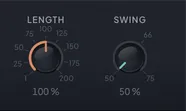
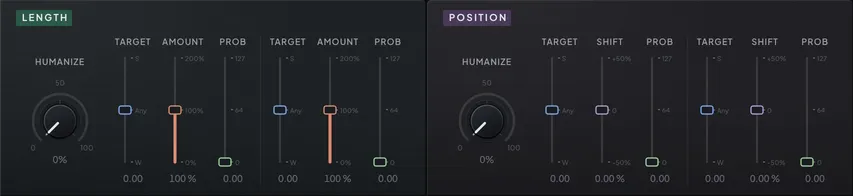
Make the bar lean before you reach for any effect. Three systems bend when and how long notes sound, without touching what plays: the Swing and Length knobs at the right of the Groove header band, and the LENGTH and POSITION modules below every Groove editor.
Swing delays the second eighth of every eighth-note pair inside each quarter. At the neutral setting both eighths are equal; at a setting of 66 the first eighth takes 66 percent of its quarter note and the second squeezes into the rest — the classic shuffle lean. Swing moves playback timing only — accents are still read from the unswung grid.
Length, beside it, sets the base duration of every sequenced note as a share of its slot. Below full, notes detach and the line turns staccato; past full, consecutive notes overlap — which, with LEGATO lit on the OSC page’s Voicing tab, makes them slide (see Playing it live (Chapter 7 — The Sequencer)). A tied beat ignores Length and holds its whole slot (see Ties (Chapter 7 — The Sequencer)). Two length modifier slots in the LENGTH module then bend duration per note: each has a target on the weak-to-strong continuum, an amount, and a probability, and amounts randomize “up to” the configured value so the articulation drifts from bar to bar. At their default targets the two slots aim one at clearly weak beats and one at clearly strong — shorten the ghosts and lengthen the anchors, and a static line starts phrasing itself.
Position modifiers, in the POSITION module, are the humanizers: two slots that shift notes off their grid positions. Each pairs a weak/strong/any target with a shift — negative pushes hits early, positive drags them late — plus a probability, again with “up to” randomization, so the push differs note to note and bar to bar. Position shifts happen after every decision has been made: they never change which slot won its lottery or which strength cell a note read, so the groove’s logic stays on the grid while its feel drifts off it.
Each of the three modules — LENGTH, POSITION and VELOCITY — leads with a Humanize knob that turns all six of its sliders at once: from their defaults at 0, through a musical middle at 50, to their extremes at 100. One turn gets you most of the way; the sliders are what the patch keeps, so fine-tune them afterwards. The knobs are not host parameters, but each takes MIDI Learn and MIDI Forget from its right-click menu: a controller moves the six sliders exactly as a drag does, and with Soft Takeover on the controller takes over once it passes the knob’s position. Every preset load except a sound-only one sets the three knobs back to 0.
When a groove feels stiff: strength-map contrast first, swing second, a length modifier aimed at weak beats third, and only then a touch of position shift — a little of each goes much further than a lot of one.
Playing it live
Treat the sequencer as an instrument you play, not a tape you start. The controls that matter on stage sit outside the grids, in the keyboard row under every page: the OCTAVE stepper that voices the whole preset at its head, LATCH beside it, and at its right how an external keyboard drives the sequencer, MODE and VOLUME VELOCITY LOCK, covered in Input modes (Chapter 10 — MIDI & Your DAW). There is no audition switch among them: on the Groove page a plain press on the keys follows the note-edit row’s Play Note / Play Seq menu — Play Note to hear a pitch alone, Play Seq to play it — and a Shift-press draws chance instead.
Set Root on the note-edit row moves the pool you already have: it makes the selected key the root and carries every other note along. A held key moves the line too, but only while it is down — the pool itself stays as written.
OCTAVE is the preset’s voicing: whole octaves applied to every note the voice receives — the pool, a played key, a held chord — without moving a single note on the roll. It is what lets a preset play right around C3, middle C, whatever register the sound was built for: a bass that lives around C1 keeps its pool near C3 and sets Octave to −2, so the hand stays where a keyboard puts it and the sound stays where the author put it, and nobody has to guess the register the author meant. Everything pitch-tracked follows — filter and envelope key tracking, FOLD, the PLL reference — while the roll, the bar preview and MIDI OUT keep the notes as written, and the temporary root a held key shows is unshifted too. Set Root and Octave do opposite things: Set Root moves the notes, Octave moves the sound. The Keyboard Octave host parameter, reached by automation or MIDI learn rather than from the panel, is the other half of the story — it moves what you play, for this instance only, never what the preset carries (see Input modes (Chapter 10 — MIDI & Your DAW)). Author with Octave, perform with Keyboard Octave.
Legato — on the OSC page’s Voicing tab, in the PORTAMENTO group beside GLIDE — makes overlapping notes glide instead of retriggering: light its LEGATO switch and the envelope carries through while the pitch slides over the time its slider sets, separate from the always-on GLIDE — the interplay is described in Glide and legato (Chapter 2 — Oscillators). The SYNC switch under the slider decides what that time is measured in: unlit, a time — read in milliseconds per octave while the curve button under GLIDE reads RATE, in milliseconds under TIME and EXP; lit, note values at the current tempo, so a slide keeps its musical length when the tempo moves. That curve — the Glide Curve parameter — shapes how every glide travels, Legato’s included; only a tie’s slide always follows EXP. Flip SYNC by hand and the glide stays close to what it was — the nearest note value to the time, or the time the note value lasts. Since overlap is what triggers it, Length and the length modifiers decide which steps slur, while a tie slurs its one beat with Legato on or off (see Ties (Chapter 7 — The Sequencer)). The VCA switch on the volume envelope goes further: lit, with Depth at 0, the voice holds permanently open and the sequencer re-pitches a continuous drone — run it when the level should come from somewhere else, like a host-side gate or the filter riding an LFO. See The volume envelope (Chapter 4 — Modulation).
Note priority decides which of several held MIDI keys owns the voice: the last played, the lowest or the highest. Last is what a sequencer-driven single voice wants, so it has no panel control — it is exposed to the host rather than drawn on the window. Set it from a preset or a host parameter and low priority with legato gives the classic bass-player setup — hold the root, hammer above it, always fall back home.
While the DAW plays, it owns time, in both MIDI modes. The bar runs phase-locked to the DAW timeline whether or not a key is down, and your key only opens the gate: it joins the bar in progress where the playhead stands, on a freshly rolled bar. Nothing behind the playhead fires, and a note the phrase would already be sounding starts at once with the length it has left, so a stab that lands inside a phrase note is not silent. Release, and the sound rings out while the clock runs on; hold a note in your piano roll, or use LATCH, to keep the line playing through a take. A transport start plays from the top — beat 1 of bar 1, the step modulators and LFOs restarting with it — so every take opens the same way. Loop wraps and relocates re-seek instantly to the DAW’s bar lines, key held or not, and tempo changes rescale the playing bar in place. The step modulators and tempo-synced LFOs follow the DAW and are never reset by a key; only those set to retrigger per note still restart on one. With the DAW stopped the phrase belongs to your note: it starts from step 1 wherever you play it, the step modulators and LFOs starting with it, while tempo and divisions still follow the host clock (see Clock and transport (Chapter 10 — MIDI & Your DAW)). With Transport In on, the standalone treats a hardware master that has sent START or CONTINUE the way a plugin treats a playing DAW, and otherwise plays like a stopped one; under an external MIDI clock it holds the master’s tempo and position — see Following an external clock (Chapter 10 — MIDI & Your DAW).
A probabilistic bar is rolled afresh at every bar line, loop wraps included, and on every fresh attack — deliberately: no pass is ever a guaranteed repeat of the last. There is no seed control: the random stream is seeded from system entropy when the instrument loads, and for any given seed the generator’s decisions are deterministic. When a pass is the take, record it — a bounce is the only permanent copy.
The table below also carries the instrument-wide performance parameters — the pitch-bend range, the transport’s global volume and the host bypass — together with GENERATE’s Groove Figure and Groove Ties, the OSC page’s Voicing tab controls — Legato, Legato Time, Legato Sync and Legato Division, the Glide Curve, Glide Sync and Glide Division, and the Skip and Paraphony sliders, which read as whole percentages — the NOTE STRENGTH and VELOCITY modulation routes (covered in Velocity and note strength (Chapter 4 — Modulation)), and Velocity As Strength, which has no panel control in this build and travels with the preset.
| Parameter | Range | Default | What it does |
|---|---|---|---|
| Global Volume | -inf dB – 12.0 dB | 0.0 dB | Master output level — the MASTER fader and the transport-bar volume, and the level of DRY/WET's dry; global, never moved by preset loads. |
| Bypass | Off / On | Off | Host bypass: on a VST3 or CLAP insert your track passes through untouched and in time; under the AU it mutes instead. |
| Pitch Bend Range | 0 … 24 (25 steps) | 2 | How far the pitch-bend wheel reaches — ±2 st by default, up to ±24 st; 0 ignores the wheel. Per instance. |
| Note Length % | 1 % – 200 % | 95 % | Base length of every sequenced note as a share of its slot; past full, notes overlap and, with Legato on, slide. A tied beat holds its whole slot whatever Length says. |
| Len Mod 1 Target | -100 – 100 | 0 | Which beats length modifier 1 aims at, from weak through any to strong, judged against the strength map's own quiet-to-loud range. |
| Len Mod 1 Amount | 0 % – 200 % | 100 % | The length the modifier bends notes toward; each hit randomizes up to it from the base. |
| Len Mod 1 Prob | 0 – 127 | 0 | Chance per note that length modifier 1 fires at all. |
| Len Mod 2 Target | -100 – 100 | 0 | Which beats length modifier 2 aims at, from weak through any to strong, judged against the strength map's own quiet-to-loud range. |
| Len Mod 2 Amount | 0 % – 200 % | 100 % | The length the modifier bends notes toward; each hit randomizes up to it from the base. |
| Len Mod 2 Prob | 0 – 127 | 0 | Chance per note that length modifier 2 fires at all. |
| Vel Strength Follow | 0 % – 100 % | 0 % | How far velocity tracks the strength map — this slider is what makes Strength audible: 0% keeps every note at the flat base hit, 100% reads each note's strength cell across the full range. The modifiers below still apply. |
| Vel Strength Target | -100 – 100 | 0 | Which beats the strength-keyed velocity modifier hits, judged against the map's own quiet-to-loud range. |
| Vel Strength Amount | -99 – +27 | 0 | Velocity push above or below the base hit when the strength modifier fires; randomized up to the value. |
| Vel Strength Prob | 0 – 127 | 0 | Chance per note that the strength velocity modifier fires. |
| Vel Length Target | -100 – 100 | 0 | Which notes the length-keyed velocity modifier hits, from short through any to long — ranked by each note's slot length among the groove's enabled slots, so Length and the length modifiers never move it. |
| Vel Length Amount | -99 – +27 | 0 | Velocity push above or below the base hit when the length modifier fires; randomized up to the value. |
| Vel Length Prob | 0 – 127 | 0 | Chance per note that the length velocity modifier fires. |
| Note Mod Dest | None – Cable Filter 4 > Freezer Feedback In | None | NOTE STRENGTH destination — the parameter each sequenced note's painted strength pushes for its duration. |
| Note Mod Amount | -100.0 – +100.0 | 0.0 | NOTE STRENGTH amount — how far a full-strength note pushes the destination, as a share of the target knob's whole travel: ±100 % reaches the knob's end from where it sits (Tune and a few other targets listed in the modulation chapter keep their own units); negative inverts the movement. |
| Vel Mod Dest | None – Cable Filter 4 > Freezer Feedback In | None | VELOCITY module destination — the parameter the sounding note’s velocity drives. |
| Vel Mod Amount | -100.0 – +100.0 | 0.0 | VELOCITY module amount — how far full velocity pushes the destination, as a share of the target knob's whole travel: ±100 % reaches the knob's end from where it sits (Tune and a few other targets listed in the modulation chapter keep their own units); negative inverts the movement. |
| Note Mod Dest 2 | None – Cable Filter 4 > Freezer Feedback In | None | NOTE STRENGTH second route — another parameter each sequenced note's painted strength pushes for its duration, beside the first. |
| Note Mod Amount 2 | -100.0 – +100.0 | 0.0 | NOTE STRENGTH second amount — how far a full-strength note pushes the second destination, as a share of the target knob's travel; negative inverts it. |
| Vel Mod Dest 2 | None – Cable Filter 4 > Freezer Feedback In | None | VELOCITY second route — another parameter the sounding note's velocity drives, beside the first. |
| Vel Mod Amount 2 | -100.0 – +100.0 | 0.0 | VELOCITY second amount — how far full velocity pushes the second destination, as a share of the target knob's travel; negative inverts it. |
| Pos Mod 1 Target | -100 – 100 | 0 | Which beats humanizer 1 nudges, from weak through any to strong, judged against the strength map's own quiet-to-loud range. |
| Pos Mod 1 Shift | -50 % – +50 % | 0 % | How far humanizer 1 moves a hit off the grid — negative plays early, positive drags late. |
| Pos Mod 1 Prob | 0 – 127 | 0 | Chance per note that humanizer 1 fires. |
| Pos Mod 2 Target | -100 – 100 | 0 | Which beats humanizer 2 nudges, from weak through any to strong, judged against the strength map's own quiet-to-loud range. |
| Pos Mod 2 Shift | -50 % – +50 % | 0 % | How far humanizer 2 moves a hit off the grid — negative plays early, positive drags late. |
| Pos Mod 2 Prob | 0 – 127 | 0 | Chance per note that humanizer 2 fires. |
| Swing | 50 – 75 | 50 | Delays the second eighth of every pair toward a shuffle lean; the bottom of the travel is straight time. |
| Legato | Off / On | Off | The LEGATO switch under the Legato slider: on, a note played while the last is still held glides into it without retriggering the envelope — keyboard, host and sequencer notes alike, SEQ on or off. Tied beats slide either way. |
| Legato Time | 1.0 ms – 5000.0 ms | 50.0 ms | How long a legato slide takes while Legato Sync is off — 1 ms to 5 s, per octave under the Rate glide curve; ties slide over it too. Glide beside it on the Voicing tab times every other note-on. |
| Legato Sync | Off / On | Off | SYNC under the Legato slider: the slide in note values at the song tempo instead of milliseconds. Flipping it keeps the slide about as long. |
| Legato Division | 1/1 … 1/128 (18 steps) | 1/32 | The note value a synced legato slide lasts at the song tempo; the rail offers 1/128 to 1/1, triplets and dotted included. |
| Legato Vel Lock | Off / On | Off | Legato Vel Lock — whether a slurred note keeps the held note's velocity. No panel control and the engine leaves it off; kept so old automation and presets load. |
| Glide Curve | Rate · Time · Exponential | Exponential | Glide Curve — the button under the Glide slider: how every glide travels, Legato's included: Rate a fixed speed per octave, Time the whole trip in the set time, Exponential a smooth lag. Ties always slide Exponential. |
| Glide Sync | Off / On | Off | SYNC under the Glide slider: the portamento in note values at the song tempo instead of milliseconds. Flipping it keeps the glide about as long. |
| Glide Division | 1/1 … 1/128 (18 steps) | 1/32 | The note value a synced glide lasts at the song tempo; the rail offers 1/128 to 1/1, triplets and dotted included. |
| Note Priority | Last · Low · High | Last | Which held key owns the voice when several are down: the last played, the lowest or the highest. Host automation and presets only — no editor control, and it ships on Last. |
| Osc Skip | 0 % – 100 % | 0 % | Per-note chance that a targeted oscillator sits out, thinning the tone from note to note. A key you play always keeps one oscillator you can hear playing it; a sequencer step may sit them all out. |
| Paraphony | 0 % – 100 % | 0 % | Paraphony — per-note chance that a targeted oscillator plays a different pool note than the voice, SEQ on or off. A key you play draws from the pool moved to that key; a chord you hold is the pool. |
| Volume Velocity Lock | Off / On | On | Volume Velocity Lock — every note arrives at the same loudness, and only the loudness: Vel› amounts, the VELOCITY source and MIDI out still follow your touch. On by default. |
| Velocity Amount | 0 % – 100 % | 100 % | How much of your velocity applies everywhere it is read — envelopes, the VELOCITY source, MIDI out: 100% full dynamics, 0% flattens to the resting hit. Per instance. |
| Velocity As Strength | Off / On | Off | Play velocity as note STRENGTH: how hard you strike drives the strength route and per-note targeting — even while velocity itself is locked. No panel control in this build; saved with the preset. |
| Preset Octave | -3 · -2 · -1 · 0 · 1 · 2 · 3 | 0 | The preset's voicing in whole octaves — every note the voice plays shifts, while the roll, bar preview and MIDI OUT stay put. How a sound stays playable around C3. |
| Keyboard Octave | -3 · -2 · -1 · 0 · 1 · 2 · 3 | 0 | OCT ± for this instance, reached from your host (automation or MIDI learn — no panel control): incoming keys shift by whole octaves before they reach the voice or the sequencer. |
| Groove Figure | Home – Sextuplet Run | Home | The GENERATE Figure dial: 0 is Home, the patch's own groove; 1–127 are the Figures, quarter steps blending into the next; CC value n picks Figure n, while a CC learned on Morph moves it relatively. Every preset load sets it to Home, so a Soft Takeover knob passes 0 first. |
| Groove Ties | Off – All | Off | GENERATE's Ties knob: how many beats it ties on top of the ties you drew — slides into a following hit first, then plain holds, likely beats and weak landings before the rest. Off adds none; All ties every beat that can, the last holding to the bar line. |