
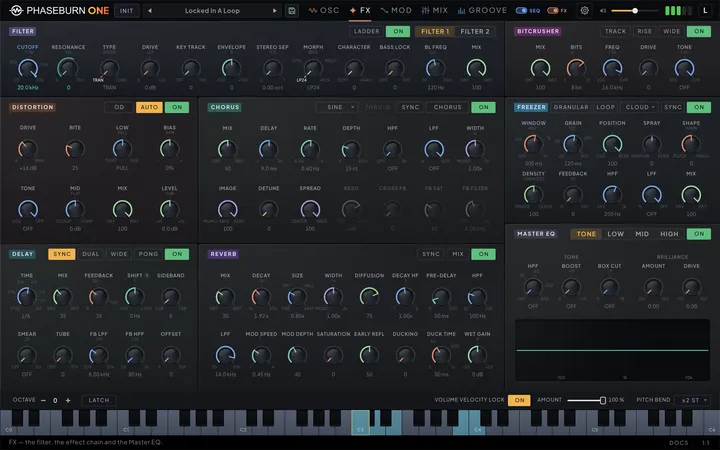
Everything in this chapter happens after the voice. The oscillators, filter and coloration stages hand over one finished stereo signal; the six effects and the master section decide where that signal appears to live — how it repeats, how much space surrounds it, how wide it spreads, and how it leaves the plug-in. Phaseburn One runs one voice by design, and the effects spend the budget that buys: each one runs real per-sample processing on the same 64-bit signal path as the voice itself.
Every effect listens where you point it
Most synths run their effects as a fixed chain: whatever leaves the filter passes through everything, in one factory-set order. Phaseburn One ships with a chain too — but nothing about it is fixed. Each effect is a module whose inputs are cables you patch, and the first thing to learn about the effects is that what goes in is a decision you make per effect.
An effect can listen to either filter’s output, or tap one oscillator directly: the Phase-Locked Loop (PLL) voice, the VECTOR phase-shaping oscillator, the MORPH oscillator, or the sub. That idea unlocks arrangements a fixed chain cannot express: echo only the MORPH line while the PLL bass stays bone dry; send only the VECTOR into a long reverb so the sustain blooms while the attack stays close; crush one oscillator and leave the rest clean. Out of the box everything is already patched. The default patch that INIT loads runs the four sources → FILTER 1 → FILTER 2 → BitCrusher → distortion → chorus → delay → reverb → freezer → master, every cable at unity — with FILTER 1 powered but wide open (20 kHz, no resonance), FILTER 2, every effect and MASTER EQ powered off, and the sub’s NO FX switch lit, so the sub itself takes a clean lane straight to the output (see the master section below). The open filter passes everything audible, and a powered-off effect passes signal straight through, so the chain adds nothing you hear until you press a module’s power button. Effects come alive with power, not with patching. Every module also rests where powering it on is something you hear, rather than something that runs silently until you go looking for its blend knob: the delay synced to a dotted eighth at 35 % MIX, the reverb at 30 % with a short tail, the BitCrusher already crunching at 8 bits, the distortion with its AUTO make-up on.
Above all those power buttons sits one more, in the app header beside the SEQ switch: a single FX toggle that bypasses the whole effects section at once — and with it FILTER 1, FILTER 2 and MASTER EQ, which share the FX tab, and the patchbay’s Filter 3 and Filter 4. It is a layer over the per-module buttons rather than a replacement for them — each module keeps its own state while the master switch is down, so flipping it back up re-engages exactly what was running. That makes it the fastest honest A/B in the instrument: the dry patch, then the patch as built, with nothing re-dialled in between. With it down the FX page veils over and says so, since nothing on it is reaching the sound; the modules underneath keep every setting, and the veil lifts the moment you switch back on. Like the SEQ switch it belongs to the plugin instance rather than to the sound — it is saved with your project, never inside a preset, so a preset you share always arrives with its effects intact.
The reverse mistake — a module powered on whose cables have been unpatched — would otherwise fail silently: the effect runs, but no signal reaches it, so the sound never changes. The instrument flags it instead. A power button on the FX tab turns yellow and reads PATCH while its module is on but not fully wired, and switching such a module on opens a small prompt with a way out: Connect wires the module into the playing chain in one click — the button names the exact patch it will make, FILTER 2 → BITCRUSHER → DIST for example, and re-routes the cable it interrupts so the dry shortcut does not dilute the effect; Open Patchbay jumps to the Mixer tab with the module’s box pulsing so it is easy to find; Not now dismisses the prompt. The yellow state clears the moment both jacks carry cables.
Two more conventions are shared by every effect. First, each input is a cable with its own level — off, unity, or pushed up to 12 dB hot — so a send can be a whisper or a shove. Second, every effect has a MIX control. For the delay and the chorus, MIX adds wet signal on top of the effect’s own input, which always passes at full level; for the reverb, distortion and BitCrusher, MIX crossfades between the effect’s input and the processed signal. The distortion pairs MIX with a LEVEL knob — a true output level on the processed signal, independent of the blend. Cable levels set what an effect hears; MIX sets what it contributes; and the cable each effect sends toward the master sets how loud that contribution lands in the sum.
The chain is the front door to a larger routing system: a patchbay on the Mixer tab, where effects can feed each other in any non-circular order or run in parallel. The delay, chorus, reverb and freezer also expose feedback tap and return jacks there, and each of those four loops accepts an insert — the distortion, the BitCrusher, another of those four effects, even the filter. This chapter describes each effect as a unit; the patchbay chapter (Chapter 5 — Mixer & Patchbay) covers the cables between them. The effect panels themselves — knobs and power buttons, no routing — live on the FX tab, and double-clicking a module’s box in the patchbay jumps straight to its panel.
Delay: repeats that slide in pitch
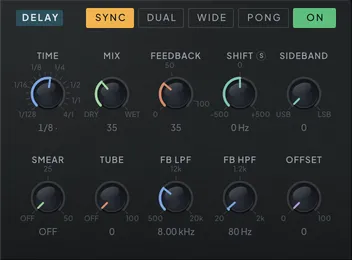
Set an eighth-note delay, then raise FREQ SHIFT a few hertz and hold a note. The repeats stop being copies: each one comes back slightly higher than the last, sliding up through the harmonics of your patch and then out of them entirely. The defining feature of this delay is a frequency shifter inside the feedback loop.
Frequency shifting is not pitch shifting. A pitch shifter multiplies every frequency by a ratio, so harmonics stay in tune with each other. A frequency shifter adds a fixed number of hertz to every partial — a tone with partials at 100, 200 and 300 Hz, shifted up by 50 Hz, reappears at 150, 250 and 350 Hz. The harmonic series is broken, and that is the appeal: the technique goes back to Harald Bode’s analog frequency shifters, and its inharmonic sheen is a sound no filter or chorus can make. Because the shifter sits inside the loop, the shift compounds — each repeat is shifted again, so tails spiral steadily upward or downward like a barber pole, seemingly without end.
Three controls define the shift. SHIFT sets the amount per pass: with WIDE off it spans a fine window, and WIDE opens the full range for extreme mangling (see table). A few hertz gives slowly rotating, phasing tails; tens of hertz turns repeats into metallic bells; hundreds shreds them into clangs. SIDEBAND chooses which sideband survives: at the USB end repeats shift up, at the LSB end they shift down, and the midpoint keeps both sidebands for a ring-modulated echo character.
SHIFT carries the S snap badge. Lit, the knob stops being a hertz control and becomes a semitone one: twenty-five stops from an octave down to an octave up, with the readout and the tick ring naming notes instead of hertz — C3 (middle C) is no shift at all. Three things are worth knowing before you trust the note names. Only the fundamental lands on the named note: this is a true frequency shifter, so tuning the shift to a fifth puts the fundamental a fifth up and leaves every harmonic somewhere inharmonic — the note name is a tuning reference for the root, not a transposition. The reference is middle C, because a linear shift has no intervals of its own and one had to be chosen. And the grid stops at one octave in each direction, because shifting down the fundamental reaches DC an octave and a bit below and there is no pitch left to name; the full sweep is one click away with the badge off. WIDE hides while the badge is lit, since the note grid brings its own span. Engaging the snap never moves a shift you have already set, and a value that is not on a semitone still reads out in hertz, so the readout can never name a note the delay is not actually at.
The rest of the panel shapes the trail. FEEDBACK sets how long repeats regenerate: at everyday levels the loop’s safety bound stays out of the way, so each repeat comes back quieter by exactly the FEEDBACK amount, and past 100 the line tips into self-oscillation, blooming into a steady drone that settles a few decibels under full scale instead of running away — a soft bound in the loop catches only what climbs that high. SMEAR diffuses each repeat’s transients through an allpass network, from crisp echoes to a reverb-like wash that thickens with every pass. TUBE saturates what enters the line, so the very first echo already carries its colour and every repeat after it returns a little more worn than the one before; the knob is continuous from OFF, so the first nudge is a touch of warmth rather than a jump, and back at OFF the delay is exactly clean again. The top of the knob is gentle on purpose: at full a hot echo keeps close to its dry level — a −6 dBFS echo loses about 3 dB — instead of dropping well under it. The curve is an asymmetric tube one, warm rather than crushed, and since every repeat takes one more pass, long tails still darken and thicken. FB LPF / FB HPF darken or thin the trail as it recirculates.
Delay time: on the grid, in tune, in motion
Lock the echoes to a dotted eighth and they sit in the groove; pull TIME down to a few milliseconds and the delay stops echoing and rings at a pitch; aim an LFO at it and the repeats bend like tape. All three come from the same control on the DELAY panel.
The SYNC switch in the module header decides how time is set; a patch started from INIT has it on, at a dotted eighth. Off, the panel shows a TIME knob in milliseconds, running from 1 ms up to 2 s. On, it swaps that knob for a beat division, from four bars down to 1/128 including dotted and triplet values, and synced echoes can run up to eight seconds: long enough for two bars down to 60 BPM and four bars down to 120 BPM. A division that still does not fit at the current tempo is folded by octaves onto one that does — four bars at 100 BPM plays two — so a synced echo always lands on the grid rather than on a clipped length that belongs to no grid at all.
Free TIME below about 10 ms stops sounding like discrete echoes and turns into a comb, a resonator whose pitch follows TIME — from roughly 1 kHz at 1 ms down to 50 Hz at 20 ms. With SHIFT at exactly zero that comb is harmonic and in tune, so FEEDBACK pushed up turns the delay into a ringing string or pipe, and SMEAR and the loop filters shade it into metallic resonators and flanged textures. Move SHIFT off zero and the same comb turns inharmonic and clangorous, because every pass through the shifter holds the low end back further than the top.
DUAL appears only while SYNC is on, because what it selects is a second division for the right channel — asymmetric bounces on the grid. Free-running, or synced with DUAL off, the right tap is the left one plus OFFSET, which pushes it up to 40 ms behind for width. PONG makes repeats alternate left-right.
TIME is a modulation destination too — Delay Time in the destination list — in both modes. A route slides the time in octaves around where you set it: free-running across the knob’s own range, stopping at its ends; synced, as a multiple of the chosen division. However hard the route pushes, the delay never bends a repeat’s pitch by more than two semitones on the way, so a deep or fast route wobbles rather than screams; long times travel further per octave and want small depths. Under SYNC the division knob reads as modulated while a route is aimed at TIME, so a route on the hidden millisecond knob never goes unseen.
| Parameter | Range | Default | What it does |
|---|---|---|---|
| Delay Enable | Off / On | Off | Switches the frequency-shifter delay on or off. |
| Delay Mix | 0 – 1 | 0.35 | Dry/wet blend — zero is fully dry, full is echoes only. Starts at half, so switching the delay on is audible straight away. |
| Delay Time | 1.0 ms – 2000.0 ms | 375.0 ms | Echo spacing in milliseconds — the knob the panel shows while SYNC is off. A modulation target (Delay Time): a route slides the time in octaves, bending repeats like tape. |
| Delay Time Sync | Off / On | On | SYNC — locks echo spacing to the host tempo, swapping the millisecond TIME knob for a beat division. |
| Delay Time Division | 1/1 … 1/128 (18 steps) | 1/8. | Beat division for synced echoes, from four bars to 1/128 with dotted and triplet feels, up to 8 s; one too long at this tempo folds by octaves onto one that fits. A Delay Time route shows on it as modulation. |
| Delay Feedback | 0 – 1.1 | 0.35 | How much of each echo is fed back in — higher settings regenerate longer trails; past 100 the line self-oscillates into a bounded drone. |
| Delay Freq Shift | -5000.0 Hz – 5000.0 Hz | 0.0 Hz | Shifts every repeat by a fixed Hz amount; repeats slide in pitch and grow inharmonic as they regenerate. With SNAP lit the readout names the note the fundamental lands on. |
| Delay Freq Shift Snap | Off / On | Off | SNAP — constrains the shift to semitone steps against middle C, an octave each way; off, the knob sweeps hertz freely. Only the fundamental lands on the named note. |
| Delay Sideband | 0 – 1 | 0 | Shift direction: 0 = UP, 0.5 = RING (both sidebands, ring-mod flavor), 1 = DN. |
| Delay Smear | OFF – 50.0 ms | OFF | Diffuses each repeat's transients — from crisp echoes to a washy, reverb-like blur that builds per pass. |
| Delay Saturation | 0 – 1 | 0 | Tube-style saturation on what enters the line — the first echo already carries it, and every repeat comes back slightly more worn. Gentle at the top, so the first echo keeps close to its level; continuous from OFF. |
| Delay FB LPF | 500.0 Hz – 20000.0 Hz | 8000.0 Hz | Low-pass on the feedback path — repeats get darker each time around. |
| Delay FB HPF | 20.0 Hz – 2000.0 Hz | 80.0 Hz | High-pass on the feedback path — thins low end out of regenerating echoes. |
| Delay Stereo Offset | 0 – 1 | 0 | Delays the right channel up to 40 ms behind the left for wider echoes; inactive when dual time is on. |
| Delay Freq Range | Off / On | Off | WIDE toggle — expands the frequency shift from a fine ±500 Hz to the full ±5 kHz range. Hidden while SNAP is lit, which brings its own span. |
| Delay Dual Time | Off / On | Off | Gives the right channel its own beat division for asymmetric, polyrhythmic echoes. Needs SYNC on — it appears only there, since what it picks is a division. |
| Delay Time Division R | 1/1 … 1/128 (18 steps) | 1/32 | Beat division for the right channel when dual time is on. |
| Delay Ping Pong | Off / On | Off | Cross-feeds the channels so repeats bounce alternately left and right. |
Reverb: rooms you can resize mid-note
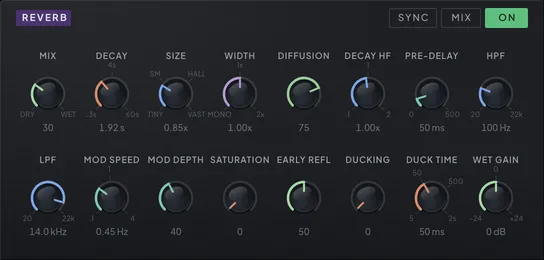
The reverb is built in two stages, and both are audible as separate handles. Early reflections — the first fraction of a second of a room answering back — come from banks of discrete stereo taps, and their level is exposed as its own control, which behaves like proximity: high, and the room’s first slap is present and close; low, and only the diffuse wash remains. The taps feed an eight-line feedback delay network (FDN) — the late-reverb architecture in the Jot / Stautner–Puckette lineage — which recirculates the sound into a dense tail.
SIZE scales the whole structure. The lower range covers rooms that could exist; past the middle it keeps going, into halls and then into spaces with no architectural excuse. Turn it while a note rings and the tail follows without a click: each delay line crossfades from its old length to the new one over about fifty milliseconds instead of gliding, so the ringing tail neither clicks nor Doppler-shifts. DECAY sets how long the tail rings, from under a second to around a minute, spaced so the musical middle of the range is easy to hit. DIFFUSION controls how quickly reflections blur into a smooth wash — low values keep the grain of individual echoes, high values are instantly dense.
Decay shaping is where this reverb rewards attention. DECAY HF is a relative control: it sets how fast the highs die compared to the rest of the tail. Below one, the tail darkens as it fades, the way air absorbs treble in a real hall; above one, the top end outlives the body. The tank’s LPF and HPF are damping filters inside the recirculation itself, draining highs or lows a little more on every pass; together with DECAY HF they sculpt where the tail’s energy sits without changing its overall length. MOD speed and depth add slow chorus-like movement inside the tank, which keeps very long tails from settling into a static ring. Saturation warms the recirculating signal with soft clipping, and pre-delay inserts a gap — free or synced to tempo — between the dry note and the room’s answer, keeping attacks articulate under heavy wet mixes. A synced pre-delay division longer than the gap can hold at your tempo is folded by octaves onto a shorter one, so the room still answers on the grid.
Wet gain, and the WET/MIX decision
The Reverb header carries a MIX / WET switch. MIX is the normal insert behaviour: the Dry/Wet knob blends the room against the signal feeding it. WET removes the dry path entirely and outputs only the tail, which is what you want when the reverb is fed from a send, or when you are layering a room under a part that already exists elsewhere in the chain.
Wet Gain trims that wet path across ±24 dB — in WET mode it is the only level control the return has, so cutting an over-hot room matters as much as boosting a distant one. It sits after the tank’s own safety limiter, so it behaves as a real output gain rather than as something the limiter quietly eats — useful when a distant, heavily damped room needs to come forward without touching Decay or Size. It is a modulation destination, so an envelope or LFO on Wet Gain swells or ducks the room without disturbing the tail’s character; see the modulation chapter (Chapter 4 — Modulation) for routing.
Shimmering tails come from two effects cooperating rather than a dedicated knob. The delay already feeds the reverb in the default chain: power both on, put a few hertz of upward shift on the delay, and every repeat entering the room arrives a little higher than the last, smeared by the tank into a slowly climbing, shimmering tail.
DUCKING solves the classic problem of a long reverb swallowing the part that feeds it. An envelope follower tracks your playing and pushes the reverb down while notes sound; the tail swells back in the gaps. DUCK TIME sets that recovery, and it follows the reverb’s own SYNC button, the same switch that governs pre-delay: SYNC off shows DUCK TIME in milliseconds (5 ms – 2 s); SYNC on shows it as a tempo division — an easy way to keep a big room from crowding a lead line either freely or on the grid.
| Parameter | Range | Default | What it does |
|---|---|---|---|
| Reverb Enable | Off / On | Off | Switches the reverb on or off. |
| Reverb Dry/Wet | 0 – 1 | 0.3 | Dry/wet balance — zero is dry, full is reverb only. Starts at half, so switching the reverb on is audible straight away. |
| Reverb Pre-Delay | 0.0 ms – 500.0 ms | 20.0 ms | Gap before the reverb speaks — keeps the dry attack distinct from the room. |
| Reverb Pre-Delay Sync | Off / On | Off | Snaps pre-delay to musical divisions of the host tempo. |
| Reverb Pre-Delay Division | 1/1 … 1/128 (18 steps) | 1/8 | Beat division used for synced pre-delay. |
| Reverb Size | 0 – 3 | 0.5 | Room size — scales the tank's delay lines from tight booth to cathedral and beyond. |
| Reverb HPF | 20.0 – 22000.0 | 100.0 | High-pass damping inside the tank — drains lows from the tail a little more on every pass. |
| Reverb LPF | 20.0 – 22000.0 | 8000.0 | Low-pass damping inside the tank — the tail darkens progressively, like air absorption. |
| Reverb Mod Speed | 0.10 Hz – 4.00 Hz | 0.45 Hz | Rate of the slow chorus-like movement inside the tank. |
| Reverb Mod Depth | 0 – 1 | 0.2 | Depth of tank modulation — keeps long tails alive instead of ringing statically. |
| Reverb Diffusion | 0 – 1 | 0.7 | How fast reflections blur into a wash — low keeps discrete echoes, high is instantly dense. |
| Reverb Decay | 0.30 s – 60.0 s | 1.92 s | Tail length, from under a second to around a minute on a logarithmic curve. |
| Reverb Decay HF | 0.100 – 2.000 | 1.000 | How fast highs die relative to the body — below 1 darker faster, above 1 brighter longer. |
| Reverb Ducking | 0 – 1 | 0 | Pushes the reverb down while you play so the tail swells back in the gaps. |
| Reverb Duck Division | 1/1 … 1/128 (18 steps) | 1/16 | With SYNC on, the tempo division setting how quickly the ducked reverb recovers. |
| Reverb Duck Time | 5.0 ms – 2000.0 ms | 50.0 ms | With SYNC off, how quickly the ducked reverb recovers, in milliseconds — short pumps, long lets the tail creep back. |
| Reverb Stereo Width | 0 – 2 | 1 | Mid/side width of the wet signal — mono through full stereo to extra wide. |
| Reverb Saturation | 0 – 1 | 0 | Soft clipping in the tank feedback — the tail thickens and warms instead of staying glassy. |
| Reverb Wet Gain | -24.0 dB – 24.0 dB | 0.0 dB | Level trim on the reverb's wet path, ±24 dB. It sits after the tank's safety limiter, so it is a true gain rather than something the limiter absorbs. A modulation target. |
| Reverb Wet Only | Off / On | MIX | MIX blends dry and wet with the Dry/Wet knob; WET removes the dry path entirely and outputs only the tail — the setting for send-style use. |
| Reverb ER Level | 0 – 1 | 0.5 | Level of the early reflections — the room's first slap before the diffuse tail. |
Chorus: thickness as a choice
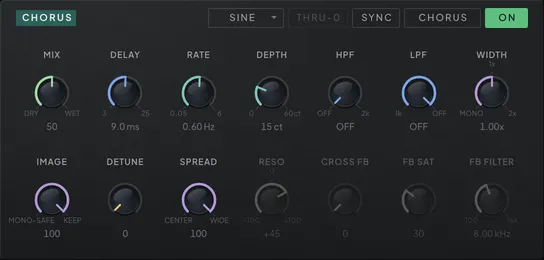
One line frames this whole module: Phaseburn One’s voice is already stereo at the source, so the chorus is a color you reach for, not a structural repair for a mono engine. It is a four-mode engine, and the modes are genuinely different circuits rather than one engine wearing four labels — each fixes its own tap count, gain staging and control ranges. The header picker chooses CHORUS, FLANGER, ENSEMBLE or VIBRATO; beside it sit SYNC to lock the LFO to host tempo and a THRU-0 toggle, live in the single-tap modes, where it delays the dry path to the middle of the sweep, so the wet passes through the dry twice every cycle and the comb flips sides — true through-zero, tape-style flanging. Switching modes never moves the panel: every control keeps its place, and the ones the chosen topology cannot act on grey out rather than vanishing, so you can always see the whole module and what this mode is not using. Nor does it interrupt the audio — the modes really are different circuits, so changing one swaps tap counts, gain staging and control ranges all at once, and the engine dips the wet to silence for three milliseconds, rebuilds itself there, and fades back; with THRU-0 on, the delayed dry glides to its new place over about ten milliseconds rather than jumping. You can audition all four while a part plays.
CHORUS runs two taps a quarter-cycle apart — the classic thickener, with a gentle top-end rolloff so it sits in a mix instead of glinting on top of it. FLANGER runs a single tap against the dry signal at unity, which is what lets its comb null completely rather than merely dipping; DELAY becomes FLOOR, the shortest delay the comb sweeps up from, DEPTH becomes SWEEP in octaves, and RESO feeds the comb back on itself all the way to a bounded self-oscillating drone. ENSEMBLE is the three-tap string machine: taps 120° apart plus a second, fixed-rate 6.3 Hz LFO layered under the slow one — its three phases also a third of a cycle apart, so it never pulses — which is where the classic string-machine shimmer actually comes from. VIBRATO is a single tap with no dry blend at all — pitch movement on its own.
DEPTH is the knob worth understanding. Pitch bend from a swept delay depends on rate and depth together, so a depth measured in milliseconds means nothing by itself — the same setting wobbles five times harder at 5 Hz than at 1 Hz. Here DEPTH is a share of the mode’s own ceiling and the readout shows what it works out to in cents (or octaves of comb sweep in FLANGER), solved against whatever RATE is doing and whichever LFO shape is running. Turn RATE or change the shape and the depth of the wobble stays put. The LFO’s shape — sine, triangle, random walk, or the two ramps that give the barber-pole modes their endless rise and fall — is shared across every mode. In FLANGER, SWEEP reaches up to four octaves of comb travel.
DELAY and RATE follow the same idea. Each is a position on the chosen mode’s own span rather than one fixed range for all four, so the whole knob is useful in every mode — FLANGER’s comb floor spans 0.1 to 10 ms, CHORUS’s delay 3 to 25 ms — and the ticks at either end name the span of the mode you are in. The panel reads out the milliseconds and hertz the mode is really running and accepts typed values in them; a DAW’s automation lane shows the same knobs as a percentage. With SYNC lit, RATE becomes a beat division played as written, one LFO cycle per division; a division faster or slower than the LFO can run is folded by octaves onto one it can, so 1/128 at 120 BPM sweeps as a 1/16. Presets and projects from earlier versions convert on load and keep the delay and rate they had, but DELAY or RATE automation recorded in an earlier version was drawn against the old knob law, plays different values now, and is worth redrawing.
Two controls handle the stereo field, and they answer different questions. SPREAD places the taps across it: at zero they stack in the centre, at full they fan to the edges. IMAGE decides what happens to the width the signal already had. At zero the taps are summed to a single stream before being placed, so the wet folds down perfectly in mono; at full, each tap’s own left/right difference passes through untouched, so an already-wide source keeps its image instead of being flattened. Between them you can widen a mono-ish patch without wrecking mono compatibility, or thicken a wide one without collapsing it. DETUNE scatters the taps’ sweep rates so they drift apart over time rather than moving in lockstep — thickening underneath the motion. SPREAD, DETUNE and IMAGE all act on the tap bank, so all three grey out in FLANGER and VIBRATO: a single tap has nothing to fan across the field and no neighbour to drift against, and IMAGE holds at full there, because folding the other channel into a lone tap would only fill the flanger’s notches and narrow the vibrato.
FLANGER’s feedback, RESO, is bipolar — negative values invert the comb for a hollower resonance — and CROSS FB feeds the loop across channels for spatial swirl. A new patch starts with RESO part-way up, so the first time you pick FLANGER it already rings like one. All four feedback controls grey out in the other three modes, which carry no regeneration by design: a chorus or an ensemble with feedback stops being one. The loop carries its own low-pass filter and saturation, so high resonance turns dark and singing rather than brittle, and the power button always lets it go: switched off, even a self-oscillating flanger rings out and stops. On the output side, HPF and LPF are a 12 dB highpass (20 Hz to 2 kHz) and lowpass (1 to 20 kHz) on the wet signal only, the same filters as the freezer’s; the dry path never passes through them. Each reads OFF at the open end of its range, where it leaves the wet untouched — the classic move is cutting the wet lows so the bass stays solid while everything above it moves. In FLANGER, THRU-0’s dry tap shares the wet filters’ state, so the comb still nulls to true zero with the filters engaged or moving. A wet-only width control scales the result from mono to extra wide.
One thing to know before you use THRU-0 in a bigger patch: it works by delaying the chorus’s own dry path to the middle of the sweep — as much as 20 ms at the top of FLANGER’s range — and nothing outside the module waits for it. A parallel patchbay path summed with the chorus output, or the master DRY/WET below 100 % blending your track back in, meets that delayed dry undelayed and combs against it. Keep THRU-0 for patches where the chorus output is the only way through, or treat the extra comb as part of the sound.
| Parameter | Range | Default | What it does |
|---|---|---|---|
| Chorus Enable | Off / On | Off | Switches the chorus on or off. |
| Chorus Mode | Chorus · Flanger · Ensemble · Vibrato | Chorus | Picks the engine: CHORUS thickens with two taps, FLANGER sweeps one resonant comb, ENSEMBLE runs the three-tap string machine, VIBRATO bends pitch alone. |
| Chorus Through-Zero | Off / On | Off | Delays the dry signal to the middle of the sweep and flips the wet, so the wet passes through the dry twice a cycle for the tape-flange null. Single-tap modes only. |
| Chorus Mix | 0 – 1 | 0.5 | Dry/wet balance for the chorus; in VIBRATO it goes full wet for true pitch vibrato. |
| Chorus Base Delay | 0 % – 100 % | 52 % | Delay the sweep works from, as a position on the active mode's own span — the whole knob is live in every mode. In FLANGER the knob reads FLOOR: the bottom of the sweep, the shortest delay the comb reaches. |
| Chorus LFO Rate | 0 % – 100 % | 52 % | Speed of the chorus's own LFO, from slow drift to fast warble — a position on the active mode's own span, so the whole knob is live in every mode. |
| Chorus Rate Sync | Off / On | Off | Locks the sweep LFO to the host tempo; the Rate knob becomes a beat division. |
| Chorus Rate Division | 1/1 … 1/128 (18 steps) | 1/1 | Beat-locked sweep length when SYNC is on — one LFO cycle per division. |
| Chorus Depth | 0 % – 100 % | 25 % | How much pitch the sweep bends, as a share of the mode's ceiling — the readout shows the cents it works out to, or octaves of comb sweep in FLANGER. Neither RATE nor the LFO shape changes it. |
| Chorus LFO Shape | Sine · Triangle · Random Walk · Sine · Ramp Up · Ramp Down | Sine | Pattern of the sweep — steady waves, random wander, or the ramp shapes for endless barber-pole motion. |
| Chorus Detune | 0 – 1 | 0 | Scatters the taps' sweep rates so they drift apart instead of moving in lockstep — thickens the multi-tap modes. |
| Chorus Spread | 0 – 1 | 1 | Fans the taps across the stereo field; zero stacks them in the centre. |
| Chorus Image | 0 – 1 | 1 | How much of the input's own stereo image survives: zero sums the taps for a mono-safe wet, full keeps the incoming width. Multi-tap modes only — held at full in FLANGER and VIBRATO. |
| Chorus Feedback | -1 – 1 | 0.45000005 | FLANGER only: feeds the comb back on itself for resonance, up to a bounded self-oscillating drone; negative inverts the comb. |
| Chorus Cross Feedback | 0 – 1 | 0 | Sends feedback across channels (left to right and back) for spatial swirl. |
| Chorus FB Saturation | 0 – 1 | 0.3 | Soft clipping in the feedback path — keeps high feedback musical instead of brittle. |
| Chorus FB Filter | 100.0 Hz – 16000.0 Hz | 8000.0 Hz | Low-pass inside the feedback loop — each recirculation comes back darker. |
| Chorus Wet HP | OFF – 2000.0 Hz | OFF | 12 dB highpass on the wet signal only, 20 Hz to 2 kHz — keeps the chorus off the low end; OFF at the bottom of the dial. |
| Chorus Wet LP | 1000.0 Hz – OFF | OFF | 12 dB lowpass on the wet signal only, 1 to 20 kHz — softens the top of the wet voices; OFF at the top of the dial. |
| Chorus Wet Width | 0 – 2 | 1 | Stereo width of the wet signal only — mono to extra wide. |
Distortion: four archetypes, one cascade
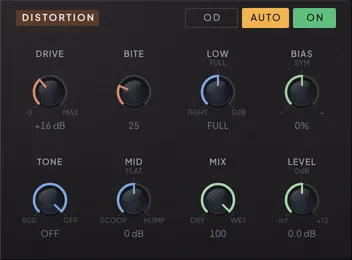
The distortion is not a single curve with a drive knob in front of it. It is three cascaded soft stages with filters between them feeding a final clipper whose knee tightens as you push — the same arrangement a guitar amplifier uses, and for the same reason. Each stage adds a little harmonic content that the next filter shapes before the following stage multiplies it again, so the buildup is gradual and follows what you play, rather than arriving all at once as a wall of buzz.
The four modes in the section header are voicings of that one cascade, not four separate effects. OD is a mild singing overdrive that leaves some dynamics intact — the flattering choice for a resonant filter sweep, where it folds the resonance back into the body of the tone instead of leaving it whistling on top. DIST is the classic: harder, flatter, the picture squaring off. FUZZ is deliberately broken — heavily asymmetric, and its bias drifts with the envelope, so notes sputter and gate as they die away instead of fading politely. METAL is tight and scooped, with a highpass between the stages so the low end cannot smear the ones above it, and the widest gain range of the four. Because the modes differ only in their settings, switching between them glides rather than cutting.
DRIVE reads in decibels, and its ceiling follows the archetype: +30 dB in OD, +42 in DIST, +48 in FUZZ, +60 in METAL. That is a great deal of gain, and the important part is what it does not do — every stage is calibrated so that a signal at the synth’s nominal level leaves it at the nominal level, and AUTO listens to the program and holds that loudness at any playing level. Turning DRIVE up changes what the sound is, not how loud it is. Wind it to the top and a thirty-decibel swing of input level comes out within about a decibel: the dynamics have been converted into harmonics, which is exactly the flat, relentless picture that hard electronic music is after.
BITE is the control that keeps that from becoming a smear, and it is not a tone boost. It lifts a mid band going into the cascade and puts it back on the way out, so what changes is how hard that band is driven rather than how loud it ends up — five to six times the harmonic content around its centre, at any playing level, while the balance moves only a few decibels. The depth follows the envelope, so a loud note is driven harder than a quiet one: level contrast collapses as you drive, but accent contrast survives, converted into edge and grit. Turn it up on a sequenced line with accents and the line starts speaking rather than buzzing.
LOW decides what happens to the bottom. Left of centre it is a tightening highpass into the drive (from 20 Hz up to around 300), so bass stops eating the headroom the mids need — the control behind a tight, articulate chug. Right of centre it does the opposite: it splits a clean sub band out, routes it around the distortion and sums it back afterwards, so the weight underneath stays intact while everything above it is destroyed. Centre passes everything straight through.
BIAS sets the symmetry. Centred, the curve is symmetric and you get odd harmonics; either way off centre it skews, bringing in the even harmonics that read as thickness and warmth. Pushed far in FUZZ it drives the gated, sputtering behaviour that mode is built around.
The lower row is the voicing after the fact. TONE is a post-distortion lowpass that pulls the fizz down from 22 kHz to 500 Hz, reading OFF at the top of its range. MID scoops or humps at the archetype’s own centre frequency — scooped for modern and metal flavours, humped for a lead that has to cut. MIX blends against the dry signal, which is how you keep chords intelligible: distortion on a bus makes notes intermodulate, so a parallel dry path preserves the harmony while the wet path supplies the aggression. The dry waits out the few samples the distortion itself takes, so a partial MIX sums cleanly instead of combing against the input. LEVEL is the clean trim on top of the auto make-up.
About that make-up: DRIVE holds the peak steady by construction, but not the loudness. As the cascade converts dynamics into harmonics it lifts everything that was quiet, and the average level climbs with it — around 6 dB by the top of the knob, more in FUZZ. AUTO follows the input and output loudness of whatever is actually playing and closes that gap for it, not just for one waveform at one playing level — a quiet line through FUZZ comes back at the same loudness as a loud one, and a note’s own decay keeps its sustain rather than being pulled back up. Run the knob end to end and hear the sound change without the level chasing you. AUTO is on in a patch started from INIT; switch it off when you want the drive to push.
The distortion arrives already patched: in the default chain it takes the BitCrusher’s output and feeds the chorus. The patchbay allows sharper tricks — it can sit inside the delay’s, chorus’s or reverb’s feedback loop, so every repeat comes back dirtier than the last. The patchbay chapter (Chapter 5 — Mixer & Patchbay) maps those routes.
| Parameter | Range | Default | What it does |
|---|---|---|---|
| Distortion Enable | Off / On | Off | Switches the distortion on or off. |
| Dist Mode | OD · Dist · Fuzz · Metal | OD | Archetype: OD (mild, keeps some dynamics), DIST (classic hard, flat), FUZZ (broken and asymmetric, bias drifting with the envelope), METAL (tight, scooped, widest gain range). |
| Dist Drive | 0 – 1 | 0.35 | Pre-clip gain in decibels — up to +30 (OD), +42 (DIST), +48 (FUZZ) or +60 (METAL). Every stage is level-matched, so DRIVE changes what the sound is, not how loud it is. |
| Dist Bite | 0 – 1 | 0.25 | Lifts a mid band into the cascade and takes it out after — the band is driven harder, not louder. Envelope-tracked, so accents bite more than ghost notes. |
| Dist Low | 0 – 1 | 0.5 | What the low end does: left of centre a tight highpass into the drive (20 Hz to ~300) so bass cannot eat headroom; right of centre a clean sub band routed around it. |
| Dist Bias | 0 – 1 | 0.5 | Asymmetry. Centre is symmetric, odd harmonics only; either side skews the curve and adds even harmonics — clean fold versus tube thickness. Extremes push FUZZ into its sputter. |
| Dist Tone | 0 – 1 | 1 | Post-distortion lowpass — pulls the fizz down from 22 kHz to 500 Hz; OFF at the top of the range leaves the signal untouched. |
| Dist Mid | 0 – 1 | 0.5 | Post-clip mid voicing at the archetype's own centre frequency: scoop for modern and metal flavours, hump for a lead-forward push, flat in the middle. |
| Dist Mix | 0 – 1 | 1 | Parallel blend of distorted and dry signal — lower it to tuck the dirt under the intact sound. |
| Dist Level | -inf dB – 12.0 dB | 0.0 dB | Output level after the auto make-up, from mute to +12 dB. |
| Dist Autogain | Off / On | On | Auto make-up — holds the output as loud as the input while DRIVE adds harmonics: it follows the drive, then corrects for how dense the material is. Off lets the drive push. |
| GR Dest 1 | None – Cable Filter 4 > Freezer Feedback In | None | FILTER ENV route — the parameter the filter envelope pushes, into any destination; it runs whether or not the filter is powered. (GR in the id is a legacy name.) |
| GR Amount 1 | -100.0 – +100.0 | 0.0 | Depth of the FILTER ENV route, as a share of the target knob's whole travel: ±100 % reaches the knob's end from where it sits (Tune and a few other targets listed in the modulation chapter keep their own units); negative inverts the movement. |
| Filter Env Dest 2 | None – Cable Filter 4 > Freezer Feedback In | None | Second FILTER ENV route — another parameter the filter envelope pushes, into any destination, with its own depth; like the first, it runs whether or not the filter is powered. |
| Filter Env Amount 2 | -100.0 – +100.0 | 0.0 | Depth of the second FILTER ENV route, as a share of the target knob's whole travel: ±100 % reaches the knob's end from where it sits (Tune and a few other targets listed in the modulation chapter keep their own units); negative inverts the movement. |
BitCrusher: controlled damage
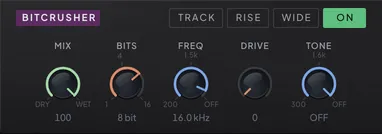
Two knobs do the damage. BITS redraws the waveform on a coarser amplitude grid: at the top of its range the grid is fine enough to be transparent, and as it comes down the wave turns to audible steps. The quantizer is dithered the way a real converter is, so from about 12 bits up quiet passages and decays dissolve into a gentle noise floor instead of cutting out. Through the classic 8-to-12-bit crunch the dither eases back, so decays keep their grainy sputter rather than sitting on a constant hiss; keep going down and it fades further on purpose, leaving raw grit and, at the very bottom, gated crackle. Silence stays silent at every setting — no noise bed between notes. The control is continuous, and fractional bit depths shift the grid smoothly, so a modulated BITS sweeps rather than clicking between settings. FREQ is a virtual sample rate: at the top of the knob the decimator is off — genuinely off, at any host rate — and the dial’s last octave runs smoothly into that point, so there is no jump from sheen to clean at the end of the travel. As it comes down, a hold-style resampler makes the folded-back image frequencies audible — the classic downsampled alias sheen — and even at the slowest rates TRACK or modulation can reach, each held step stays a step instead of sagging into a pulse. This is the one place in the instrument where aliasing is the point. DRIVE is a soft clip before the quantizer; a touch of it tames spiky inputs so they do not splatter into huge quantization jumps, and more of it thickens the crush. It is loudness-compensated, so what grows is density, not volume. DRIVE runs at twice the host rate, so its tone hardly depends on your project’s sample rate: at 44.1 or 48 kHz it stays within about 1.3 dB of the 96 kHz sound up to 16 kHz. At 0 it is out of the path entirely, and a partial MIX over a driven crush blends against an aligned dry, so it never combs. A patch started from INIT parks the BitCrusher at 8 bits and 16 kHz, so powering it on is a crunch you hear at once.
The crush can also be played in tune. Flip TRACK and the FREQ knob becomes RATIO: the virtual sample rate follows the note you play, RATIO × the fundamental. Because the rate moves with the pitch, the alias partials keep the same musical interval on every key — at whole-number ratios they lock into the harmonic series and the sheen becomes part of the chord instead of a fixed hiss over it. Every new note locks the tracked rate instantly, whatever your host’s buffer size, so the alias pattern is stable from the first sample of every attack. A legato jump to a new pitch locks it too when the jump is wider than a glide would cover in one host buffer — at very large buffers a small legato step glides instead — and bends and portamento carry the rate along smoothly. Each mode remembers its own knob position, so flipping TRACK back restores the absolute rate you had dialed.
The TRACK, RISE and WIDE switches sit in the section header beside the power button; the five knobs — MIX, BITS, FREQ (or RATIO), DRIVE and TONE — run in a single row beneath them. RISE changes the quantizer’s grid: the default (mid-tread) has a level at zero, which is where the gated crackle at low BITS comes from; RISE has no zero level, so quiet passages sputter between the two nearest steps instead of cutting out — at 1 bit it is a true rail-to-rail comparator. WIDE runs separate left and right capture clocks half a period apart, so the two channels crush at different instants and the grit spreads across the stereo field. With FREQ at OFF both channels capture every sample in step, so WIDE leaves the timing untouched; the half-period offset returns the moment FREQ comes down. TONE, the last knob in the row, is a lowpass after the damage — pull it down to tame the alias sheen while the steps stay.
The BitCrusher is a single node in the routing system, and its character changes with its address. Feed it one oscillator directly and that line alone turns to grit while the others stay clean. Put it after the delay and the tails degrade like worn media. Run it in parallel against the clean mix for weight without total destruction. Its controls have their own panel on the FX tab, and BITS, FREQ, MIX, DRIVE and TONE are all modulation destinations, so the damage can move with the music.
| Parameter | Range | Default | What it does |
|---|---|---|---|
| BitCrusher Enable | Off / On | Off | Switches the BitCrusher on or off. |
| BitCrusher Mix | 0 – 1 | 1 | Dry/wet blend for the crushed signal. |
| BitCrusher Bits | 1.0 – 16.0 | 8.0 | Amplitude grid of the quantizer — full is transparent, low is coarse steps; fractional values sweep smoothly. |
| BitCrusher Freq | 200.0 Hz – 22050.0 Hz | 16000.0 Hz | Virtual sample rate — top of the knob is OFF (no decimation); lower it and a hold-style decimator adds the classic downsampled alias tone. |
| BitCrusher Drive | 0 – 1 | 0 | Soft clip before the quantizer — tames spiky inputs and thickens the crush. Loudness-compensated, so it adds density, not volume. |
| BitCrusher Track | Off / On | Off | Locks the decimation rate to the played note (RATIO × pitch) so the crush stays in tune across the keyboard. |
| BitCrusher Ratio | ×0.5 – ×64.0 | ×8.0 | With TRACK on, the virtual rate as a multiple of the note pitch — whole-number ratios lock the aliasing into the harmonic series. |
| BitCrusher Tone | 300.0 Hz – 22050.0 Hz | 22050.0 Hz | Lowpass after the crush — pulls down the alias sheen while the steps stay; top of the range is off. |
| BitCrusher Rise | Off / On | Off | Quantizer grid with no zero level — quiet passages sputter between steps instead of gating out; at 1 bit a true rail-to-rail comparator. |
| BitCrusher Wide | Off / On | Off | Separate left/right capture clocks — the two channels crush at different instants and the grit spreads across the stereo field. |
The freezer: a granular engine
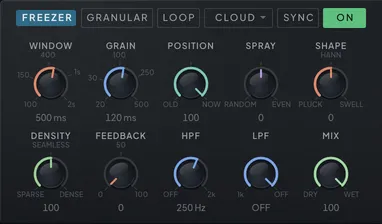
The freezer chops whatever reaches it into short windowed fragments — grains — and rebuilds a sound out of them. Line the grains up end to end and you get the original back. Pull them apart, stack them or scatter them and you get everything from a hard rhythmic stutter to a diffuse cloud that has no beginning and no end.
Two engines, one module. The selector at the head of the freezer’s row reads GRANULAR or LOOPER, and it decides what the module does when you are not holding LOOP. On GRANULAR it granulates what you are playing, all the time: the grains sound continuously over whatever is cabled in, so the module is an effect you play through. On LOOPER the wet path stays shut until you engage LOOP, so the freezer is silent until you reach for it. The choice is saved with the patch and automates like any other control — which is what makes the two engines a decision rather than an accident of which build a patch was born in.
LOOP is the gate both engines are built around, and it means something slightly different in each. On GRANULAR, pressing it stops the recording: the grains keep coming from that instant, but now they are all cut from what was just caught, and a passing chord becomes a pad that sustains as long as you like. Grains already sounding cross into the held material without a click; let go and the live sound returns. On LOOPER, pressing it opens the wet path and restarts the captured loop from a known point with a fresh scatter, so every press is a clean downbeat. Held grains sit about 1 dB under the live stream — live grains add up exactly, held and sprayed ones add up in power — which is the level the looper has always had.
RESET clears the capture, and it has no button on the panel: it is reached from an automation lane or from a modulation route, where a rhythmic clear belongs. Firing it fades the freezer out over a few milliseconds, empties the buffer and every grain, and fades back in. Without LOOP it fades to the dry signal and the grains return as new material arrives; with LOOP engaged it fades to silence and stays there, on an empty buffer, until LOOP releases. Aim a square LFO or a mod step at it and a held texture keeps renewing itself; reach for it from your host and it is the safety valve for a feedback cable that has run away. Each firing scatters fresh grains rather than replaying the last pattern.
What you are reading. WINDOW sets how much recent audio the capture holds, from 100 ms up to two seconds, and so bounds how far POSITION can reach back. GRAIN sets how long each fragment is, from a tight almost-pitched sliver at 20 ms up to a slow half-second swell. POSITION is where in the window the grains are cut from: NOW at the top, OLD at the bottom. While the freezer is granulating live, every step down is a true delay into what was just recorded; under LOOP it seeks through the captured instant without ever crossing a seam. Grains always play at the pitch they were recorded.
How they arrive. DENSITY decides how often a grain starts, independently of how long it is. Turn it toward SPARSE and the grains separate into silence between them, which is the hard rhythmic stutter the module is best at; toward DENSE they stack into something thicker. At SEAMLESS, the middle of the dial, they join end to end. SHAPE is the fragment’s own envelope: a sharp PLUCK attack at one end, the smooth HANN window at the centre, a slow SWELL that cuts off at the end on the other.
SPRAY scatters where the grains read, and it works from the centre out. At the centre each mode keeps its own scatter — none for SMOOTH, REVERSE and RANDOM, CLOUD’s natural spread for CLOUD. Turn it toward RANDOM and the read points scatter at random and random gaps open in the stream, while the average grain rate stays where DENSITY put it. Turn it toward EVEN and the grains spread evenly over the same range instead, left and right each on their own sequence, so the stereo image widens and still holds together in mono. A SPRAY move reaches the grains born after it.
HPF and LPF are a 12 dB highpass (20 Hz to 2 kHz) and lowpass (1 to 20 kHz) on the grains only; the dry signal never passes through them. Each reads OFF at the open end of its range, where it leaves the path entirely, and both have their travel at the low end of the dial, like the reverb’s filters. A new patch starts with the highpass at 250 Hz, so the cloud earns its place over the dry signal instead of doubling its low end; wind it down to OFF when you want the whole range. Thin a frozen pad out of the bass, or darken a cloud until it sits behind the mix. MIX blends the result under anything you keep playing, so the texture can be a drone to solo over rather than a hard replacement. On GRANULAR the dry is held in step with the grains, so a partial MIX blends cleanly instead of combing.
FEEDBACK, the knob between DENSITY and HPF, turns the cloud into an echo of itself. It writes the grain stream back into what the freezer records, along with the input, so every repeat is granulated again — the same scatter, direction and window shape — and HPF and LPF shape each pass the way a tape delay’s tone controls do: pull LPF down and the repeats darken as they circle. A repeat never comes back sooner than one grain. At POSITION NOW the repeats arrive a grain apart, a stutter echo; further toward OLD, the age POSITION reads at is the echo time. At OLD with no scatter that age is the WINDOW, so with SYNC lit the repeats land on the grid there. Moving GRAIN or POSITION glides or crossfades to the new spacing instead of jumping. In every mode, dense or scattered, each repeat comes back at the FEEDBACK share of the one before, so the knob means the same whatever DENSITY, SPRAY and MODE are doing; only at the far ends of SHAPE can a repeat fade a little faster. At zero nothing comes back and the freezer plays exactly as it always has, which is where older patches load; all the way up, the cloud sustains while it still takes input, held by a soft limit. Feedback acts only while the freezer records on GRANULAR: a held LOOP keeps its loop exactly as caught, and on release the held cloud flows into the regenerating stream. On LOOPER, which records only what it is fed, the knob is greyed out. The freezer also carries an FB IN / FB OUT pair on the patchbay, so another module can sit inside this loop — see Feedback without forbidden loops (Chapter 5 — Mixer & Patchbay).
MODE picks the character. CLOUD, where new patches start, scatters four overlapping copies into a diffuse choir-like wash and smears away the metallic tint a single tight loop can have. SMOOTH is a clean sustained stream. REVERSE plays the grains backwards. RANDOM tosses a coin for each grain and lets forward and backward ones interleave, which is far more organic than committing the whole stream one way.
SYNC locks the freezer to the beat, the same switch the chorus and reverb carry: with it on, WINDOW and GRAIN become musical time divisions instead of milliseconds — a window of one bar and grains of 1/16 turn a held chord into a texture that loops in time with the song, and stuttering LOOP from a step sequencer lands every repeat on the grid. The divisions track the host tempo live, so a tempo change re-tunes the whole texture without touching a knob. The synced WINDOW stops at 1/1, one bar: the capture itself is two seconds, so longer divisions would only promise a window the buffer cannot hold. The cap holds on every route into the control, not only on the ring: a patch saved with a longer division loads at 1/1, a restored DAW session comes back at 1/1, and an automation lane parked past the cap both plays and reads 1/1. GRAIN’s ring stops at 1/4 — a grain lasts half a second at most — but nothing caps the parameter itself: a preset, a session or an automation lane can hand it any division, as with the LFOs, the delay, the chorus and the reverb. A division that does not fit its control at the current tempo — a one-bar WINDOW below 120 BPM, where a bar outlasts two seconds, or a long GRAIN division past the half-second a grain can last — is folded by octaves onto the nearest one that does: at 90 BPM a one-bar window plays half a bar. The texture stays on the grid instead of being cut to an arbitrary length.
None of it clicks. A grain only ever appears or vanishes at the moment its own envelope is at zero, so changing DENSITY while the sound is running cannot produce a step, and the level holds steady as grains are added or removed. Every knob is smoothed too, so scrubbing them — or aiming an LFO at them — glides instead of stepping.
LOOP and RESET are controls rather than plain buttons, so both are modulation destinations that fire on any positive value. A square — or any bipolar — LFO or mod step-seq on LOOP turns the effect into a rhythmic stutter that grabs and drops the sound in time; the same on RESET clears the capture rhythmically, so a held texture keeps renewing itself. The LOOP button lights whenever the loop is actually engaged, by hand or by modulation, so a gated stutter shows on the panel. Both are read once per host buffer, so a pulse shorter than the buffer can be missed. LOOP, RESET, POSITION, GRAIN, WINDOW, DENSITY, SPRAY, SHAPE, FEEDBACK and MIX are all modulation targets, and a full-depth route on SPRAY or SHAPE sweeps the whole dial from one end to the other. With SYNC lit, a route on GRAIN or WINDOW scales the synced length, so modulation keeps working while the texture is locked to the beat. Neither LOOP nor RESET is saved: a preset or a host project always opens with both released.
Which engine a patch opens on still depends on where it came from — a patch that never stored the choice loads as the LOOPER, which is every preset from 0.2.1, and a patch made in this build starts on GRANULAR. The difference is that the selector is now yours: switch an old preset to GRANULAR to play through it, or a new one to LOOPER to keep the wet path shut until you ask, and save either way.
Like every effect here it is one node in the routing graph, and by default it sits just after the reverb on the way to the master — hold the tail of a reverb and it blooms into an endless pad. Move it earlier to granulate a dry oscillator, or run it in parallel for a textured layer beside the live line. Its panel is on the FX tab, below the BitCrusher, with the GRANULAR | LOOPER selector, LOOP, the mode picker, SYNC and the power switch in the header; its output level rides the FREEZER fader on the mixer.
| Parameter | Range | Default | What it does |
|---|---|---|---|
| Freezer Enable | Off / On | Off | Switches the freezer on or off; while on it granulates whatever reaches it and keeps recording recent input, ready to loop. |
| Freezer Loop | 0 – 1 | 0 | LOOP — stops recording and loops the grains over what was just caught; release returns the live stream. Any positive modulation engages it, so an LFO or step lane can gate it. |
| Freezer Reset | 0 – 1 | 0 | Clears the capture. No button: reach it from an LFO or envelope (destination Freezer Reset) for rhythmic clears, or from a host lane when a feedback cable runs away. |
| Freezer Grain Size | 20 ms – 500 ms | 120 ms | Length of each grain, 20–500 ms — short is tight and almost pitched, long is a slow evolving swell. |
| Freezer Window | 100 ms – 2000 ms | 500 ms | How much recent audio the capture holds for the grains to read, 100 ms – 2 s — short is a tight stutter, long is a wide evolving pad. A modulation target. |
| Freezer Position | 0 – 1 | 1 | Where the grains read, NOW at the top, OLD at the bottom. Live, lower values are a true delay into what was just recorded; older looper patches read a grain back at the top. |
| Freezer Mix | 0 – 1 | 1 | Blends the grains under the dry signal, from dry to fully wet. |
| Freezer Density | 0 – 2 | 1 | How often a grain starts, independently of how long it is. Down opens silence between them for a hard rhythmic stutter, the middle joins them seamlessly, up stacks them thicker. |
| Freezer Spray | -1 – 1 | 0 | Centre keeps the mode's own scatter. Toward RANDOM the grains scatter at random with random gaps; toward EVEN they spread evenly, wide in stereo and solid in mono. |
| Freezer Engine | Off / On | GRANULAR | Picks the engine. GRANULAR grains whatever is cabled in continuously, and LOOP freezes the material it reads; LOOPER stays silent until LOOP, then plays the capture from the top. |
| Freezer Shape | -1 – 1 | 0 | The envelope of each grain: a sharp PLUCK attack at one end, the smooth HANN window at the centre, a slow SWELL that cuts off at the end on the other. |
| Freezer Wet HP | OFF – 2000.0 Hz | 250.0 Hz | 12 dB highpass on the grains only, 20 Hz to 2 kHz; OFF at the bottom of the dial. A new patch starts at 250 Hz, which keeps the cloud clear of the dry low end. |
| Freezer Wet LP | 1000.0 Hz – OFF | OFF | 12 dB lowpass on the grains only, 1 to 20 kHz; OFF at the top of the dial. |
| Freezer Mode | Smooth · Reverse · Cloud · Random | Cloud | Grain character: Cloud (four scattered copies, a diffuse wash), Smooth (clean sustained loop), Reverse (grains play backward), Random (each grain tosses for its own direction). |
| Freezer Sync | Off / On | Off | Locks WINDOW and GRAIN to musical time divisions that follow the host tempo. |
| Freezer Window Division | 1/1 … 1/128 (18 steps) | 1/4 | Capture window as a musical division while SYNC is on — 1/1, one bar, is the longest it offers; below 120 BPM, where a bar outlasts the 2 s buffer, it folds by octaves onto a division that fits. |
| Freezer Grain Division | 1/1 … 1/128 (18 steps) | 1/16 | Grain length as a musical division while SYNC is on — repeats land on the grid. |
| Freezer Feedback | 0 – 1 | 0 | How much of the grain stream is fed back into what the freezer records — each repeat is granulated again, shaped by HPF and LPF, a grain or more after the last. GRANULAR only; greyed out on LOOPER. |
The master section: the last inch of the signal
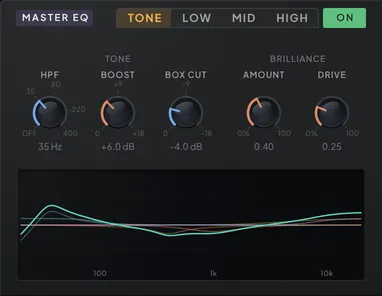
Every path through the instrument ends here. Once the routing graph has summed everything headed for the output — dry cables, effect outputs, oscillator directs — the master bus runs one fixed chain on that sum: high-pass, box cut and brilliance, then three parametric EQ bands, then stereo control, then volume, the DRY/WET blend and the limiter. All of the tone controls live in the MASTER EQ panel on the FX tab; the stereo controls sit on the Mixer tab next to the goniometer. The limiter itself is a global on/off with a single control — a compact L button in the header, reachable from any tab, just past the output meters.
MASTER EQ carries its own ON/OFF button, like every other effect panel, and like them a fresh patch starts with it off — the output you get from INIT is the sum, unshaped. Presets made before the switch existed load with it on, because the tone chain was part of their sound. Turning it off is a true bypass: the stage crossfades out where it stands, so you hear the chain leave rather than the filter sweep away, which makes the button a clean A/B against your own EQ.
The panel’s header is a tab strip — TONE | LOW | MID | HIGH — with the power switch at its right end. Only the knobs change when you move between tabs. The response chart underneath always draws the whole chain, every stage and all three bands together, so what you are looking at is the curve the master bus is actually applying, not the tab you happen to be on.
TONE is the stage that was always here, three continuous knobs. HPF sweeps the corner from 20 Hz to 400 Hz, with the bottom of the range reading OFF — so you can trim exactly as much rumble as the track needs rather than picking from fixed steps. BOOST adds a resonant emphasis right at that corner: at 0 dB the slope is a clean Butterworth, and as you raise it the cutoff becomes a deliberate bump that can make the low end feel tighter and louder even as everything below it is removed. BOX CUT scoops the congested, boxy low-mids around 400 Hz — sweep the depth in dB until the mix opens up. BRILLIANCE is a high-shelf at 4.5 kHz with a twist: AMOUNT sets the lift, and DRIVE saturates the lifted band, generating new harmonics above what the patch contains — a clean shelf at zero drive, an exciter when pushed.
LOW, MID and HIGH are a full parametric EQ after it: a resonant low shelf, a bell and a resonant high shelf, each with the same three knobs — FREQ anywhere from 20 Hz to 20 kHz, RES from 0.3 to 10, and GAIN of ±15 dB. Every band ships flat, and a flat band is a true bypass: it costs nothing and sounds like nothing, so the section is there when you want it and absent when you do not. The two shelves read their RES knob as shelf character rather than a filter Q — the default 0.71 is the flat, Butterworth-shouldered shelf you would expect, and winding RES up steepens the transition and lets the shoulder overshoot for a more forward, console-like tilt. The bell uses it straight: low for a broad tilt across an octave or two, high for a surgical notch. All nine are modulation destinations, so a slow LFO on a gain is a tone that breathes across a phrase — and a band whose gain is riding through flat drops in and out of the path silently rather than chattering at the crossing.
Then the image, which lives on the Mixer tab (Chapter 5 — Mixer & Patchbay) beside the goniometer — the display you need to judge it by. STEREO WIDTH scales the whole picture, from fully collapsed — the honest way to hear what a mono system receives — through unchanged, to tripled. MONO BASS is the anchor: below the frequency you set, the low end is planted in the center, so it stays put on big systems no matter how wide the rest of the patch swims. The Sum / Left switch beside MONO says which signal that anchor is made of. Left — where a new patch starts — takes the left channel as the mono bass, which keeps a detuned or wide-panned bass from cancelling itself the way a sum can. Sum is the old L+R average, and it is what every patch saved before this release loads on, so nothing you made changes under you; switch a patch to Sum if that is the low end it was voiced with. The MONO monitor check folds down using the same source, so what you audition is what the anchor is doing. Width where it helps, mono where it matters.
The sub oscillator has an escape route of its own: the NO FX switch on the sub’s Oscillators-tab header and its mixer strip — mirrored by the patchbay’s SUB → OUT cable, and lit on every patch started from INIT — routes it around the effects and the whole Master EQ stage, straight to the output bus, so the foundation stays clean and centered while everything above it is shifted, frozen, crushed or widened.
Between the volume stage and the limiter sits DRY/WET, the knob at the top of the Mixer’s AUDIO IN strip: on an insert it blends the track’s own audio back in beside the result, and at its default of 100 % it leaves the output exactly as it is — see Audio from outside (Chapter 5 — Mixer & Patchbay).
Last in line is the true-peak limiter, on by default. It is a safety ceiling, not a loudness tool: leave it on and the occasional resonance spike or feedback swell is caught before it clips the output; switch it off at the header’s L button if you would rather handle overs in your own chain. Its on/off state is global rather than stored in a preset, so it stays where you set it as you browse sounds.
The limiter is also the only latency the plug-in reports to your host. It looks 1.5 ms ahead of the signal, and the plug-in reports that look-ahead to the host once, when it loads, whether the limiter is on or off; the host compensates it so everything stays in time. Switching it off stops the limiting but keeps the look-ahead in the path, so flipping L (or the mixer’s LIMIT) never changes the plug-in’s delay: it is a gain fade of about ten milliseconds, with no comb and no click, and on material that is not being limited it changes nothing at all. You can flip it during playback or automate it. With the limiter as the final stage, nothing in this chapter — not runaway delay feedback, not a frozen reverb under a fresh bass line — has to be timid. Push the effects as far as the music wants; the exit is guarded.
| Parameter | Range | Default | What it does |
|---|---|---|---|
| Preset Volume | -24.0 dB – 24.0 dB | -7.6 dB | The PRESET fader — a per-preset offset (±24 dB) saved with the patch for level-matching; set it by ear or let AUTO match loudness. The master fader never moves it. |
| Master EQ Enable | Off / On | Off | Powers the Master EQ — HPF, Boost, Box Cut, Brilliance and the three EQ bands. Off is a true bypass, not a filter sweep; presets made before the switch existed load with it on. |
| Master HPF | OFF Hz – 400 Hz | OFF Hz | Master high-pass. Sweeps 20–400 Hz; the bottom of the range is OFF, so you can dial in exactly as much low-end clearing as the track needs. |
| Master HPF Boost | 0.0 dB – 18.0 dB | 0.0 dB | Resonant lift right at the high-pass corner — 0 dB is a clean Butterworth slope, higher values put a peak at the cutoff for a firmer, more forward low end. |
| Sub FX Bypass | 0 – 1 | 1 | Sub NO FX — ON sums the raw sub after the master tone chain, clean of master FX and still pre volume. Mirrored on the sub panel, the mixer SUB strip and the SUB → OUT cable. |
| Box Cut | 0.0 dB – 18.0 dB | 0.0 dB | Scoops the congested, boxy low-mids around 400 Hz — sweep the depth in dB until the mix opens up. 0 dB is off. |
| Brilliance Amount | 0.00 – 1.00 | 0.00 | High-shelf lift around 4.5 kHz — the exciter-style sheen on the master. |
| Brilliance Drive | 0.00 – 1.00 | 0.00 | Saturates the lifted band for exciter-style harmonics on top of the shelf. |
| Master EQ Low Frequency | 20 Hz – 20000 Hz | 100 Hz | Where the LOW shelf turns — the gain below this frequency, the corner at it. |
| Master EQ Low Resonance | 0.30 – 10.00 | 0.71 | Resonance of the LOW shelf. 0.7 is a clean shelf; higher values put a peak right at the corner, lower ones soften the slope. |
| Master EQ Low Gain | -15.0 dB – 15.0 dB | 0.0 dB | LOW shelf gain, ±15 dB. At 0 dB the band is a true bypass. |
| Master EQ Mid Frequency | 20 Hz – 20000 Hz | 1000 Hz | Center frequency of the MID band — a peak or a notch, wherever you sweep it. |
| Master EQ Mid Resonance | 0.30 – 10.00 | 0.71 | Resonance (Q) of the MID band — narrow with high resonance, broad with low. |
| Master EQ Mid Gain | -15.0 dB – 15.0 dB | 0.0 dB | MID band gain, ±15 dB — boost for a peak, cut for a notch. At 0 dB the band is a true bypass. |
| Master EQ High Frequency | 20 Hz – 20000 Hz | 8000 Hz | Where the HIGH shelf turns — the gain above this frequency, the corner at it. |
| Master EQ High Resonance | 0.30 – 10.00 | 0.71 | Resonance of the HIGH shelf. 0.7 is a clean shelf; higher values put a peak right at the corner, lower ones soften the slope. |
| Master EQ High Gain | -15.0 dB – 15.0 dB | 0.0 dB | HIGH shelf gain, ±15 dB. At 0 dB the band is a true bypass. |
| Mono Bass | 0 – 500 | 0 | Sums the channels to mono below this frequency so the low end stays anchored in the center. |
| Stereo Width | 0.00 – 3.00 | 1.00 | Overall image width — zero collapses to mono, one leaves it unchanged, up to triple width at three. |
| Master Bass Source | Sum · Left | Left | Which channel feeds the mono-bass path below M BASS, and what the MONO check folds onto: Left is the left channel alone, Sum the blend. Try Sum if a mono sum cancels the bass. |
| Limiter | Off / On | On | True-peak safety limiter on the final output — catches spikes before they clip; on by default. The plug-in reports its 1.5 ms look-ahead whether it is on or off, so switching is just a short gain fade. |