Phaseburn One · v0.3.0 early access 64-bit DSP

PHASEBURN ONE

A groove synth — one plugin, three jobs. Four oscillators led by a Phase-Locked Loop (PLL) and opened by four macro dials. A probability sequencer that plays them, and sends every note out as MIDI. A patchable rack — two filters, six effects and a master EQ — on the voice’s 64-bit path, with an audio input, so it works on your tracks too.

Free while in beta · €149 at launch

VST3 · CLAP · Standalone · macOS · Windows — AU on macOS

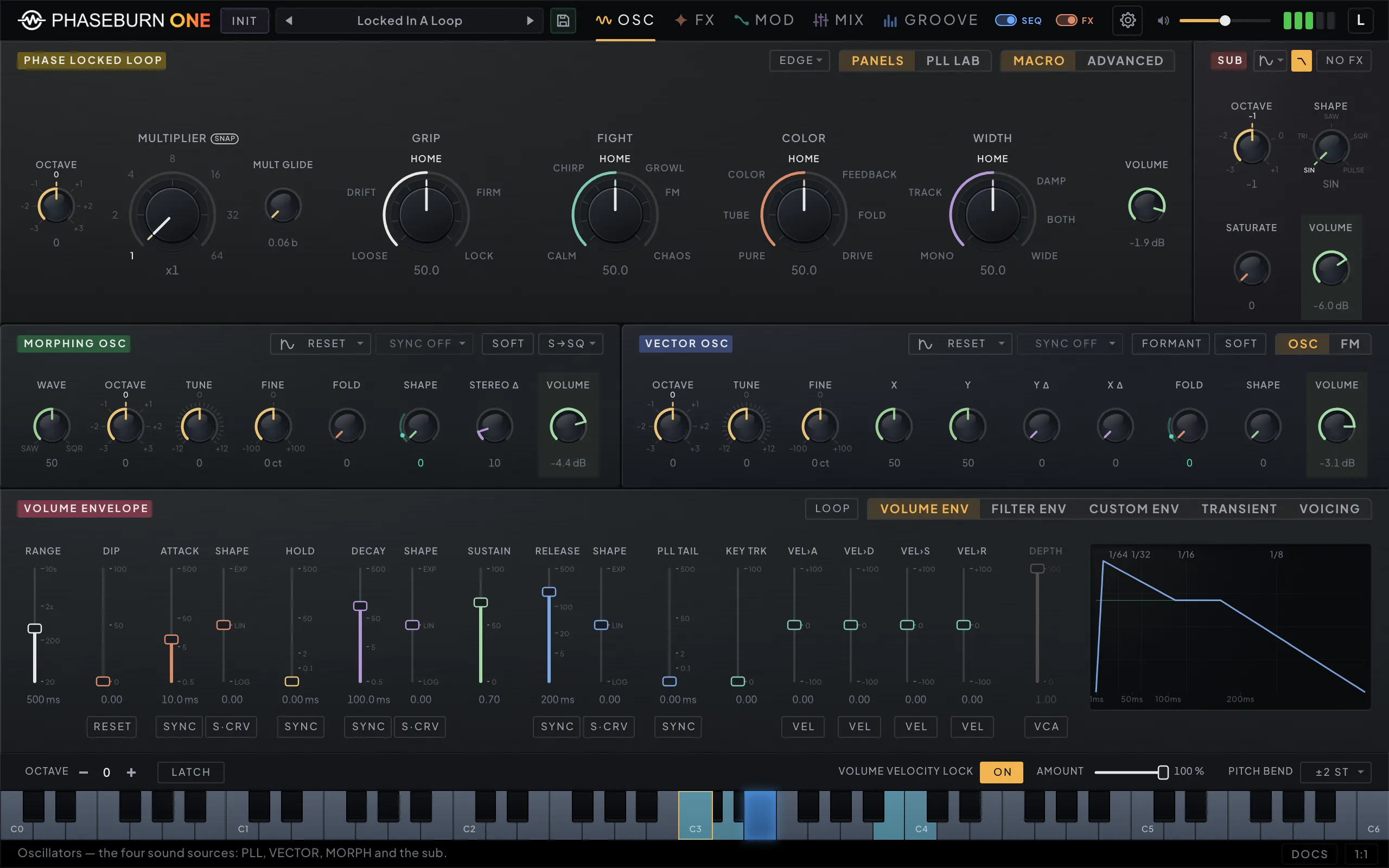
Phaseburn One oscillators page with the PLL section on its MACRO lens: MULTIPLIER, GRIP, FIGHT, COLOR and WIDTH as five large dials with named scale marks
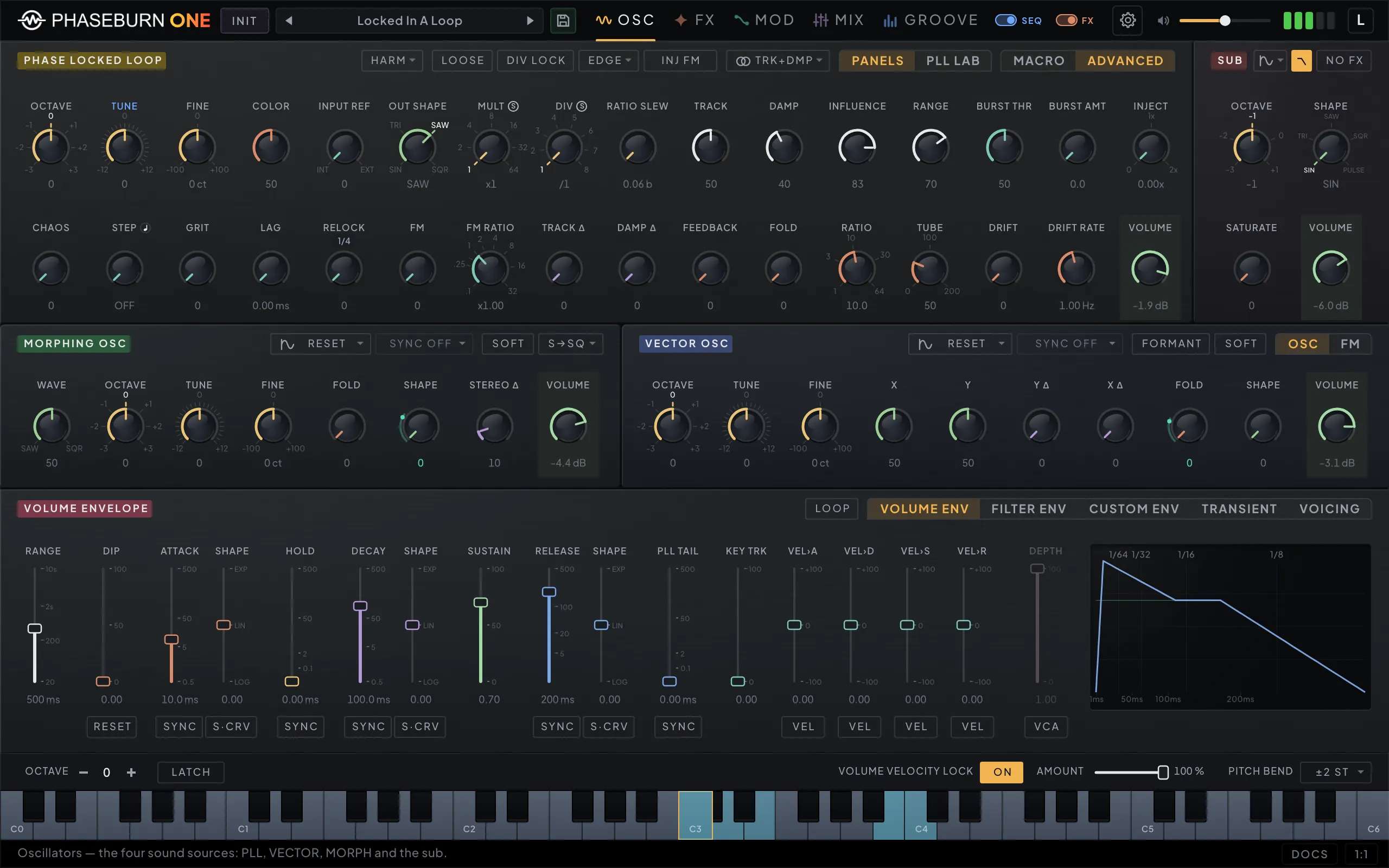
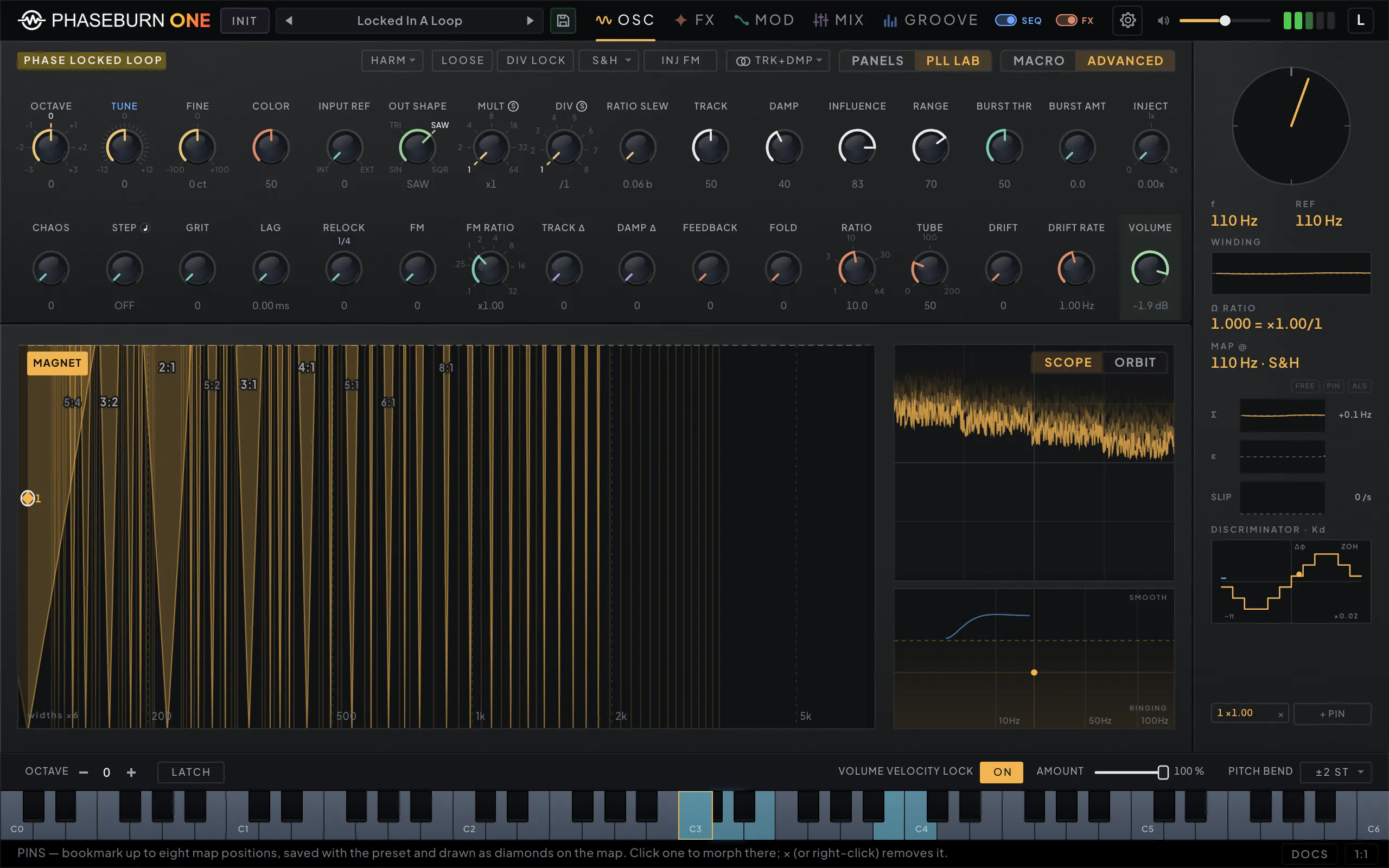
Phaseburn One oscillators page on its ADVANCED lens: the Phase Locked Loop knob field, the sub, the morphing and vector oscillators, and the volume envelope on its own tab
Phaseburn One PLL LAB view: the lock map with its ratio tongues and a pinned operating point, the scope and orbit panes, the winding trace and the discriminator plot
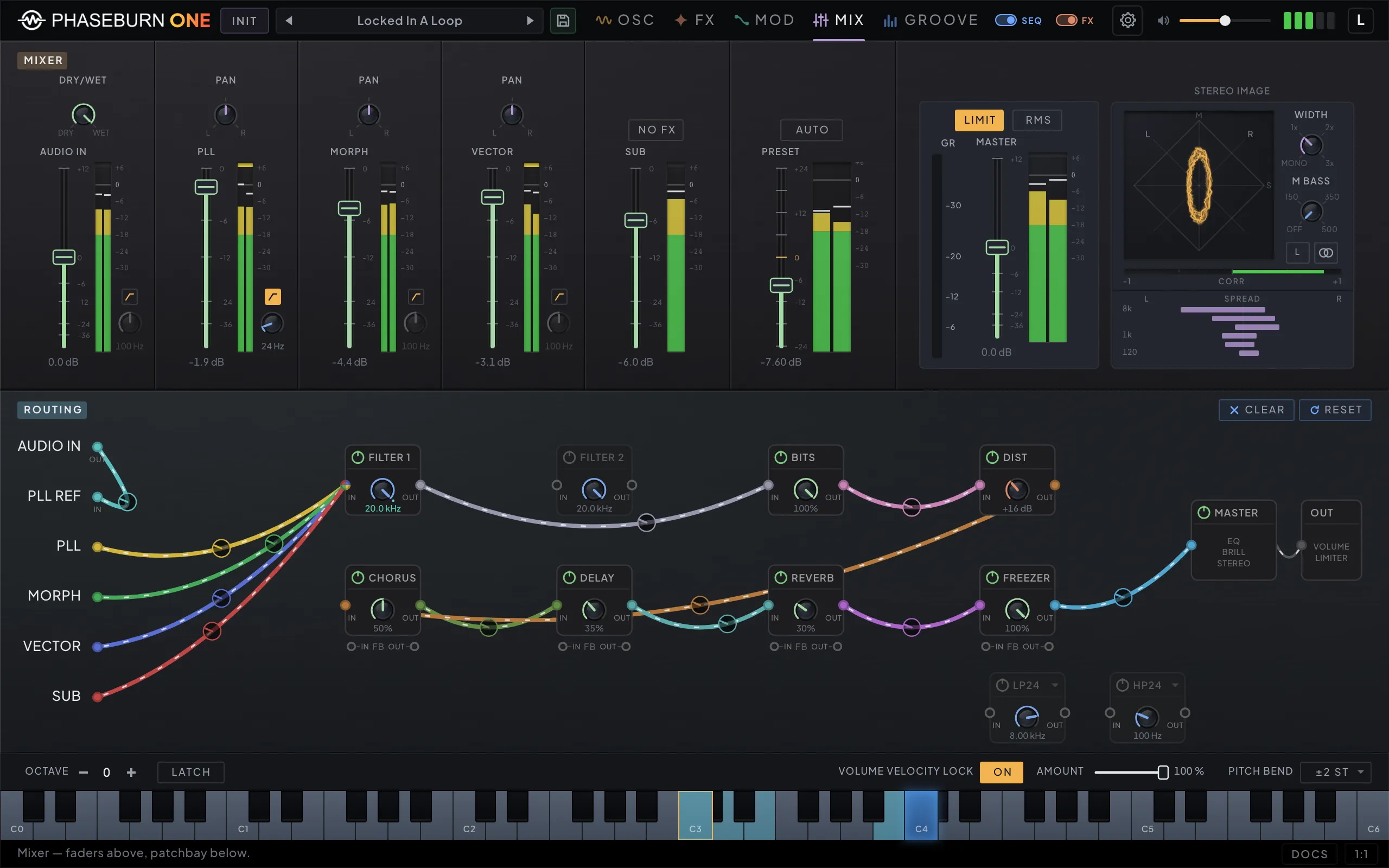
Phaseburn One mixer page: per-module channel faders, a goniometer stereo-image scope, and a routing patchbay where the modules, two high/low-pass filters and the master are wired by patch cables
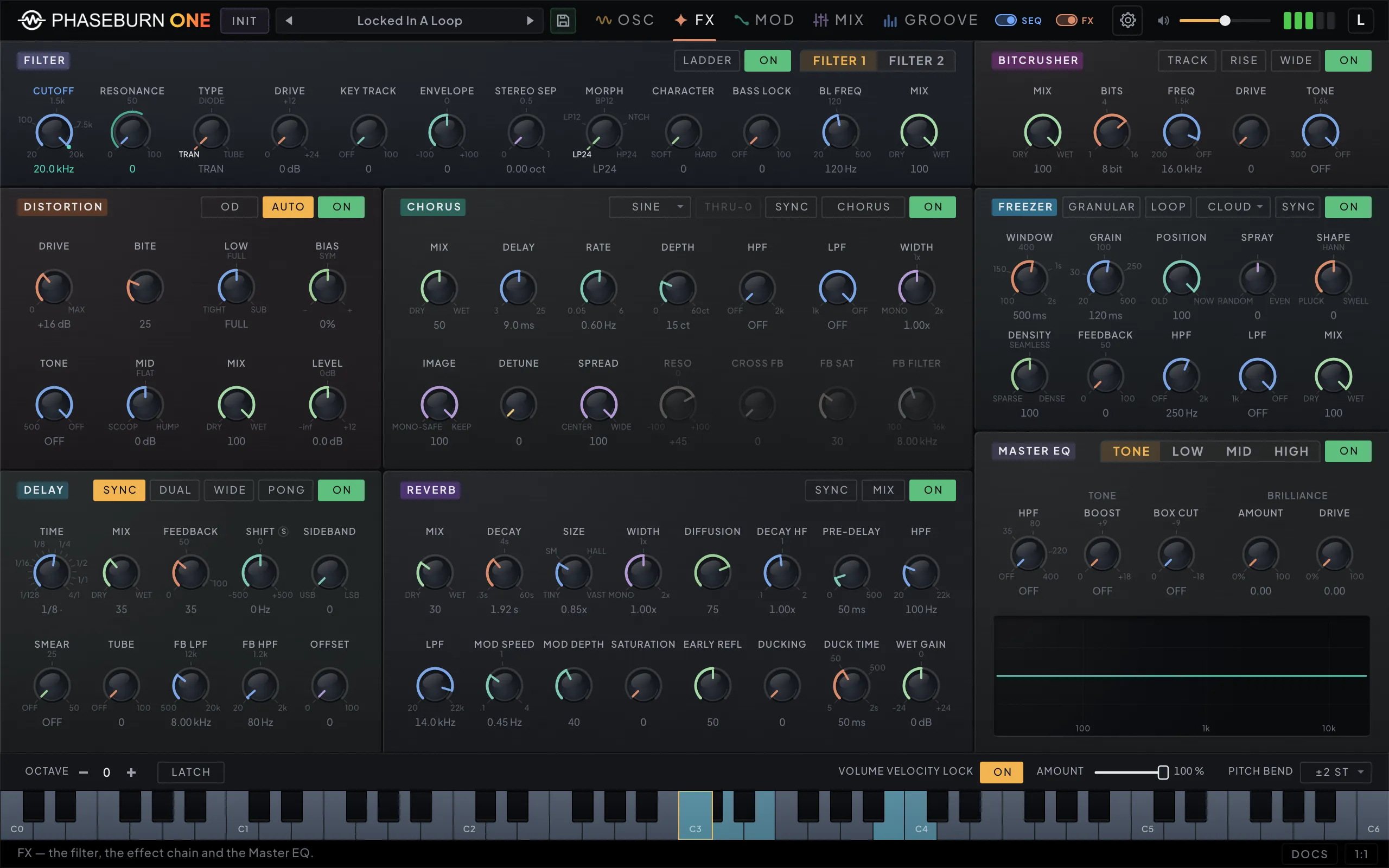
Phaseburn One FX page: a two-filter section on its FILTER 1 tab, distortion, chorus, delay, reverb, bitcrusher and freezer, and a Master EQ with TONE, LOW, MID and HIGH tabs
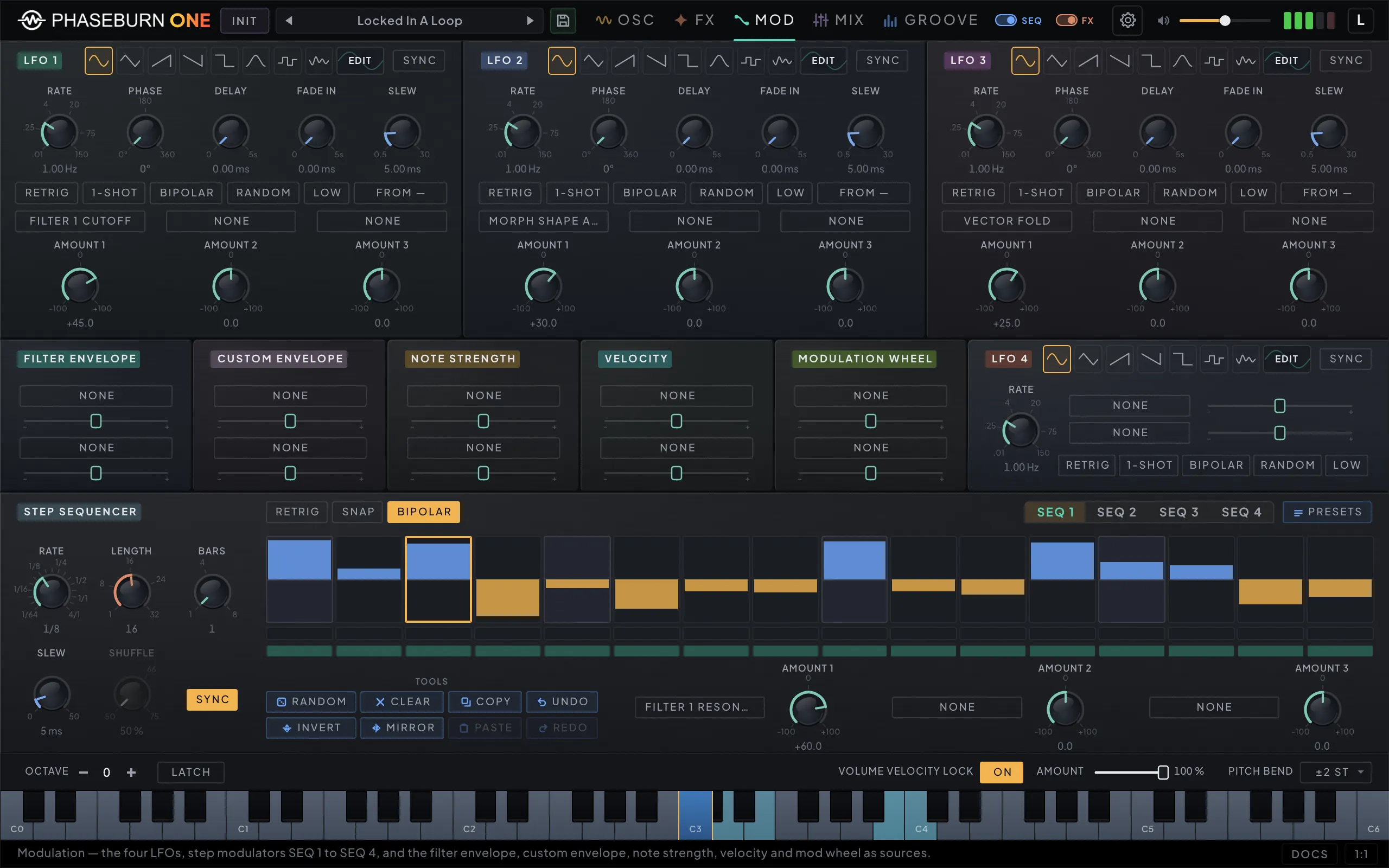
Phaseburn One modulation page: LFO 1 to 3 with their waveform pickers and EDIT chips, note strength, velocity, aftertouch and filter-envelope modulators, the compact LFO 4, and one of the four bipolar step modulators
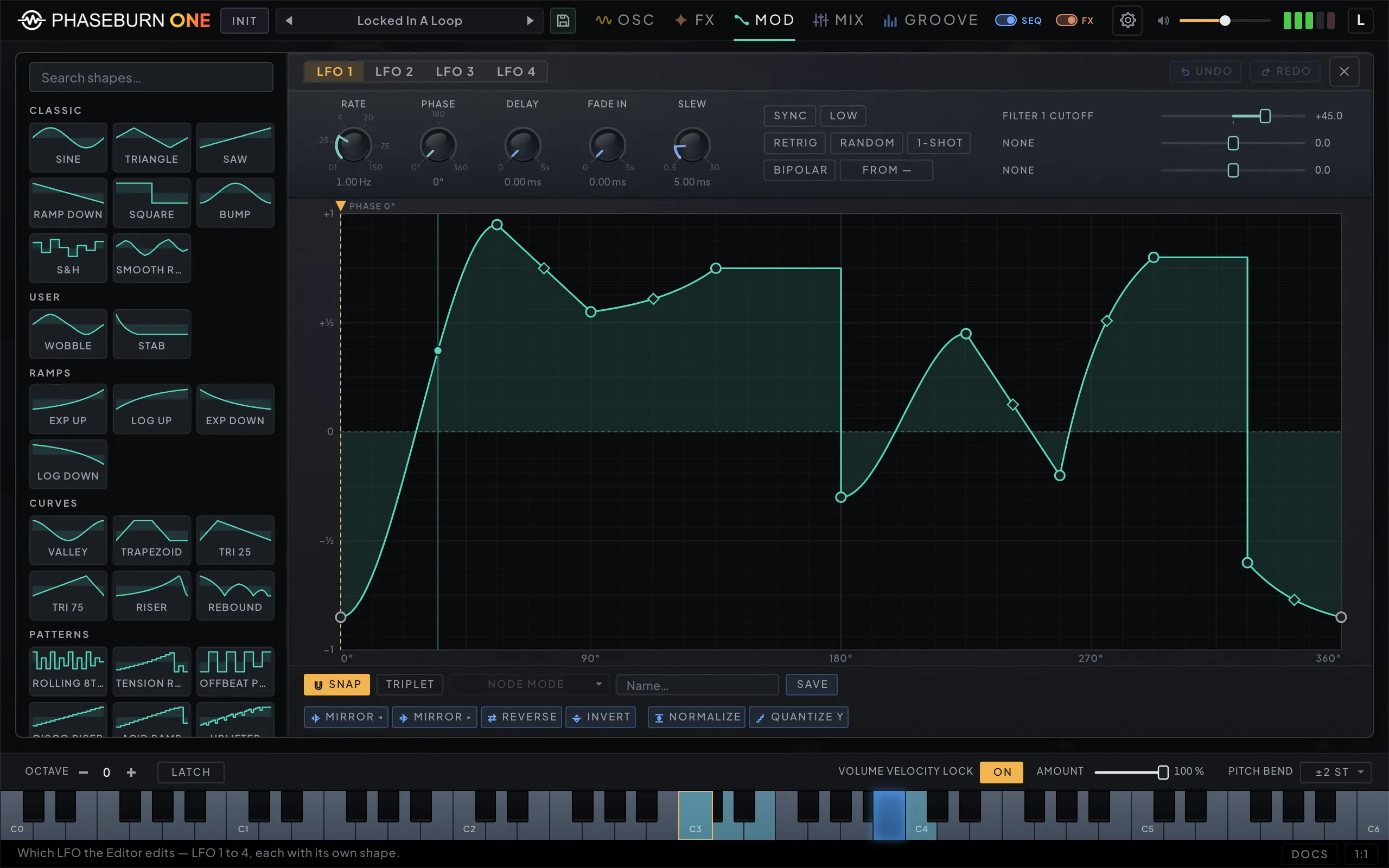
Phaseburn One LFO Editor: a searchable shape catalog on the left, the LFO rate, phase and destination strip along the top, and a full-width breakpoint editor holding a drawn curve with smooth, stepped and bent segments over a 32-column grid
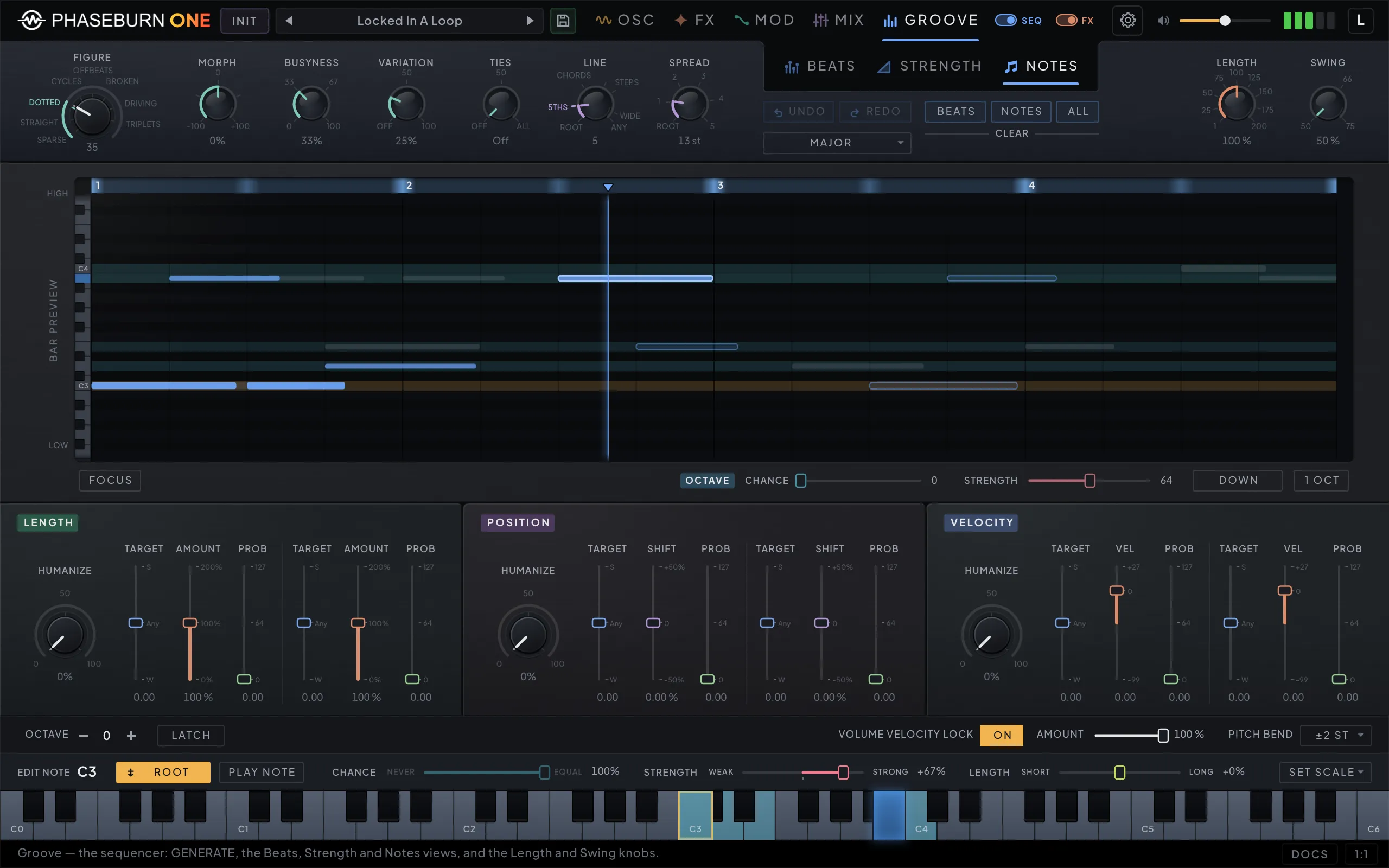
Phaseburn One Groove page, Notes tab: a live bar preview above the note, octave, arpeggio, oscillator and perform modules, each with its own chance, strength and length controls
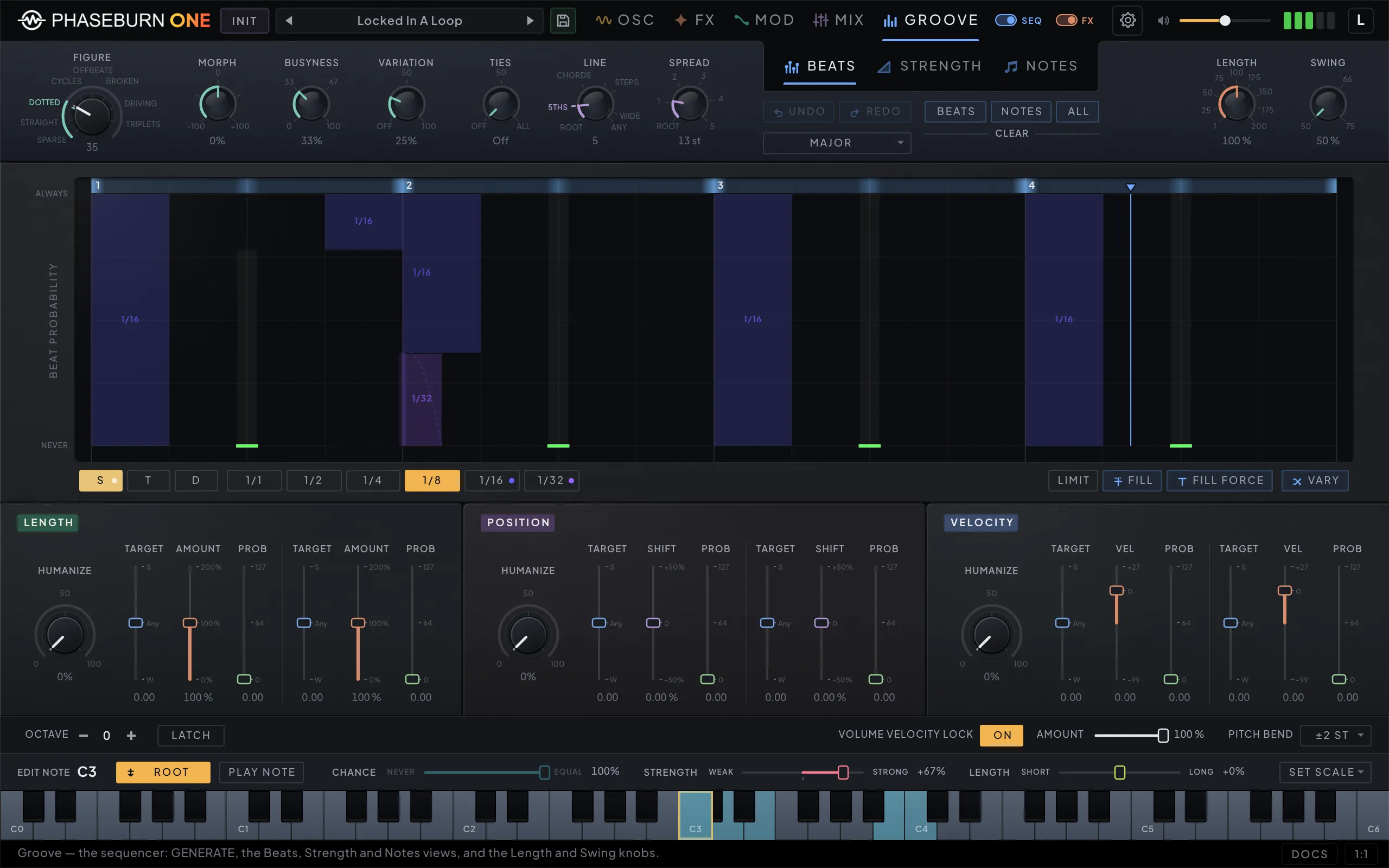
Phaseburn One Groove page, Beats tab: per-slot probability bars with swing, length, velocity and position groove tools
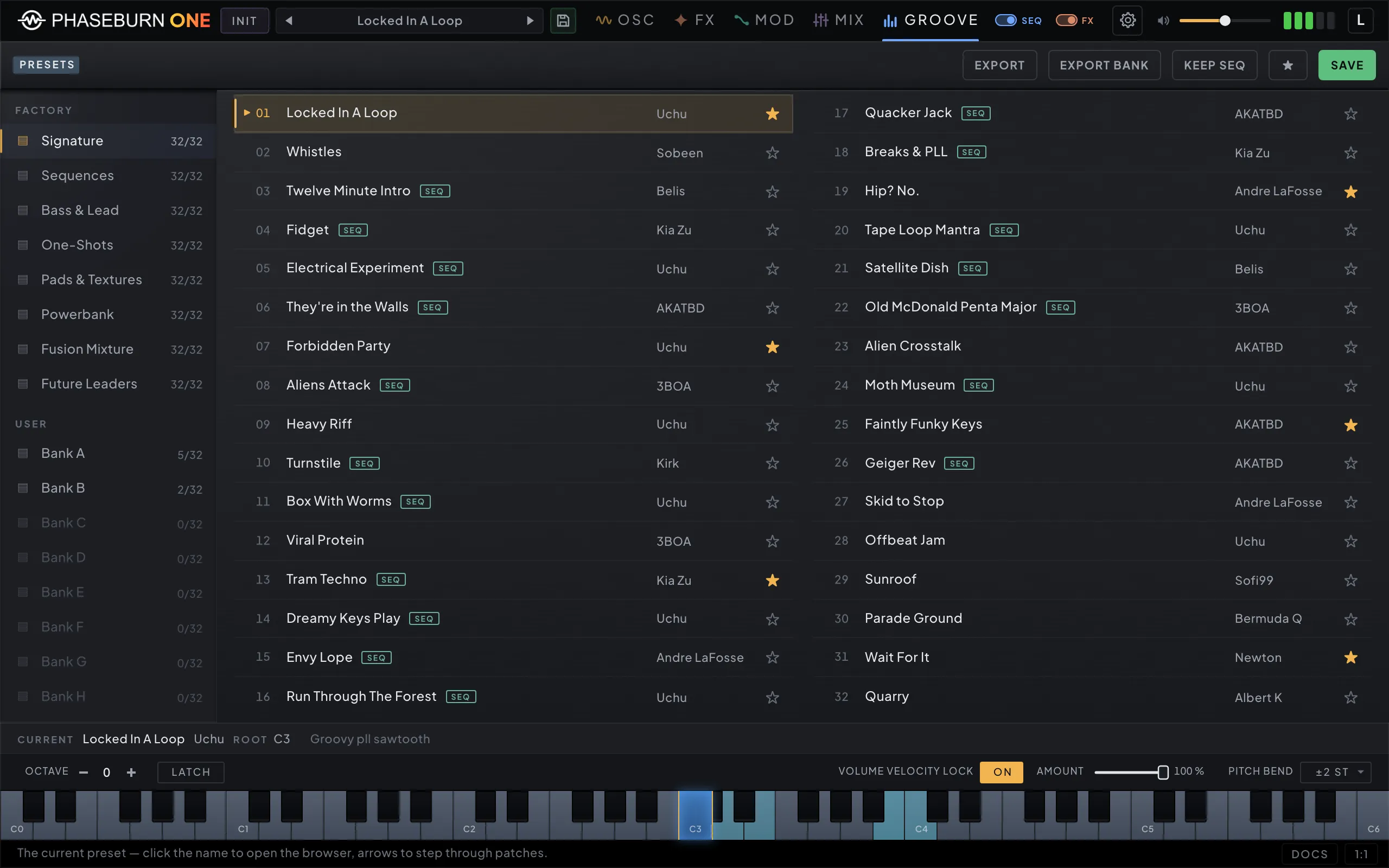
Phaseburn One preset browser: factory and user banks with favorites and sequence tags
Macro Four macro dials over the loop, each tuned by ear
Oscillators Phase-Locked Loop, MORPH and VECTOR, side by side
PLL Lab Where the loop locks, slips or runs chaotic — drag to play
Mixer & patchbay Faders and a stereo scope — patch cables below
FX Two filters, six effects and a Master EQ, each a patchable node
Modulation Four LFOs, note modulators, four step modulators
LFO Editor Draw the LFO — breakpoints, bends and held steps
Groove · Notes A scale-aware note pool — and a preview of every bar
Groove · Beats Chances, not steps — every bar is a fresh draw
Presets Factory and user banks, favorites, tags, import and export
1 / 10
Sound · The instrument

Four oscillators, one voice

All four run into a single voice path — a focus that buys the loop mathematics, the double-precision path and the oversampling — while OSC DRIFT can still hand each oscillator its own note for a paraphonic chord. And the voice is true stereo: left and right are generated independently — divergent loops, per-side phase shaping, per-channel unison — so width comes from the source, not from a widener bolted on at the end. Full parameter names below are the actual panel controls.

Phase-Locked Loop

The signature voice

A phase-locked loop is a control circuit from radio engineering: an oscillator listens to a reference, measures how far its phase has drifted, and constantly corrects itself. Phaseburn One turns that whole feedback dance into its main voice.

TRACK sets how fast the oscillator chases, DAMP how hard the correction brakes, INFLUENCE how much the reference pulls: tight, it locks into solid, weighty pitch with analog character; loose, the chase itself becomes audible — gliding approach, ringing overshoot, sirens and growls. Four macro dials — GRIP, FIGHT, COLOR, WIDTH — open the loop by ear with your own patch at twelve o’clock, ADVANCED hands back every knob, PLL REF points the loop at any other output or at your audio, and the PLL LAB charts the whole loop live.

  • TRACK
  • DAMP
  • INFLUENCE
  • CHAOS
  • RANGE
  • MULT ×1–64
  • DIV ÷1–8
  • INPUT REF (INT/EXT)
  • BURST THR · AMT
  • INJECT
  • STEP · GRIT
  • LAG · RELOCK
  • FM · RATIO
  • COLOR HARM/SAT/FOLD
  • SATURATE · TUBE
  • DRIFT · RATE

Vector Phase Shaping

The sculptor

The VECTOR oscillator bends the phase of a waveform around a movable inflection point — two coordinates, X and Y, sweep one cycle from smooth and flute-like to bright and biting without ever swapping waveforms. It builds on vector phase shaping, a published synthesis method (Kleimola, Lazzarini, Timoney & Välimäki, 2011), implemented here in double precision.

  • X · Y
  • X∆ · Y∆ stereo
  • FORMANT mode
  • FOLD
  • SHAPE
  • SHAPE TYPE soft/hard/fold

MORPH (12 modes)

The palette

Twelve waveform families, picked from a mode menu and each swept by a single knob: classic shapes, a 7-voice detuned unison saw stack, hard-sync sweeps, additive build-ups to 64 harmonics, staircase shapes, true vowel synthesis (A · E · I · O · U) from a runtime source-filter engine, and a spectral wavetable — with click-free, equal-power crossfades whenever the mode changes.

  • WAVE
  • FOLD
  • SHAPE
  • STEREO ∆
  • FINE
  • BREATH · SIZE (formant)

Sub

The foundation

A dedicated sub oscillator below everything else: −3 to 0 octaves, continuously shaped from sine through triangle, saw and square to a narrowing pulse, with its own saturation. Its FX BYPASS switch routes the raw sub around the tone-shaping chain entirely, so the low end stays untouched no matter how hard the rest of the patch is driven.

  • OCTAVE −3…0
  • SHAPE sin→pulse
  • SATURATE
  • FX BYPASS
Groove · The MIDI groove generator

Dice between note lengths

Not a step grid with a random switch — a weighted lottery over one bar, engineered so the result stays musical. Rules you can read, dice you load yourself — and every note it rolls leaves the plug-in as MIDI.

  • 01

    You set chances, not steps

    Every one of 152 slots carries a probability. 100% is a step; 30% is a maybe; the space between is where grooves live.

  • 02

    Three grids share one bar

    Straight, triplet and dotted timing run at the same time in the same bar — polyrhythm without switching patterns.

  • 03

    Beats compete for the bar

    Overlapping slots gamble for each moment: give the quarter note 80% and the half note 10%, and most bars open with the quarter, some ring the half through — and one in ten, the downbeat holds its breath. The winner occupies its length and quiets the rivals.

  • 04

    Strength marks the beats that matter

    A second map ranks every position — downbeat strong, ghosts weak — and the rest of the instrument aims at it: the root prefers the strongest beat, a modulation route pushes a knob harder on accents, length dice shorten the weak hits. Velocity follows only as far as its own slider says.

Rack · The effects rack

A rack, not an afterthought

Every effect is a node that takes cables — feed it from the mix, from one oscillator, or from another effect — and each one runs real per-sample processing on the same 64-bit path as the voice. Patch AUDIO IN into the rack and it processes your tracks with no note held. The rack is part of the instrument, not a garnish.

Filter

Two complete filters, each with two machines — a saturating four-pole ladder and a state-variable filter — and one MORPH knob sweeping real in-between shapes.

  • FILTER 1 | FILTER 2
  • CUTOFF
  • RESONANCE
  • LADDER · SVF
  • DRIVE
  • KEY TRACK
  • ENVELOPE
  • MORPH
  • CHARACTER
  • STEREO SEP
  • BASS LOCK

Delay

A frequency shifter inside the loop, so every repeat slides in pitch — inharmonic tails, barber-pole echoes.

  • TIME · SYNC
  • FEEDBACK
  • FREQ SHIFT ± · WIDE
  • SIDEBAND
  • SMEAR
  • TUBE
  • FB LPF · HPF
  • DUAL · OFFSET · PONG

Reverb

A feedback-delay-network room with modulated tails, ducking that rides the dry signal, and wet gain that can push the room to the front.

  • DECAY
  • SIZE
  • WIDTH
  • DIFFUSION
  • DECAY HF
  • PRE-DELAY
  • MOD SPEED · DEPTH
  • DUCKING
  • WET GAIN

Chorus

Four circuits — chorus, flanger, ensemble, vibrato — with depth in cents, so the same setting means the same thing at every rate.

  • DELAY
  • RATE
  • DEPTH
  • WIDTH
  • IMAGE
  • SPREAD
  • DETUNE
  • RESO
  • CROSS FB
  • FB FILTER

Distortion

Four archetypes on one cascade — overdrive, distortion, fuzz, high gain — with drive calibrated to change tone, not level.

  • OD / DIST / FUZZ / METAL
  • AUTO
  • DRIVE
  • BITE
  • LOW
  • BIAS
  • TONE
  • MID
  • MIX
  • LEVEL

Bitcrusher

Bit depth and rate reduction with drive — from sampler dust to full collapse.

  • BITS
  • FREQ
  • TRACK
  • DRIVE
  • MIX

Freezer

A granular engine: granulate what you play as it happens, or catch a moment and hold it as a pad — scrub it, reverse it, scatter it into a cloud.

  • GRANULAR | LOOPER
  • LOOP
  • WINDOW
  • GRAIN
  • POSITION
  • MIX
  • SMOOTH · REVERSE · CLOUD

Master

Corrective cuts, a brilliance exciter and three sweepable EQ bands, stereo width with a mono-bass anchor, and a true-peak limiter.

  • HIGH-PASS · BOOST
  • BOX CUT
  • BRILLIANCE
  • LOW · MID · HIGH
  • STEREO WIDTH
  • MONO BASS
  • TRUE-PEAK LIMITER
Patchbay · The wiring

A patchbay, four rules

Oscillators, audio from your host, both filters and every effect are nodes — plus two plain HP/LP slots, high-pass, band-pass or low-pass, that live only here. Draw gain-scaled cables from any output into the inputs it can reach — series, parallel, or effects nested inside feedback loops.

PLL SUB MORPH VECTOR FLT 1 FLT 2 CHORUS DIST BITS DELAY REVERB MASTER EQ OUT
  • 01

    Inputs sum

    Cables into one input mix, each with its own gain — except the main source on chorus, distortion, delay, reverb and bitcrusher: a filter’s output or the oscillators direct, and picking one releases the other.

  • 02

    Outputs fan out

    One output can feed a filter, a delay and the master at once.

  • 03

    Feedback runs through taps

    Delay, chorus and reverb expose feedback jacks — patch other effects inside the loop; dedicated taps mean it can never stall the engine.

  • 04

    Rebuilt every block

    The graph re-schedules itself on the audio thread with no locks and no allocations — repatch while it plays.

Modulation · Movement

180+ things to move

Modulation is source-centric: pick a source, aim it at a handful of destinations, layer sources for complexity. More than a hundred and eighty targets across the whole instrument.

4 LFOs

Sample-accurate, free or synced — and they can modulate each other, so two slow LFOs braid into drift no single shape produces. The LFO Editor draws the shape itself: move the breakpoints, bend or step a segment, keep it in your own library.

4 mod sequencers

Step-sequenced modulation lanes that run beside the note sequencer — stepped filter rides, rhythmic pans, evolving morphs.

Aftertouch & velocity

First-class sources, not afterthoughts: press into a pad to open the loop’s influence, strike harder to push drive.

Envelopes

Volume and filter envelopes with per-stage curve shaping, per-stage sync and loop mode — plus a separate transient engine with its own power switch, one-shot TRIGGER mode and oscillator targets.

Destination groups
  • Oscillators
  • Envelopes
  • Both filters
  • Transient
  • Every FX
  • Master EQ
  • Mixer
Engineering

Built like a measuring instrument

One voice path is a budget decision: every cycle saved on polyphony is spent on precision — and OSC DRIFT can still split the four oscillators into a paraphonic chord.

PLL · IDLE 48 kHz · 64-bit
Signal path
64-bit floating point through the core DSP — oscillators, envelopes, filters
Stereo
True stereo — left and right generated independently at the oscillators; width from the source, chorus as a choice rather than a crutch
Oversampling
Built-in on the stages that need it
Filters
Zero-delay-feedback, after published topologies — self-oscillate cleanly
Anti-aliasing
Band-limited modes plus antiderivative anti-aliasing on the drive, clipping and exciter stages — strong alias suppression throughout
Output
True-peak limiter — catches inter-sample overs
Audio thread
Lock-free; the patch graph is rebuilt every block with zero allocations
Written in
Native Rust — no garbage collector between you and the sound
Hear it

What one instrument can do

One instrument, no external processing, no layering.

Electrical Experiment
0:00 0:32
Moth Museum
0:00 0:32
Tape Loop Mantra
0:00 0:32
The Long Goodbye
0:00 0:32
Contact
0:00 0:32
Run Through The Forest
0:00 0:32
Dirty
0:00 0:32
Box With Worms
0:00 0:32
Drumloop
0:00 0:32
Teebeedom
0:00 0:32
Lost Dance
0:00 0:32
PLL Jukebox
0:00 0:32
Late Bus
0:00 0:32
PLL Oda
0:00 0:32
Destroyed
0:00 0:32
Fireflies
0:00 0:32
Gameboy
0:00 0:32
Short Legs Jump
0:00 0:32
Ambulance
0:00 0:32
Song
0:00 0:32
Heavy Duet
0:00 0:32
Blues Shaffle
0:00 0:32
Apple Jam
0:00 0:32
Cyberpunk Streets
0:00 0:32
Guessing
0:00 0:32
Street Beat
0:00 0:32
K-hole
0:00 0:32
Minimalisto
0:00 0:32
Banjo
0:00 0:32
Demo

Every sound here is Phaseburn One

A full demo track from layered instances alone — instruments, effects and drums. No other synth, no outside processing.

Demo Layered Phaseburn One instances only — instruments, effects and drums.
Specifications

Runs where you work

Phaseburn One system specifications for macOS and Windows
Specification macOS Windows
Formats VST3 · CLAP · AU · Standalone VST3 · CLAP · Standalone
Architecture Apple Silicon & Intel x86-64
Voices Paraphonic — one voice path, up to 4 pitches via OSC DRIFT Paraphonic — one voice path, up to 4 pitches via OSC DRIFT
MIDI In + out, program change in (plug-in) · hardware in, clock/transport out (standalone) In + out, program change in (plug-in) · hardware in, clock/transport out (standalone)
OS macOS 10.14+ Windows 10 21H2+ / 11
Engine Native Rust DSP Native Rust DSP
Audio I/O Stereo in + sidechain · stereo out Stereo in + sidechain · stereo out

Any host that loads VST3, CLAP or AU should work — the installers offer every format for your platform, pre-selected, and put what you keep in the standard system folders.

Releases

Every build, logged

Phaseburn One moves fast in early access. Each build lands on the changelog, and beta testers get an email with the download link the day it ships.

v0.3.0 Update

Draw your own shapes + a second filter

First, thank you. This build came out of your notes, and the synth is better for every one of them. Two reminders. The beta runs until 15 October 2026, after which an unregistered build continues as a demo. And sending us your presets is the best way to a free license: we will choose from what you send, at our discretion, for the factory banks of the final release. Nothing of yours is in the banks yet. In the meantime there are more presets in this build to play with.

  • The LFO Editor: draw your own shapes, transform them, and keep a library of your own. Your shapes travel inside the preset.
  • A second filter, two more modular filters you can drop anywhere in the patchbay as highpass, bandpass or lowpass, and a cleanup highpass on every mixer channel strip.
  • The freezer has a proper granular mode, and the delay now reaches ultra-fast times, so it works as a comb filter.
  • Bug fixes and interface improvements throughout.
Questions

Answered before you ask

The four we hear most. The full list covers licensing, updates and the beta in detail.

What makes the sequencer different?

It rolls dice between note lengths, not just on and off. The slots that overlap a moment compete for it in one weighted draw — give the sixteenth on beat one 80%, the quarter note 10%, the eighth 5%, and the rest is a rest — and the winner plays its full length and quiets its rivals. A Strength map ranks every position, and the rest of the instrument reads it: each note in the pool can prefer strong or weak beats and long or short notes, the length modifiers humanize only where you aim them, and beat links hang fills off a beat.

Every note it rolls also leaves the plug-in as MIDI, so the same dice can drive any instrument you own.

Can I use it as an effect?

Yes. A stereo input plus a sidechain arrive as AUDIO IN in the patchbay, beside the oscillators. Insert the VST3 or CLAP on a track, or send to it, and cable AUDIO IN into either filter, the freezer, the delay or any other effect — each runs on the voice’s 64-bit path, no note required. In Logic the AU takes audio through the channel strip’s Side Chain menu. AUDIO IN can also feed PLL REF, so the loop chases your audio.

What does the beta include — and how long is it free?

The beta is free and open — no card required. The build is free to use until October 15, 2026, then keeps working as a demo until you register a perpetual, DRM-free license (which you can do any time). Ten beta users we pick get the full license free, and shipping at least one of your presets in the factory bank earns you at least a solid discount — all at our discretion.

Perks and preset picks are at our discretion — the beta comes with no guarantees.

How much will it cost at launch?

€149, one time — a perpetual license, VAT included for EU customers. Sales open October 15, 2026; the beta is free until then.

Open beta

Play it before it costs anything

Free and open — no card required. It’s free to use until October 15, 2026, then keeps working as a demo until you register a perpetual, DRM-free license (any time); ten beta users we pick get the full license free, and submitted presets can ship in the factory bank, credited to their authors.

Free €149 one-time at launch

Join the beta → Read the FAQ

Perks and preset picks are at our discretion — the beta comes with no guarantees