
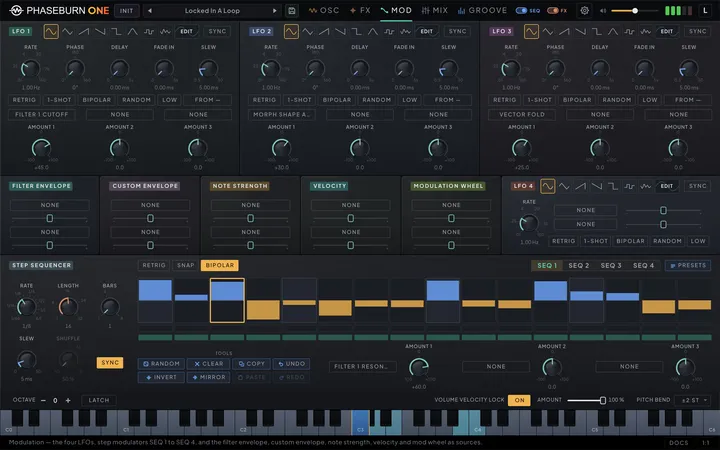
Phaseburn One runs one voice by design, and modulation is what keeps that voice alive. This chapter collects every mover in the engine: the volume envelope that shapes every note, the custom envelope — a second contour for the filters that doubles as a modulation source — and the transient engine that sharpens a note’s first milliseconds, all in the envelope panel on the Oscillators tab, whose tab strip (VOLUME ENV, FILTER ENV, CUSTOM ENV, TRANSIENT and VOICING) also holds the filter envelope; the four LFOs and four step modulators on the Modulation tab, which can reach most of the instrument; and the velocity, note-strength and mod-wheel routes that let your playing and the groove’s dynamics shape the sound. Filter cutoff has its own dedicated envelope — that one is covered with the filter in the filter chapter (Chapter 3 — The Filter).
Think in sources, not targets
Decide what should move, then give the movement a shape. Phaseburn One’s modulation is source-centric: you do not open a giant routing matrix under a knob — you go to a source (an LFO, a step modulator or the mod wheel), and give it destinations. Each LFO and each step modulator carries three routing slots, and the filter envelope, the custom envelope, note strength, velocity and the mod wheel carry two each, so a patch can run more than thirty routes at once. Every slot is a pair: a destination picked from one list shared by all sources, and a bipolar amount — positive pushes the target up as the source rises, negative inverts the movement, and small values matter more than you expect on sensitive targets. Every route is visible from the other side too: the target control draws a modulation ring showing how far its routes can push it, whichever source — an LFO, a step modulator, the filter or custom envelope, note strength, velocity or the mod wheel — is pushing it. In the Modern theme a dot also rides that ring at the spot the modulation is playing right now, but only while it moves slowly enough to follow by eye — about once a second or slower; faster movement, and the Classic theme, show the reach alone.
That shared list holds 245 destinations plus the gain of every patch-bay cable, and the browser presents it the way the panels do: groups in page order, and each group’s entries in the order its knobs sit on the panel — finding a destination is the same gesture as finding its knob. Above the groups it offers the last four controls you touched, newest first, so routing to a knob you just moved needs no search at all. The Phase-Locked Loop (PLL) oscillator exposes its detector and its output shape, the multiplier and the divider — each in a stepped and a continuous form — with the DIV LOCK switch, the input-reference blend, its loop controls — track speed, damping and influence — the burst threshold and amount, injection and the injection switch, the chaos drive, the four loop-lab controls (step, grit, lag and relock), FM depth and ratio, the color stage’s COLOR, FOLD and fold ratio, the reference octave and tune, the feedback, the stereo pair’s PHASE and DETUNE — heard only while the stereo pair is set to Phase + Detune — and the four macro dials, where a route alone hands the loop to the macros, with no need to touch a dial first (see MACRO view (Chapter 2 — Oscillators)). The VECTOR oscillator exposes its octave and tune, its X and Y shaping pair, fold and stereo offsets, and everything on its FM tab: the MORPH, SUB and PLL depths with the tone of each, FEEDBACK, WIDTH and FILTER ENV — a route on one of the depths brings that modulator in even while its knob sits at zero. The MORPH oscillator exposes its octave and tune, morph amount, fold, shape and stereo detune. Every Tune destination has a Tune Wide twin listed right under it — Vector Tune Wide, Morph Tune Wide and PLL Ref Tune Wide — for moves wider than an octave. Each of the three pitched sources also exposes its mixer pan, so a route can place a source off-centre or swing it across the stereo field. Beyond the oscillators (all introduced in the oscillators chapter (Chapter 2 — Oscillators)) the list reaches both filters — from cutoff and resonance through drive and morph to each one’s mix and STEREO SEP — grouped as FILTER 1 and FILTER 2 with every entry named for its filter: Filter 1 Cutoff, Filter 2 Resonance Character and so on. A third group, FILTER 3 & 4, holds the frequencies of the patchbay’s own two filters, Filter 3 and Filter 4 (Chapter 5 — Mixer & Patchbay), which a full-depth route sweeps across their whole 20 Hz–20 kHz range in octaves. After them come the delay, its echo TIME included, the reverb (mix, early-reflection level and wet gain), the chorus, the distortion, the BitCrusher, the freezer (loop, reset, window, grain, position, spray, shape, density, feedback and mix), a MIXER group holding the master’s stereo width, and the Master EQ’s three bands — frequency, resonance and gain for each of LOW, MID and HIGH, so a tone move can ride a phrase at the very end of the chain. And, unusually, the modulators themselves: every stage time, shape and sustain of the volume, filter and custom envelopes, and the velocity routes of all three, are destinations — the custom envelope’s Filter 1 and Filter 2 amounts included, in a CUSTOM ENVELOPE group of its own — so one source can reshape how another behaves.
That last idea runs all the way through. The AMOUNT of every LFO and step-lane route is a destination, and so is the RATE of every LFO and every step lane — grouped as LFO DEPTH & RATE and STEP SEQ DEPTH & RATE near the end of the list. Aim a slow LFO at another LFO’s amount and its wobble breathes in and out instead of running flat; aim one at a step lane’s amount and the lane fades up over a phrase; aim a step lane at an LFO’s rate and the speed jumps in time with the pattern. The first routes of the filter envelope and of note strength have their amounts there too, under PLAYING DEPTH (Filter Env Route Amount and Note Strength Amount), so velocity or the mod wheel can decide how deep those two play; the second routes of those two, and the routes of the custom envelope, velocity and the mod wheel, have no amount destination. A depth offset adds to the knob and clamps at its own ends, exactly as a hand would, and a source may sensibly aim at its own amount. A route on an AMOUNT reads its source one sample late, exactly as a route on a RATE does, which is far under any of the smoothing downstream — and it means a gate built through a swept amount, such as a lane opening an LFO’s depth into Transient Retrigger, fires on the same samples at every buffer size your host runs.
The last group, PATCH BAY, is the gain of every cable you have patched, grouped by the module the cable leaves (PATCH BAY · VECTOR, PATCH BAY · AUDIO IN and so on) and named from source to destination, such as Audio In → Filter 1. A cable’s gain takes a route like any knob — a full amount covers its whole travel, and routes on one cable add up before its ends — so an LFO can breathe a send or a step lane can open a feedback path in rhythm. A route outlives its cable: remove the cable and the route waits, marked unpatched beside its destination, and it plays again as soon as the same connection is patched. A Filter 3 or Filter 4 Frequency route shows the same marker while nothing is cabled into that filter. See the patchbay chapter (Chapter 5 — Mixer & Patchbay) for how cables and their gains work.
The freezer’s LOOP and RESET are button-style destinations that fire on any positive value, so a bipolar LFO or step lane gates them on its positive half rather than having to cross a midpoint. Transient Retrigger, at the end of the TRANSIENT group, goes one step further: it is a trigger. Every time its routed value rises above zero the Transient fires once — the pitch sweep, the click and the fold together — and then decays on its own however long the value stays up; back at zero it is armed again. A pulse LFO gives one hit per cycle, a step lane a rhythm, and a hit that lands on a ringing one restarts it. It fires only while the note sounds (or, with VCA lit, the Depth floor keeps it sounding) with the transient engine on, and a route that is already high when the note starts or the engine is switched on waits for its next rise. The note’s own hit stands in for the first routed rise in the 31 ms after the note, whatever the source, so a bipolar LFO or step lane on RETRIG never doubles the attack. The window is longer only when a SEQ lane whose SLEW is above 30 ms is routed here with a depth: the slowest such lane’s SLEW plus 1 ms, up to 51 ms at the 50 ms maximum. A route left at zero depth does not count. A step lane or a free-running LFO whose first rise falls inside that window skips that one hit, and every later rise hits.
The PLL’s DIV LOCK switch and its injection switch (INJ FM / INJ LOCK) take modulation too: it adds to what the button holds. On an unlit button any positive push switches it on (INJ LOCK, on the injection switch); on a lit one the switch stays lit while the route keeps it above the midpoint, so whenever a route pulls it down by half or more — a −50 % route at the top of its source’s swing, say — it goes off. The button shows the state the loop is running and glows while a route is aimed at it. PLL Detector steps the loop through PD, EDGE, XOR and S&H in that order, starting from the detector you selected: a full amount spans all four, a third of it per step. The selector glows and shows the detector the loop is running. The PLL’s color stage has no switch to throw: a route on PLL Color, the COLOR knob, fades the stage in and out smoothly instead.
When several sources land on the same destination their contributions sum. Amount changes are smoothed, so riding a depth mid-performance never steps audibly. Switching a route’s destination fades it out of the old target and into the new one, whatever the source, so re-routing a running LFO, step lane or envelope does not click. Coming the other way, right-clicking the target control and choosing Unlink modulation clears every route aimed at it in one gesture — the amounts stay put, so picking a destination again restores the depth that route had. The practical method: build the static patch first, then add one source at a time and give it one clear job — an LFO breathing the filter, a step lane accenting the PLL multiplier, the envelope holding the whole thing together. Because the instrument is a single voice, every route you add changes the one sound you are hearing, which makes cause and effect easy to keep track of — and easy to push much further than a polyphonic patch would tolerate.
Assigning from the control
A route can start from its target as well as from its source. Right-click a knob or slider that takes modulation — a patch-bay cable or its gain knob included — and the menu opens with a MODULATION block: one row for every route already aimed at that control, each with the source’s name, a slider for its depth, the amount in percent and a ✕ that removes the route. The slider is the same amount the source’s own panel shows, so a depth set here reads back on the Modulation page. Removing a route clears its destination and keeps its amount, as Unlink modulation does.
Add modulation opens the sources in three groups: LFO 1 to LFO 4; Mod Sequencer 1 to Mod Sequencer 4; then Filter Envelope, Custom Envelope, Note Strength, Velocity and Mod Wheel. Beside each source the menu says how many of its routes are free. Pick one and the control gets a new route at 0 %, silent until you open its slider. Pick a source with no free route and the menu turns to Replace a route in that source, showing what each of its routes drives now, so you choose which one to take over. On Vector Tune, Morph Tune and PLL Ref Tune a Range row above the sources picks ±1 octave (the Tune destination) or ±4 octaves (its Tune Wide twin), and a Wide route already on the knob is marked WIDE in its row. The menu lists and offers only the routes the Modulation page shows — two on LFO 4 — so every route you add here can be found and edited there. LFO 4’s third route is the exception: no picker anywhere sets its destination — only host automation or a preset does, and the LFO Editor shows it — and it gets no row in the MODULATION block, but Unlink modulation and the route count beside it include it, and Unlink clears it too. ‹ Back or Escape steps back one view, and a right-click outside the menu closes it.
How far a route reaches
Every amount means the same thing on every destination: a full amount, ±100 %, moves the target all the way to the end of its knob, starting from wherever the knob sits. Park Filter 1 Cutoff at the top, give it a ramp at −100 % and the filter closes all the way down; park an oscillator’s pan hard left and a unipolar source at +100 % carries it hard right. A partial amount is that share of the knob’s whole travel, added where the knob sits — from the middle of a knob, 50 % just reaches the end, and a bipolar source at 50 % reaches both ends. Modulation stops at the knob’s ends, as a hand turning it would, so a route deeper than the room left on the knob flat-tops at the end instead of wrapping or overshooting. The ring on the target shows exactly this reach, and moving the knob never changes how far a route travels, only where it starts.
Frequency, rate and ratio destinations move in octaves across their knob’s range, so a sweep sounds even from the bottom of the range to the top. Filter 1 Cutoff spans about ten octaves (Filter 2 Cutoff works the same), which makes one octave of cutoff about 10 % of amount and one semitone a little under 1 %. Amounts read with one decimal place, and you can type more: click the readout and enter 10.03 for one octave of cutoff — which is also the amount at which a step lane with SNAP lit moves a Filter 1 Cutoff route in semitone steps. The tick labels around an amount knob read −100, 0 and +100 on the same scale, and clicking one sets the amount there. The tune destinations are the deliberate exception, because they are calibrated to the keyboard: at 100 % Vector Tune, Morph Tune and PLL Ref Tune move twelve semitones and their Tune Wide twins forty-eight, so a step lane with SNAP lit plays whole semitones on a Tune route at 100 % (or on Tune Wide at 25 %). Only the Tune destinations land on whole semitones at round amounts. Tune and Tune Wide add up, so both can aim at the same oscillator at once — a step lane on Tune Wide for the big jumps, an LFO on Tune for vibrato — and the Tune knob’s ring draws both, just as Unlink modulation on that knob clears both.
Delay Time slides the echo time in octaves. Free-running, a route covers the knob’s own 1 ms–2 s and stops at its ends; with the delay’s SYNC lit it scales the synced time by the same number of octaves instead, so a lane that stretches the echo in free time stretches the synced echo the same way. The echo bends toward its new time by at most two semitones of pitch, so a deep or fast route wobbles rather than screams — long times want small depths. Routes on Chorus LFO Rate, Freezer Grain and Freezer Window keep working while their effect’s SYNC is lit in the same way: the route scales the synced value, and the result is still held inside what the effect can play.
The end stop is real on every destination. A few effects used to let a route push past their knob, and now stop at its end like everything else: Delay Mix, Chorus Mix, the BitCrusher’s mix (BC Mix in the list), Delay Freq Shift, Vector X Stereo Offset, Vector Y Stereo Offset, PLL Stereo Track Offset and PLL Stereo Damp Offset. At the BitCrusher’s default mix of 100 % a positive route therefore has nowhere left to go; pull the amount negative to modulate it. A route on Env Sustain, Filter Env Sustain or Custom Env Sustain also stops at the knob’s end first, and the envelope’s velocity-to-sustain route then applies on top of that — a route that runs out of knob cannot save up travel for a soft note to spend.
A small set of destinations keep the response they have always had, on purpose — their amounts work in the destination’s own units rather than as a share of the knob:
| Destinations | Full amount (±100 %) |
|---|---|
| PLL Volume, Vector Volume, Morph Volume, Sub Volume | the whole level range of the fader |
| Env Attack, Filter Env Attack | 4 seconds either way |
| Env Decay, Env Release, Filter Env Decay, Filter Env Release | 8 seconds either way |
| Env Hold, Filter Env Hold, Custom Env Hold, PLL Tail Time | 5 seconds either way |
| Sub Octave | one octave step |
| Vector Octave, Morph Octave, PLL Ref Octave | three octave steps |
| LFO 1 Rate, LFO 2 Rate, LFO 3 Rate, LFO 4 Rate | two octaves either way |
| PLL Fold Ratio, PLL FM Ratio | two octaves either way |
| Chorus Base Delay | two octaves of the knob either way; the knob maps onto the active chorus mode’s own delay span, so a full route sweeps the delay itself by up to about 0.77 octave in CHORUS, 0.50 in ENSEMBLE, 0.58 in VIBRATO and 1.67 in FLANGER |
| Reverb Wet Gain | 12 dB either way |
| Transient Sweep | 96 semitones either way — half the knob’s travel from one end to the other |
| PLL Influence, BitCrusher bits (BC Bits in the list) | the knob’s whole range (15 bits on BC Bits), so a full amount still reaches the end; a partial amount is counted in the knob’s values rather than along its dial, and the ring shows where it lands |
The custom envelope’s other stage times are not in that table: a route on Custom Env Attack, Custom Env Decay or Custom Env Release follows the general rule, moving the time in octaves along its knob and stopping at the knob’s end. On a synced stage whose division already lies beyond the knob’s range, the route scales the division by the same ratio instead, so the stage still moves smoothly from zero depth. The volume and filter envelopes’ times keep the seconds-based response listed above.
Presets and projects from earlier versions
Presets and projects saved before this version are converted automatically when they load and sound the same — their amounts simply read smaller where the new scale reaches further. After updating, restart any DAW that still has the previous version loaded before you save presets or projects in it, so an older copy does not write the unconverted values back.
The first time this version opens a preset library that holds presets from an earlier version,
it keeps an untouched copy of the whole library beside it, named user_presets.pre-mod-depth.json:
- macOS:
~/Library/Application Support/Device/ - Windows:
%LOCALAPPDATA%\Device\
The copy is made once and never overwritten. To go back to it — for example to return to an
earlier version of the instrument — quit every instance (close your DAW and the standalone app),
then rename the copy to user_presets.json, replacing the library there. You can delete the
copy once you are happy, but do it after you have saved at least one preset with this version:
until the library has been saved once, a deleted copy is made again the next time it loads.
If you ever find a file named user_presets.pre-mod-depth.torn-….json in the same folder, keep
it: it is an earlier copy the instrument set aside, and it may be the only complete one.
What cannot be converted is anything your host or controller sends in. Automation lanes, MIDI controllers learned to an amount and host modulators or parameter links on an amount, all recorded before this version, send the old values, and on most destinations those now play deeper: about twice as deep on most destinations that changed, only slightly deeper on a few (the filter resonances about 5 %, Delay Feedback 10 %), and up to about 2.6× on Chorus LFO Rate. PLL Stereo Track Offset and PLL Stereo Damp Offset go the other way and play at half depth. The same applies to automation or a learned controller that switches a route’s destination. Listen through old automation and redraw the lanes that now overshoot; lanes on the Tune destinations and on every destination in the table above play exactly as before. An amount left parked on a route with no destination is kept as it was stored, so when you pick a destination for it again it reaches by the new scale — check its depth then.
The volume envelope

Shape how every note starts, carries and lets go. The volume envelope runs five stages — attack, hold, decay, sustain, release — and attack, decay and release each have their own curve control: at zero the segment is a straight line, negative values bend it into a fast-start curve that covers most of its travel early and then eases in, positive values into a slow-start one that holds back and moves late — which is why the Shape sliders on the volume, filter and custom envelopes read LOG at the bottom, LIN in the middle and EXP at the top. Each of the three also has an S-curve switch that turns the bend into a symmetric ease-in, ease-out shape — the positive half of the shape slider then sets how pronounced the S is, while negative values fall back to a straight line in this mode. Hold sits between attack and decay and keeps the envelope pinned at full level for a moment, which fattens sustained transients without touching the decay itself.
A patch started from INIT decays over 300 ms and releases over 60 ms, long enough that even a low note lets go without a click.
Every timed stage can sync to the host tempo. Flip a stage’s sync switch and its time is derived from a musical division instead of milliseconds, each stage with its own division selector — a release that is always exactly one beat long survives any tempo change. The PLL tail carries the same switch, so a ring-out can be locked to the grid rather than set in milliseconds. The LOOP button in the panel header turns the one-shot envelope into a cycling one: while a note is held, attack, hold and decay repeat, which reads as tremolo at short settings and slow rhythmic swells at long ones. The VCA switch beneath the slider decides who owns the voice’s loudness. Unlit — where every instrument patch sits — the volume envelope owns it outright, and the Depth slider is greyed out because nothing is reading it. Lit, the slider hands you the floor: Depth blends between the enveloped signal and a constant level, so pulling it down loosens the envelope’s grip until, at 0, the VCA is simply open and the sound ignores note shape entirely. Switching VCA on from a full-depth slider drops Depth to 0 for you, because full depth is the sound you just switched away from; a slider parked anywhere else is left where you put it, so you can flick the switch to A/B a floor you are dialling in.
A drone needs a pitch before it can sound, and it waits for one. With VCA lit and Depth below 100 %, the voice stays silent after a preset loads until a note names a frequency, whether that comes from your keyboard, the host, or the instrument’s own sequencer. Without that it would start droning the moment the patch landed, on whatever pitch the previous preset happened to leave behind, which is nobody’s choice. Once a note has arrived the drone behaves as it reads: releasing the key leaves it sounding, because that is what a constant level means. The envelopes themselves keep running underneath — the filter envelope still articulates every note, so a drone can move even while its level does not.
Key track shortens the envelope as you play higher and lengthens it lower down, the way acoustic instruments behave.
Because there is one voice, fast lines retrigger the same envelope constantly, and the retrigger behavior is tuned for that: a new note starts its attack from the current level rather than snapping to silence, so runs stay smooth. When you want audible re-articulation instead, raise the retrigger dip — whenever the sequencer retriggers a note while the previous one is still sounding, held or still releasing, it ducks the level before the new attack for a plucked, percussive restatement. Depth buys time as well as depth: at low settings the notch is a brief softening of the retrigger, and as you push it the fall lengthens and then holds at the bottom, so the top of the control is a real gap in the sound — a re-articulation of the note rather than a smoothing of it. A retrigger arriving while a dip is still running keeps the dip in progress instead of ducking again, so fast rolls cannot ratchet the voice down toward silence. The dip acts on sequenced lines only; notes played live over MIDI take the smooth path unless the envelope’s RESET switch, below, is lit. What a retrigger does to the oscillators is each one’s Start Phase setting (see Start Phase (Chapter 2 — Oscillators)): on RESET, where new patches start, and on RANDOM the wave restarts through a short crossfade, so it never clicks; on FREE and on each menu’s first mode a retrigger leaves the oscillator running, which keeps fast runs smooth. With legato phrasing, overlapping notes glide without retriggering at all.
RESET, the switch under the Dip slider, gives every retrigger a clean start instead. With it lit, a note that arrives while the envelope is still sounding — held or releasing, played or sequenced — first takes the level down to zero in a short, click-free fall and then runs its whole attack from silence, so overlapping pad notes each get their full slow swell back instead of picking up wherever the last note left off. The fall lasts at least 4 ms; on a sequenced retrigger with a retrigger dip set, Reset takes the dip’s fall whenever that is longer and adds the dip’s pause at the bottom, so Dip then sets the length of the gap. A retrigger that lands during the fall lets it finish rather than starting another. A note released before the fall, or that pause, has finished still starts its attack, transient hit included, and then releases. The PLL tail falls with the envelope, so the PLL restarts with the other sources, and the transient engine waits for the new attack instead of firing into the fall. Legato and tied notes never retrigger, Reset or not. The filter and custom envelopes carry the same switch, each acting on its own envelope.
The range control — the first slider in the row — is a pure editing zoom: it sets how far the time sliders reach. It never changes the sound by itself — shrinking it does pull any stage time beyond the new reach back to its end — and the envelope preview always draws the actual stage times.
| Parameter | Range | Default | What it does |
|---|---|---|---|
| Vol Attack | 0.5 – 5000.0 | 4.0 | Time to rise from silence to full level after note-on — short snaps, long swells. |
| Vol Attack Shape | -100 % – +100 % | 0 % | Bends the attack: negative rises fast and then eases in, zero is a straight line, positive starts slow and rises late. |
| Vol Decay | 0.5 – 10000.0 | 300.0 | Time to fall from peak to the sustain level once attack (and hold) complete. |
| Vol Decay Shape | -100 % – +100 % | 0 % | Bends the decay: negative falls fast at first, zero is a straight line, positive holds back and falls late. |
| Vol Sustain | 0 % – 100 % | 100 % | Level the envelope holds for as long as the note is held. |
| Vol Release | 3.0 – 10000.0 | 60.0 | Time to fade to silence after note-off; 3 ms is the floor, held even when modulation pushes the time lower. |
| Vol Release Shape | -100 % – +100 % | 0 % | Bends the release: negative falls fast at first, zero is a straight line, positive holds back and falls late. |
| Vol Atk S | Off / On | Off | S-curve mode for attack — ease-in/ease-out halves; the shape slider then sets S intensity. |
| Vol Dec S | Off / On | Off | S-curve mode for decay — symmetric ease-in-out instead of a one-way curve. |
| Vol Rel S | Off / On | Off | S-curve mode for release — symmetric ease-in-out instead of a one-way curve. |
| Vol Hold | 0.0 – 5000.0 | 0.0 | Holds the envelope at peak between attack and decay — fatter sustained transients; skipped when near zero. |
| Vol Depth | 0 % – 100 % | 100 % | How much the envelope shapes loudness — 0 a constant drone, 1 full envelope control. Read only while VCA is on; below full it leaves a floor that waits for the first note. |
| Vol Loop Mode | One Shot · Loop | One Shot | OneShot plays the envelope once; LoopAHD repeats attack-hold-decay while the note is held. |
| Env Key Track | 0 % – 100 % | 0 % | Scales envelope times with pitch — higher notes get shorter envelopes, lower notes longer. |
| Vel→Attack | -100 % – +100 % | 0 % | Shifts attack time with velocity, up to a second either way; positive stretches it as you hit harder, negative makes hard hits snap. |
| Vel→Decay | -100 % – +100 % | 0 % | Shifts decay time with velocity, up to a second either way; positive stretches it as you hit harder, negative makes hard hits decay faster. |
| Vel→Sustain | -100 % – +100 % | 0 % | Velocity offset on sustain level: positive raises sustain for hard hits, lowers it for soft ones. |
| Vel→Release | -100 % – +100 % | 0 % | Shifts release time with velocity, up to a second either way; positive stretches it as you hit harder, negative makes hard hits release faster. |
| Vol Atk Sync | Off / On | Off | Locks attack time to the host tempo using the attack division. |
| Vol Attack Div | 1/1 … 1/128 (18 steps) | 1/8 | Musical division for the attack stage when tempo sync is on. |
| Vol Hold Sync | Off / On | Off | Locks hold time to the host tempo using the hold division. |
| Vol Hold Div | 1/1 … 1/128 (18 steps) | 1/8 | Musical division for the hold stage when tempo sync is on. |
| Vol Dec Sync | Off / On | Off | Locks decay time to the host tempo using the decay division. |
| Vol Decay Div | 1/1 … 1/128 (18 steps) | 1/8 | Musical division for the decay stage when tempo sync is on. |
| Vol Rel Sync | Off / On | Off | Locks release time to the host tempo using the release division. |
| Vol Release Div | 1/1 … 1/128 (18 steps) | 1/8 | Musical division for the release stage when tempo sync is on. |
| Volume Env Reset | Off / On | Off | RESET — a note that retriggers the volume envelope while it still sounds first fades to zero (at least 4 ms, longer with a retrigger dip), then replays its full attack. Legato and ties never retrigger. |
| Volume Env Attack Modifier Source | Off / On | Velocity | VEL/STR for the volume envelope's Vel›A: STR reads the note's strength instead of its velocity; a note with no strength counts as neutral. Applies from the next note. |
| Volume Env Decay Modifier Source | Off / On | Velocity | VEL/STR for the volume envelope's Vel›D: STR reads the note's strength instead of its velocity; a note with no strength counts as neutral. Applies from the next note. |
| Volume Env Sustain Modifier Source | Off / On | Velocity | VEL/STR for the volume envelope's Vel›S: STR reads the note's strength instead of its velocity; a note with no strength counts as neutral. Applies from the next note. |
| Volume Env Release Modifier Source | Off / On | Velocity | VEL/STR for the volume envelope's Vel›R: STR reads the note's strength instead of its velocity; a note with no strength counts as neutral. Applies from the next note. |
| Retrigger Dip | 0 % – 100 % | 0 % | Dips the level before each sequencer re-attack for a plucked re-articulation; deeper also means longer, so the top of the range reads as a gap rather than a softening. |
| Env Range | 20 – 10000 | 2000 | Reserved legacy control — has no audible effect. |
| VCA Mode | Off / On | Off | Hands the loudness floor to Vol DEPTH. Off, the volume envelope owns it; on, DEPTH is live and 0 holds the voice open for a re-pitched drone. Turning it on drops full DEPTH to 0. |
The custom envelope
Give the filters a second gesture, or give the whole patch a third envelope to play with. The CUSTOM ENV tab of the envelope panel holds an envelope built exactly like the filter envelope: the same Range zoom, Dip and RESET, attack, hold, decay, sustain and release with their shape sliders, SYNC and S·CRV switches, the LOOP button in the panel header, and the key-track and Vel› sliders with their VEL/STR switches. A fresh patch starts it on the filter envelope’s own defaults — a 400 ms decay to zero sustain and a 300 ms release, so an amount turned up sweeps at once — and it stays out of the sound until you give it a job: both of its filter amounts and both of its routes start at zero.
Its first job is the filters. The last two sliders in its row, Filter 1 and Filter 2, are its own cutoff amounts, bipolar like the filter envelope’s, and each dims — while staying editable — when its filter is off. Both envelopes drive a cutoff at once and their sweeps add: the filter envelope can snap FILTER 1 open in a quick pluck while the custom envelope, set negative with a slow attack, draws it gradually darker across a held note — or each filter can follow its own envelope, giving one note two different timbral arcs. The sum is held to the same eight octaves either way that one envelope reaches at full amount, so stacking the two never throws the cutoff further than that.
Its second job is anything else. On the Modulation page the CUSTOM ENVELOPE module routes it to two destinations from the shared list, each with a bipolar amount — a dedicated contour for a pitch drop, a send that swells on every note, or an oscillator’s fold, without borrowing the volume or filter envelope’s shape. It is a unipolar source: at rest it sits at zero, and a positive amount pushes the target up from where its knob sits as the envelope rises. It runs on every note whether or not anything reads it, and whether or not either filter is on, and it runs its release to the end even after the note has gone silent, so a release longer than the volume envelope’s keeps moving its routes and filters, and the next note attacks from where that release really is.
COPY FILTER, beside LOOP in the panel header, copies the filter envelope’s whole shape across — stage times, curves, SYNC and divisions, hold, sustain, Dip, RESET, Range, LOOP, key track and the Vel› sliders with their VEL/STR switches — and leaves the custom envelope’s own Filter 1 and Filter 2 amounts as they were. Copy, then change one stage, and you have two related contours that part ways exactly where you want them to.
The custom envelope follows the note the way the filter envelope does: it reads the same velocity and strength and the same key, and under the transient engine’s TRIGGER it runs its whole journey with the other envelopes. Its stage times, shapes, hold, sustain, Dip, key track, Vel› amounts and both filter amounts are modulation destinations, grouped as CUSTOM ENVELOPE in the list. Its attack, decay and release follow the general reach rule — a route moves them in octaves along the knob and stops at its end — while Custom Env Hold keeps the five-second response of the other holds (see How far a route reaches (Chapter 4 — Modulation)).
| Parameter | Range | Default | What it does |
|---|---|---|---|
| Custom Env Attack | 0.5 – 5000.0 | 4.0 | Time for the custom envelope to rise to its peak after note-on. |
| Custom Env Attack Shape | -100 % – +100 % | 0 % | Bends the custom envelope's attack: negative rises fast and then eases in, zero is a straight line, positive starts slow and rises late. |
| Custom Env Hold | 0.0 – 5000.0 | 0.0 | Holds the custom envelope at its peak before decay begins; zero skips straight to decay. |
| Custom Env Decay | 0.5 – 10000.0 | 400.0 | Time for the custom envelope to fall from its peak to the sustain level. |
| Custom Env Decay Shape | -100 % – +100 % | 0 % | Bends the custom envelope's decay: negative falls fast at first, zero is a straight line, positive holds back and falls late. |
| Custom Env Sustain | 0 % – 100 % | 0 % | Custom envelope level held for as long as the note is down. |
| Custom Env Release | 3.0 – 10000.0 | 300.0 | Time for the custom envelope to fall away after note-off. |
| Custom Env Release Shape | -100 % – +100 % | 0 % | Bends the custom envelope's release: negative falls fast at first, zero is a straight line, positive holds back and falls late. |
| Custom Env Attack S-Curve | Off / On | Off | S-curve mode for the custom envelope's attack — an ease-in/ease-out pair; the attack shape slider sets its intensity. |
| Custom Env Decay S-Curve | Off / On | Off | S-curve mode for the custom envelope's decay — an ease-in/ease-out pair; the decay shape slider sets its intensity. |
| Custom Env Release S-Curve | Off / On | Off | S-curve mode for the custom envelope's release — an ease-in/ease-out pair; the release shape slider sets its intensity. |
| Custom Env Dip | 0 % – 100 % | 0 % | Dips the custom envelope on each sequencer re-attack for a percussive restatement; deeper also means longer, so the top of the range reads as a gap. |
| Custom Env Range | 1 – 8 | 4 | Zooms the custom envelope panel's time axis (1–8 s); shrinking it pulls longer stage times back inside. The zoom itself never changes the sound. |
| Custom Env Loop | One Shot · Loop | One Shot | One Shot runs the custom envelope once; Loop repeats attack-hold-decay for as long as the note is held. |
| Custom Env Key Track | 0 % – 100 % | 0 % | Scales the custom envelope's times with pitch — higher notes get shorter envelopes, lower notes longer. |
| Custom Env Velocity to Attack | -100 % – +100 % | 0 % | Shifts the custom envelope's attack time with velocity (or strength, on STR), up to a second either way; positive stretches it as you hit harder, negative makes hard hits snap. |
| Custom Env Velocity to Decay | -100 % – +100 % | 0 % | Shifts the custom envelope's decay time with velocity (or strength, on STR), up to a second either way; positive stretches it as you hit harder, negative makes hard hits decay faster. |
| Custom Env Velocity to Sustain | -100 % – +100 % | 0 % | Velocity (or strength, on STR) offset on the custom envelope's sustain level: positive raises it for hard hits, lowers it for soft ones. |
| Custom Env Velocity to Release | -100 % – +100 % | 0 % | Shifts the custom envelope's release time with velocity (or strength, on STR), up to a second either way; positive stretches it as you hit harder, negative makes hard hits release faster. |
| Custom Env Attack Sync | Off / On | Off | Locks the custom envelope's attack time to a musical division of the host tempo instead of milliseconds. |
| Custom Env Attack Division | 1/1 … 1/128 (18 steps) | 1/8 | Musical division used for the custom envelope's attack stage when its sync is on. |
| Custom Env Hold Sync | Off / On | Off | Locks the custom envelope's hold time to a musical division of the host tempo instead of milliseconds. |
| Custom Env Hold Division | 1/1 … 1/128 (18 steps) | 1/8 | Musical division used for the custom envelope's hold stage when its sync is on. |
| Custom Env Decay Sync | Off / On | Off | Locks the custom envelope's decay time to a musical division of the host tempo instead of milliseconds. |
| Custom Env Decay Division | 1/1 … 1/128 (18 steps) | 1/8 | Musical division used for the custom envelope's decay stage when its sync is on. |
| Custom Env Release Sync | Off / On | Off | Locks the custom envelope's release time to a musical division of the host tempo instead of milliseconds. |
| Custom Env Release Division | 1/1 … 1/128 (18 steps) | 1/8 | Musical division used for the custom envelope's release stage when its sync is on. |
| Custom Env Filter 1 Amount | -1 – 1 | 0 | How far the custom envelope sweeps FILTER 1's cutoff — bipolar; it adds to the filter envelope's sweep, and the two together stop at eight octaves either way. |
| Custom Env Filter 2 Amount | -1 – 1 | 0 | How far the custom envelope sweeps FILTER 2's cutoff — bipolar; it adds to the filter envelope's sweep, and the two together stop at eight octaves either way. |
| Custom Env Reset | Off / On | Off | RESET — a note that retriggers the custom envelope while it still sounds first fades it to zero (at least 4 ms; a Dip on a sequenced retrigger lengthens the fall and adds a pause), then replays its whole attack. Legato and ties never retrigger. |
| Custom Env Attack Modifier Source | Off / On | Velocity | VEL/STR for the custom envelope's Vel›A: STR reads the note's strength instead of its velocity; a note with no strength counts as neutral. Applies from the next note. |
| Custom Env Decay Modifier Source | Off / On | Velocity | VEL/STR for the custom envelope's Vel›D: STR reads the note's strength instead of its velocity; a note with no strength counts as neutral. Applies from the next note. |
| Custom Env Sustain Modifier Source | Off / On | Velocity | VEL/STR for the custom envelope's Vel›S: STR reads the note's strength instead of its velocity; a note with no strength counts as neutral. Applies from the next note. |
| Custom Env Release Modifier Source | Off / On | Velocity | VEL/STR for the custom envelope's Vel›R: STR reads the note's strength instead of its velocity; a note with no strength counts as neutral. Applies from the next note. |
| Custom Env Dest 1 | None – Cable Filter 4 > Freezer Feedback In | None | First CUSTOM ENVELOPE route — the parameter the custom envelope pushes, into any destination; it runs whether or not the filters are on. |
| Custom Env Amount 1 | -100.0 – +100.0 | 0.0 | Depth of the CUSTOM ENVELOPE's first route, as a share of the target knob's whole travel: ±100 % reaches the knob's end from where it sits (Tune and a few other targets listed in the modulation chapter keep their own units); negative inverts the movement. |
| Custom Env Dest 2 | None – Cable Filter 4 > Freezer Feedback In | None | Second CUSTOM ENVELOPE route — another parameter the custom envelope pushes, into any destination. |
| Custom Env Amount 2 | -100.0 – +100.0 | 0.0 | Depth of the CUSTOM ENVELOPE's second route, as a share of the target knob's whole travel: ±100 % reaches the knob's end from where it sits (Tune and a few other targets listed in the modulation chapter keep their own units); negative inverts the movement. |
Transient engine

Turn the first few milliseconds of every note into a drum designer. The transient engine is a dedicated transient system that rides on top of the volume envelope, with three independent tools that fire together at the start of every hit and decay on their own clocks. Every non-legato hit fires, from silence or over a still-ringing note, and restarts the transient clocks. Where VECTOR, MORPH and the sub begin their waves is each one’s Start Phase (Chapter 2 — Oscillators) setting: on RESET, where new patches start, every hit begins at the same point of the wave, so repeated hits sound identical, while FREE and RANDOM let the start vary from hit to hit. Only legato slurs skip the transient entirely. A route aimed at Transient Retrigger can fire it again inside a note — see Think in sources, not targets (Chapter 4 — Modulation). A patch started from INIT has the engine switched off but parked at a 12-semitone sweep and a 20 % click, so switching it on is heard straight away.
Sweep is a pitch envelope in semitones. Positive values start the pitch above the note and drop onto it — the classic falling drum attack; negative values rise into the note from below. Time sets how long the settle takes, from a barely-there flick to long drawn-out drops, and curve reshapes the trajectory: negative straightens it into a linear glide that lands exactly on the note, zero is a natural exponential, positive holds the offset and then dives — the zap and laser end of the range. The slider gives half its throw to the musical ±24 st zone, with the extremes still reachable at the ends.
Click adds an onset strike in one of three characters: NOISE is a burst of bandpass-filtered noise, PING a single damped sine at the TONE frequency, and METAL an inharmonic three-partial strike for rim, cowbell and cymbal-adjacent colors. The click deliberately bypasses the volume envelope, running its own short decay, so it punches through even when the envelope attack is slow — the snap arrives first, the body follows. Tone places the strike from sub-thump up into bright cymbal territory, and TRACK tunes it to the played note — at zero the tone stays absolute, at full it rides the pitch line, so clicks stay proportioned across the keyboard. Width shapes character at constant loudness: narrow is a resonant ring, wide a dry thud (in PING and METAL it sets how long the strike rings), and the click has its own decay — from short ticks out to long, ringing tails — and curve controls. DIRECT is the click’s own exit: at zero the click rides the targeted oscillators through the filter and the FX chain, so it takes on the patch’s color; turned up it leaves those buses and joins after the master tone chain instead, at a level that no longer depends on which oscillators are targeted or how loud they are. The snap stays sharp under a dark low-pass or a wall of reverb — and still sounds when every targeted oscillator’s fader is down. Either way the click plays its whole decay, even on a note whose volume envelope is over in under a millisecond.
T·Fold is extra wavefolding that is strongest at the attack and decays into the clean tone, adding a harmonically dense bite to the first instant of a note. It applies to the PLL, VECTOR and MORPH oscillators — on the PLL it folds the loop’s output with the same fold, never the loop itself, so the lock and its tracking are untouched.
Each of the three decays — the sweep’s settle, the click’s fade and the fold’s — has an S·CRV switch beneath its sliders that swaps its curve for the envelope’s S shape, an ease-in, ease-out fall. Its Curve slider then sets how steep the S is, from LIN to MAX; a negative Curve value plays as a straight line while S·CRV is lit.
Trigger turns the voice into a drum voice proper. Lit, every note runs its volume, filter and custom envelopes through their complete journey without needing the key held: attack, decay to the sustain level, then straight through the release to silence — and the note-off itself is ignored, so a long drum body finishes its fall no matter how short the gate that fired it. Unlit, a sequenced tom with a 300 ms decay and a half-step gate gets chopped at the gate’s end by the release stage; lit, the envelope’s own shape is the note’s whole life. Every stage keeps its meaning: SUSTAIN is the level where the decay hands over, RELEASE is the tail that carries the note out — set sustain to zero and the decay alone is the drum, classic AD style. Only LOOP sits out (a one-shot never loops). The contract latches per note, so flipping the switch never bends a note already sounding, and stopping the transport still cuts notes dead.
All three answer the DYNAMICS column’s two sliders. Velocity decides how much MIDI velocity scales their depth — at zero every hit lands full strength, at maximum soft notes barely trigger the transients. Strength does the same with the note’s strength — a sequenced step’s painted Strength cell — so weak steps tap and strong ones crack; a note with no strength of its own is left at full depth. On sequenced notes velocity already follows strength, so the two compound when both are up. The four target switches choose which oscillators get processed, so the sub can stay round while VECTOR takes the fold. Reach for the transient engine when you are building kicks, snares, hats and zaps from the synth voice — but also when a bass or pluck patch needs attack definition that the envelope alone cannot give. Most of the transient controls are modulation destinations too — sweep amount, time and curve; click level, tone, decay and width; fold amount and decay — so an LFO or step lane can vary the drum from hit to hit. A routed level does not have to be up on the hit’s very first sample: a sweep, click or fold whose route brings it above zero within 20 ms of the hit still plays that hit out in full, so a step lane slewing up through zero as the hit lands never mutes it.
Sweep Time, Click Decay and the fold’s Decay reach further than they did before this version: each keeps its earlier range in the lower half of its travel and extends it in the upper half, and its readout switches to seconds from one second up. Presets, projects and modulation routes made earlier keep exactly the times and depths they had. A host automation lane or a learned MIDI controller recorded on one of these three knobs is the exception: the earlier range now fills only the lower half of the lane, so the lane plays longer times than it used to — redraw it.
| Parameter | Range | Default | What it does |
|---|---|---|---|
| Transient Enable | Off / On | Off | Turns the transient engine on, so the attack of every note is shaped here rather than left plain. |
| Transient PLL | 0 – 1 | 1 | Includes the PLL oscillator in transient processing. |
| Transient VECTOR | 0 – 1 | 1 | Includes the VECTOR oscillator in transient processing. |
| Transient MORPH | 0 – 1 | 1 | Includes the MORPH oscillator in transient processing. |
| Transient SUB | 0 – 1 | 1 | Includes the sub oscillator in transient processing. |
| Transient Sweep | -96.0 st – 96.0 st | 12.0 st | Pitch sweep depth in semitones: positive drops onto the note from above, negative rises from below. |
| Transient Sweep Time | 0.5 ms – 1.00 s | 5.0 ms | How fast the pitch sweep settles onto the note — short flicks to long drawn-out drops. |
| Transient Sweep Curve | -100 % – +100 % | 0 % | Sweep shape: -1 a straight linear glide that lands exactly, 0 natural exponential, +1 holds then dives (zap). |
| Transient Click | 0 % – 100 % | 20 % | Level of the filtered noise burst at note start — it bypasses the envelope and lands even under slow attacks. |
| Transient Click Tone | 20.0 Hz – 16000.0 Hz | 1000.0 Hz | Center frequency of the click bandpass filter — sub-thump lows up to cymbal-bright ticks. |
| Transient Click Decay | 0.5 ms – 2.00 s | 2.0 ms | How fast the click fades — very short ticks out to long, ringing tails. |
| Transient Click Width | 0 % – 100 % | 50 % | Click character at constant loudness: 0 is a narrow resonant ring, 1 a wide dry thud; in PING/METAL it sets the ring length. |
| Transient Click Curve | -100 % – +100 % | 0 % | Click decay shape: -1 straight linear fade, 0 exponential, +1 holds then cuts sharply. |
| Transient Click Track | 0 % – 100 % | 0 % | Tunes the click to the played note: 0% keeps TONE absolute, 100% follows the pitch line fully. |
| Transient Click Mode | Noise · Ping · Metal | Noise | Click character: NOISE is the filtered burst, PING a damped sine at TONE, METAL an inharmonic three-partial strike. |
| Transient TFold | 0 % – 100 % | 0 % | Extra wavefolding at the attack that decays into the clean tone — on the PLL, VECTOR and MORPH (on the PLL it folds the output, never the loop). |
| Transient TFold Decay | 0.5 ms – 1.00 s | 5.0 ms | How fast the transient fold settles back to the base tone. |
| Transient TFold Curve | -100 % – +100 % | 0 % | Fold decay shape: -1 straight linear settle, 0 exponential, +1 sustained bite that then drops sharply. |
| Transient Velocity | 0 % – 100 % | 0 % | How much MIDI velocity scales sweep, click and fold depth — 0 ignores velocity, 1 follows it fully. |
| Transient Strength | 0 % – 100 % | 0 % | How much the note's strength scales sweep, click and fold depth — 0 ignores strength, 1 follows it fully; notes without a strength stay at full depth. |
| Transient Sweep S-Curve | Off / On | Off | S-curve mode for the pitch sweep — an ease-in/ease-out settle; the sweep's Curve slider then sets how steep the S is. |
| Transient Click S-Curve | Off / On | Off | S-curve mode for the click's decay — an ease-in/ease-out fade; the click's Curve slider then sets how steep the S is. |
| Transient TFold S-Curve | Off / On | Off | S-curve mode for the fold's decay — an ease-in/ease-out settle; the fold's Curve slider then sets how steep the S is. |
| Transient Trigger | Off / On | Off | TRIGGER one-shot: notes ignore their gate and last attack + hold + decay + release, so those stages set the length; raise decay or release if a patch collapses to a click. |
| Transient Click Direct | 0 % – 100 % | 0 % | Where the click goes: 0 rides the targeted oscillators through filter and FX, 1 joins after the master tone chain at a target-independent level. |
The four LFOs
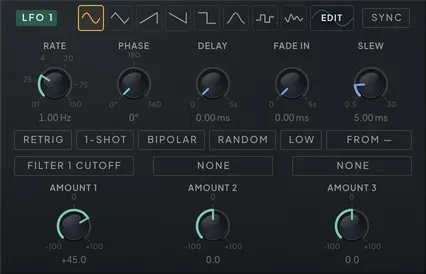
Give any control a pulse. LFO 1–3 are identical full panels, run from very slow drift up to a rate that borders on audio, and each drives three destinations, every one with its own bipolar amount; a fourth, compact LFO joins them below (covered at the end of this section). Eight shape buttons cover the useful space: sine and triangle for smooth breathing, saw and ramp down for rises and falls, square for hard toggles, bump for a single swell and return, sample-and-hold for stepped random motion, and smooth random for wandering curves that never repeat — the organic setting for filter and pitch drift. When none of them is the movement you want, the EDIT button beside them opens the LFO Editor — a catalog of drawn shapes and a place to draw your own — which has its own section below.
Slew smooths the output on its way out, which is what keeps the jumping shapes usable. At the bottom of its range it is effectively transparent — enough to turn every step edge into a short ramp instead of a discontinuity, so square and sample-and-hold stop clicking, and no more. Open it up and the smoothing becomes musical: steps lean into each other, square softens toward a rounded pulse, and a fast sample-and-hold turns into a bubbling wander rather than a staircase.
Each LFO free-runs at a rate in hertz or locks to the host tempo through a division selector that spans cycles several bars long down to very fast subdivisions, with dotted and triplet variants. A patch started from INIT runs all four on a triangle, bipolar and synced to a quarter note, at 2 Hz while SYNC is off. LOW narrows the free-running RATE to 0.01–5 Hz across the whole knob, for fine control of slow movement; unlit, RATE covers its full range again. Each range remembers its own setting, the way RATE and its synced division do, so flipping LOW can change the speed you hear. LOW greys out while SYNC is lit, since the division sets the rate then. Two toggles decide what a new note does to the cycle, and they compose. RETRIG restarts the LFO on every note for identical motion each time. RANDOM lands every note somewhere new in the cycle for per-note variation — it acts on notes whether or not RETRIG is lit, wins when both are, and holds its ground under tempo sync: SYNC still sets the rate, but a RANDOM LFO keeps each note’s phase instead of being pulled back onto the grid. With neither lit the LFO ignores single notes and restarts only where a take does: when the DAW starts or stops, and — with the DAW stopped, or in the standalone with no hardware master clock running — on the key that starts a sequenced phrase. While the DAW plays, a key never resets it. Its onset controls then run once from each of those restarts rather than per note.
The PHASE offset shifts where in its cycle the LFO reads, in every mode that has a cycle to rotate: on a retriggered LFO it sets where each note starts, on a synced one it slides the whole cycle against the beat — set two synced LFOs a quarter turn apart for quadrature motion — and on a free-running one it rotates the waveform. Sample-and-hold and smooth random have no fixed cycle to rotate, so they ignore PHASE. DELAY holds the LFO at the start of its shape for up to five seconds after the trigger — nothing is heard and nothing has moved on, so the shape begins when the delay ends rather than arriving already underway — and then FADE IN ramps its depth up: the classic pair for vibrato that develops on a held note (both restart on RETRIG/RANDOM notes, and run once from the start of a take with neither lit). A one-shot therefore survives its own delay: the shape plays out after the wait instead of finishing unheard. With SYNC on, DELAY becomes a musical division like RATE, with OFF at the bottom of its travel, and it counts in beats — change tempo mid-delay and the wait follows. 1-SHOT makes the LFO play to the end of its waveform and hold the final value, which quietly turns any waveform into an extra modulation envelope — start it mid-shape with PHASE (or RANDOM) and it plays just the remainder, and the held value keeps obeying the slew and fade, so completing never steps the destination, and the LFO Editor shows exactly the part that will play. The held value is wherever the shape ends: sine and triangle are symmetric, so unipolar they hold at their centre rather than at zero — a swoop that should settle back at rest wants BIPOLAR on, or a shape that ends at zero, instead. The BIPOLAR toggle sets the output range: lit, the LFO swings both ways around the target’s set value, as it does on a patch started from INIT; unlit, it only pushes one way from where you parked it. The LFO Editor draws the result — the shape as PHASE has rotated it, so what you see is what the LFO plays.
The LFOs can also modulate each other. Pick a source LFO in the cross-mod selector, then blend two effects: phase mod softly pulls the LFO’s phase toward zero on the source’s rising edge — a gentle sync that locks two rates into a rhythmic relationship without hard resets — and rate mod bends the LFO’s speed with the source’s output, up to two octaves in either direction at full amount. A slow sine rate-modulating a fast triangle produces accelerating, decelerating wobbles no single LFO can draw; sample-and-hold rate-modulating anything produces controlled ratchets.
LFO 4 is the compact one, at the right end of the sources row: a rate knob (hertz, or a synced division when its SYNC is lit), the other LFOs’ shape buttons minus BUMP — which stays one press away in the LFO Editor’s catalog — with an EDIT button that opens the same LFO Editor, two destination+amount routes — their amounts small horizontal sliders with the polarity marked at each end — and the same RETRIG / 1-SHOT / BIPOLAR / RANDOM / LOW toggles. It is the same LFO engine underneath, with the same full set of controls: its phase, delay and fade, slew, cross-mod and third route sit in the LFO Editor’s control strip, opened from that EDIT button.
| Parameter | Range | Default | What it does |
|---|---|---|---|
| LFO 1 Rate | 0.01 – 150.00 | 2.00 | Free-run speed of LFO 1, from slow drift up to 150 Hz audio-rate flutter; ignored when tempo sync or LOW is on. |
| LFO 1 Waveform | Sine … EUCLID 7 (64 steps) | Triangle | Shape of LFO 1's cycle: classic waves or a library pattern. EDIT opens the LFO Editor to draw your own. |
| LFO 1 Tempo Sync | Off / On | On | Locks LFO 1's rate to the host tempo using its division. |
| LFO 1 Division | 1/1 … 1/128 (18 steps) | 1/4 | Musical division for LFO 1 when tempo sync is on. |
| LFO 1 Sync Source | None · LFO 1 · LFO 2 · LFO 3 | None | Picks another LFO as LFO 1's cross-mod source; -1 means none. |
| LFO 1 Phase Mod | 0 – 100 | 0 | How strongly the source LFO nudges LFO 1's phase toward zero on its rising edge — a soft sync. |
| LFO 1 Dest 1 | None – Cable Filter 4 > Freezer Feedback In | None | First modulation target for LFO 1. |
| LFO 1 Amount 1 | -100.0 – +100.0 | 0.0 | Depth of LFO 1's first route, as a share of the target knob's whole travel: ±100 % reaches the knob's end from where it sits (Tune and a few other targets listed in the modulation chapter keep their own units); negative inverts the movement. |
| LFO 1 Dest 2 | None – Cable Filter 4 > Freezer Feedback In | None | Second modulation target for LFO 1. |
| LFO 1 Amount 2 | -100.0 – +100.0 | 0.0 | Depth of LFO 1's second route, as a share of the target knob's whole travel: ±100 % reaches the knob's end from where it sits (Tune and a few other targets listed in the modulation chapter keep their own units); negative inverts the movement. |
| LFO 1 Dest 3 | None – Cable Filter 4 > Freezer Feedback In | None | Third modulation target for LFO 1. |
| LFO 1 Amount 3 | -100.0 – +100.0 | 0.0 | Depth of LFO 1's third route, as a share of the target knob's whole travel: ±100 % reaches the knob's end from where it sits (Tune and a few other targets listed in the modulation chapter keep their own units); negative inverts the movement. |
| LFO 1 Trigger | Free · Retrigger · Random Phase | Free | RETRIG for LFO 1: on, every note restarts the cycle. (The legacy value 2 means random phase — the RANDOM toggle owns that now.) |
| LFO 1 Phase Offset | 0° – 360° | 0° | Rotates where LFO 1 reads its cycle — the seam marker in the LFO Editor; works free-running, per-note with RETRIG, and slides a synced LFO against the beat. |
| LFO 1 Fade In | 0.0 ms – 5000.0 ms | 0.0 ms | Ramps LFO 1's depth from zero after note-on — vibrato that develops on held notes. |
| LFO 1 One-Shot | Off / On | Off | LFO 1 runs a single cycle then holds its end value — an extra modulation envelope. |
| LFO 1 Bipolar | Off / On | On | Output range of LFO 1: lit swings both ways around the set value; unlit (the default) pushes one way only. |
| LFO 1 Rate Mod | 0 – 100 | 0 | How strongly the source LFO bends LFO 1's speed — up to two octaves either way at full. |
| LFO 1 Slew | 0.5 ms – 30.0 ms | 5.0 ms | Smooths LFO 1's output, so square and stepped-random shapes ramp between values instead of jumping; at the 0.5 ms floor it is transparent, at 30 ms it smears the shape. |
| LFO 2 Rate | 0.01 – 150.00 | 2.00 | Free-run speed of LFO 2, from slow drift up to 150 Hz audio-rate flutter; ignored when tempo sync or LOW is on. |
| LFO 2 Waveform | Sine … EUCLID 7 (64 steps) | Triangle | Shape of LFO 2's cycle: classic waves or a library pattern. EDIT opens the LFO Editor to draw your own. |
| LFO 2 Tempo Sync | Off / On | On | Locks LFO 2's rate to the host tempo using its division. |
| LFO 2 Division | 1/1 … 1/128 (18 steps) | 1/4 | Musical division for LFO 2 when tempo sync is on. |
| LFO 2 Sync Source | None · LFO 1 · LFO 2 · LFO 3 | None | Picks another LFO as LFO 2's cross-mod source; -1 means none. |
| LFO 2 Phase Mod | 0 – 100 | 0 | How strongly the source LFO nudges LFO 2's phase toward zero on its rising edge — a soft sync. |
| LFO 2 Dest 1 | None – Cable Filter 4 > Freezer Feedback In | None | First modulation target for LFO 2. |
| LFO 2 Amount 1 | -100.0 – +100.0 | 0.0 | Depth of LFO 2's first route, as a share of the target knob's whole travel: ±100 % reaches the knob's end from where it sits (Tune and a few other targets listed in the modulation chapter keep their own units); negative inverts the movement. |
| LFO 2 Dest 2 | None – Cable Filter 4 > Freezer Feedback In | None | Second modulation target for LFO 2. |
| LFO 2 Amount 2 | -100.0 – +100.0 | 0.0 | Depth of LFO 2's second route, as a share of the target knob's whole travel: ±100 % reaches the knob's end from where it sits (Tune and a few other targets listed in the modulation chapter keep their own units); negative inverts the movement. |
| LFO 2 Dest 3 | None – Cable Filter 4 > Freezer Feedback In | None | Third modulation target for LFO 2. |
| LFO 2 Amount 3 | -100.0 – +100.0 | 0.0 | Depth of LFO 2's third route, as a share of the target knob's whole travel: ±100 % reaches the knob's end from where it sits (Tune and a few other targets listed in the modulation chapter keep their own units); negative inverts the movement. |
| LFO 2 Trigger | Free · Retrigger · Random Phase | Free | RETRIG for LFO 2: on, every note restarts the cycle. (The legacy value 2 means random phase — the RANDOM toggle owns that now.) |
| LFO 2 Phase Offset | 0° – 360° | 0° | Rotates where LFO 2 reads its cycle — the seam marker in the LFO Editor; works free-running, per-note with RETRIG, and slides a synced LFO against the beat. |
| LFO 2 Fade In | 0.0 ms – 5000.0 ms | 0.0 ms | Ramps LFO 2's depth from zero after note-on — vibrato that develops on held notes. |
| LFO 2 One-Shot | Off / On | Off | LFO 2 runs a single cycle then holds its end value — an extra modulation envelope. |
| LFO 2 Bipolar | Off / On | On | Output range of LFO 2: lit swings both ways around the set value; unlit (the default) pushes one way only. |
| LFO 2 Rate Mod | 0 – 100 | 0 | How strongly the source LFO bends LFO 2's speed — up to two octaves either way at full. |
| LFO 2 Slew | 0.5 ms – 30.0 ms | 5.0 ms | Smooths LFO 2's output, so square and stepped-random shapes ramp between values instead of jumping; at the 0.5 ms floor it is transparent, at 30 ms it smears the shape. |
| LFO 3 Rate | 0.01 – 150.00 | 2.00 | Free-run speed of LFO 3, from slow drift up to 150 Hz audio-rate flutter; ignored when tempo sync or LOW is on. |
| LFO 3 Waveform | Sine … EUCLID 7 (64 steps) | Triangle | Shape of LFO 3's cycle: classic waves or a library pattern. EDIT opens the LFO Editor to draw your own. |
| LFO 3 Tempo Sync | Off / On | On | Locks LFO 3's rate to the host tempo using its division. |
| LFO 3 Division | 1/1 … 1/128 (18 steps) | 1/4 | Musical division for LFO 3 when tempo sync is on. |
| LFO 3 Sync Source | None · LFO 1 · LFO 2 · LFO 3 | None | Picks another LFO as LFO 3's cross-mod source; -1 means none. |
| LFO 3 Phase Mod | 0 – 100 | 0 | How strongly the source LFO nudges LFO 3's phase toward zero on its rising edge — a soft sync. |
| LFO 3 Dest 1 | None – Cable Filter 4 > Freezer Feedback In | None | First modulation target for LFO 3. |
| LFO 3 Amount 1 | -100.0 – +100.0 | 0.0 | Depth of LFO 3's first route, as a share of the target knob's whole travel: ±100 % reaches the knob's end from where it sits (Tune and a few other targets listed in the modulation chapter keep their own units); negative inverts the movement. |
| LFO 3 Dest 2 | None – Cable Filter 4 > Freezer Feedback In | None | Second modulation target for LFO 3. |
| LFO 3 Amount 2 | -100.0 – +100.0 | 0.0 | Depth of LFO 3's second route, as a share of the target knob's whole travel: ±100 % reaches the knob's end from where it sits (Tune and a few other targets listed in the modulation chapter keep their own units); negative inverts the movement. |
| LFO 3 Dest 3 | None – Cable Filter 4 > Freezer Feedback In | None | Third modulation target for LFO 3. |
| LFO 3 Amount 3 | -100.0 – +100.0 | 0.0 | Depth of LFO 3's third route, as a share of the target knob's whole travel: ±100 % reaches the knob's end from where it sits (Tune and a few other targets listed in the modulation chapter keep their own units); negative inverts the movement. |
| LFO 3 Trigger | Free · Retrigger · Random Phase | Free | RETRIG for LFO 3: on, every note restarts the cycle. (The legacy value 2 means random phase — the RANDOM toggle owns that now.) |
| LFO 3 Phase Offset | 0° – 360° | 0° | Rotates where LFO 3 reads its cycle — the seam marker in the LFO Editor; works free-running, per-note with RETRIG, and slides a synced LFO against the beat. |
| LFO 3 Fade In | 0.0 ms – 5000.0 ms | 0.0 ms | Ramps LFO 3's depth from zero after note-on — vibrato that develops on held notes. |
| LFO 3 One-Shot | Off / On | Off | LFO 3 runs a single cycle then holds its end value — an extra modulation envelope. |
| LFO 3 Bipolar | Off / On | On | Output range of LFO 3: lit swings both ways around the set value; unlit (the default) pushes one way only. |
| LFO 3 Rate Mod | 0 – 100 | 0 | How strongly the source LFO bends LFO 3's speed — up to two octaves either way at full. |
| LFO 3 Slew | 0.5 ms – 30.0 ms | 5.0 ms | Smooths LFO 3's output, so square and stepped-random shapes ramp between values instead of jumping; at the 0.5 ms floor it is transparent, at 30 ms it smears the shape. |
| LFO 1 Random | Off / On | Off | Every note lands LFO 1 on a random phase — wins over RETRIG, and a synced LFO keeps the note's phase instead of the grid's. |
| LFO 2 Random | Off / On | Off | Every note lands LFO 2 on a random phase — wins over RETRIG, and a synced LFO keeps the note's phase instead of the grid's. |
| LFO 3 Random | Off / On | Off | Every note lands LFO 3 on a random phase — wins over RETRIG, and a synced LFO keeps the note's phase instead of the grid's. |
| LFO 1 Delay | 0.0 ms – 5000.0 ms | 0.0 ms | Holds LFO 1 at the start of its shape for up to 5 s after the trigger; the shape begins when the delay ends, and Fade In ramps it up from there. |
| LFO 1 Delay Division | Off … 1/128 (19 steps) | Off | Delay length as a musical division while LFO 1 is synced — the same swap Rate makes. Off means no delay, and the countdown follows the tempo through a change. |
| LFO 2 Delay | 0.0 ms – 5000.0 ms | 0.0 ms | Holds LFO 2 at the start of its shape for up to 5 s after the trigger; the shape begins when the delay ends, and Fade In ramps it up from there. |
| LFO 2 Delay Division | Off … 1/128 (19 steps) | Off | Delay length as a musical division while LFO 2 is synced — the same swap Rate makes. Off means no delay, and the countdown follows the tempo through a change. |
| LFO 3 Delay | 0.0 ms – 5000.0 ms | 0.0 ms | Holds LFO 3 at the start of its shape for up to 5 s after the trigger; the shape begins when the delay ends, and Fade In ramps it up from there. |
| LFO 3 Delay Division | Off … 1/128 (19 steps) | Off | Delay length as a musical division while LFO 3 is synced — the same swap Rate makes. Off means no delay, and the countdown follows the tempo through a change. |
| LFO 4 Rate | 0.01 – 150.00 | 2.00 | Free-run speed of LFO 4, from slow drift up to 150 Hz; ignored when tempo sync or LOW is on. |
| LFO 4 Waveform | Sine … EUCLID 7 (64 steps) | Triangle | Shape of LFO 4's cycle: classic waves or a library pattern. EDIT opens the same LFO Editor. |
| LFO 4 Tempo Sync | Off / On | On | Locks LFO 4's rate to the host tempo using its division. |
| LFO 4 Division | 1/1 … 1/128 (18 steps) | 1/4 | Musical division for LFO 4 when tempo sync is on. |
| LFO 4 Sync Source | None · LFO 1 · LFO 2 · LFO 3 | None | Picks another LFO as LFO 4's cross-mod source; -1 means none. |
| LFO 4 Phase Mod | 0 – 100 | 0 | How strongly the source LFO nudges LFO 4's phase toward zero on its rising edge — a soft sync. |
| LFO 4 Dest 1 | None – Cable Filter 4 > Freezer Feedback In | None | First modulation target LFO 4 drives. |
| LFO 4 Amount 1 | -100.0 – +100.0 | 0.0 | Depth of LFO 4's first route, as a share of the target knob's whole travel: ±100 % reaches the knob's end from where it sits (Tune and a few other targets listed in the modulation chapter keep their own units); negative inverts the movement. |
| LFO 4 Dest 2 | None – Cable Filter 4 > Freezer Feedback In | None | Second modulation target LFO 4 drives. |
| LFO 4 Amount 2 | -100.0 – +100.0 | 0.0 | Depth of LFO 4's second route, as a share of the target knob's whole travel: ±100 % reaches the knob's end from where it sits (Tune and a few other targets listed in the modulation chapter keep their own units); negative inverts the movement. |
| LFO 4 Dest 3 | None – Cable Filter 4 > Freezer Feedback In | None | Third modulation target LFO 4 drives. No picker sets it: only host automation or a preset does. The LFO Editor shows it beside its amount, and Unlink modulation on the target clears it. |
| LFO 4 Amount 3 | -100.0 – +100.0 | 0.0 | Depth of LFO 4's third route, as a share of the target knob's whole travel: ±100 % reaches the knob's end from where it sits (Tune and a few other targets listed in the modulation chapter keep their own units); negative inverts the movement. |
| LFO 4 Trigger | Free · Retrigger · Random Phase | Free | RETRIG for LFO 4: on, every note restarts the cycle. |
| LFO 4 Random | Off / On | Off | Every note lands LFO 4 on a random phase — wins over RETRIG, and a synced LFO keeps the note's phase instead of the grid's. |
| LFO 4 Phase Offset | 0° – 360° | 0° | Rotates where LFO 4 reads its cycle — the seam marker in the LFO Editor; works free-running, per-note with RETRIG, and slides a synced LFO against the beat. |
| LFO 4 Delay | 0.0 ms – 5000.0 ms | 0.0 ms | Holds LFO 4 at the start of its shape for up to 5 s after the trigger; the shape begins when the delay ends, and Fade In ramps it up from there. |
| LFO 4 Delay Division | Off … 1/128 (19 steps) | Off | Delay length as a musical division while LFO 4 is synced — the same swap Rate makes. Off means no delay, and the countdown follows the tempo through a change. |
| LFO 4 Fade In | 0.0 ms – 5000.0 ms | 0.0 ms | Ramps LFO 4's depth from zero after note-on — vibrato that develops on held notes. |
| LFO 4 One-Shot | Off / On | Off | LFO 4 runs a single cycle then holds its end value — an extra modulation envelope. |
| LFO 4 Bipolar | Off / On | On | Output range of LFO 4: lit swings both ways around the set value; unlit (the default) pushes one way only. |
| LFO 4 Rate Mod | 0 – 100 | 0 | How strongly the source LFO bends LFO 4's speed — up to two octaves either way at full. |
| LFO 4 Slew | 0.5 ms – 30.0 ms | 5.0 ms | Smooths LFO 4's output, so square and stepped-random shapes ramp between values instead of jumping; at the 0.5 ms floor it is transparent, at 30 ms it smears the shape. |
| LFO 1 Low Range | Off / On | Off | LOW range for LFO 1: RATE runs from 0.01 to 5 Hz across the whole knob for fine slow movement; no effect while SYNC is on (greyed out on the panel). |
| LFO 1 Rate Low | 0.01 – 5.00 | 1.00 | Free-run speed of LFO 1 while LOW is lit, 0.01 to 5 Hz; kept separately from the full-range rate and ignored when tempo sync is on. |
| LFO 2 Low Range | Off / On | Off | LOW range for LFO 2: RATE runs from 0.01 to 5 Hz across the whole knob for fine slow movement; no effect while SYNC is on (greyed out on the panel). |
| LFO 2 Rate Low | 0.01 – 5.00 | 1.00 | Free-run speed of LFO 2 while LOW is lit, 0.01 to 5 Hz; kept separately from the full-range rate and ignored when tempo sync is on. |
| LFO 3 Low Range | Off / On | Off | LOW range for LFO 3: RATE runs from 0.01 to 5 Hz across the whole knob for fine slow movement; no effect while SYNC is on (greyed out on the panel). |
| LFO 3 Rate Low | 0.01 – 5.00 | 1.00 | Free-run speed of LFO 3 while LOW is lit, 0.01 to 5 Hz; kept separately from the full-range rate and ignored when tempo sync is on. |
| LFO 4 Low Range | Off / On | Off | LOW range for LFO 4: RATE runs from 0.01 to 5 Hz across the whole knob for fine slow movement; no effect while SYNC is on (greyed out on the panel). |
| LFO 4 Rate Low | 0.01 – 5.00 | 1.00 | Free-run speed of LFO 4 while LOW is lit, 0.01 to 5 Hz; kept separately from the full-range rate and ignored when tempo sync is on. |
The LFO Editor
Draw the movement you hear in your head instead of settling for the nearest classic wave. Beside the shape buttons of every LFO sits an EDIT button; press it and the LFO Editor opens over the page, the rest of the window blurred behind it, and the instrument keeps sounding, so audition as you draw. EDIT lights amber whenever none of the LFO’s shape buttons owns the playing shape: a drawn shape, an edited catalog shape, or a catalog shape with no button of its own — BUMP included on LFO 4, whose row has no BUMP button. The ✕ in the top-right corner closes the Editor.
The header row across the top is short: the LFO 1–4 tabs — each LFO keeps its own shape — and, at the right, UNDO, REDO and the ✕. Under it, a strip in the LFO’s own colour carries the LFO’s full control set — RATE, PHASE, DELAY, FADE IN and SLEW (with PHASE MOD and RATE MOD while a cross-mod source is picked), SYNC and LOW, RETRIG, RANDOM and 1-SHOT, BIPOLAR and the cross-mod source, and all three destinations with their amounts — so the whole LFO can be played without leaving the editor. A destination reads here as a plain label, because picking one is a job for the Modulation page where the picker lives; its amount is a readout you can click and type into, and its slider carries a single centre tick. Down the left runs the shape catalog: the eight classics under CLASSIC, in the same order as the panel’s buttons, then your own saved shapes under USER, then RAMPS and CURVES, PATTERNS — twelve stepped figures that take a whole LFO cycle to say what they have to say, each one different from cycle to cycle rather than a short figure repeated, which is what RATE is for — and then the library groups: gates, Euclidean patterns, staircases that glide between their levels instead of jumping, and the hard-edged pulse, gap and centre families. Search by name or scroll the groups, press a shape to load it into the LFO, then keep editing to make it yours.
The chart in the middle is the curve itself, one cycle wide, drawn the way it plays: the left edge is the moment the LFO starts — on a note, or when the transport starts — so the curve is rotated by PHASE. Drag a node — a point the curve passes through — to move it; double-click empty space to add one and double-click a node to remove it. Between any two nodes lies a segment, in one of three modes. LINEAR, the default, carries a handle whenever its ends sit at different levels: drag it up or down to bend the straight line into a curve. STEP holds its level flat until the next node, and SMOOTH curves through its nodes without a corner — neither shows a handle, since there is no straight line left to bend. NODE MODE sets the mode of the segment leaving the selected node, and stays greyed out until a node is selected.
The grid is 32 × 32. Its columns come in four brightnesses — halves brightest, then quarters, eighths and the single columns faintest — and its rows in three. SNAP keeps nodes on it, so timing lands on divisions of the cycle and levels on even steps; switch it off to draw freehand. TRIPLET switches the columns to 24, so snapped timing lands on triplets instead.
Two tool rows run along the bottom, and no more. The first holds SNAP, TRIPLET and NODE MODE, then the shape’s name — it reads Name… until you give it one — and SAVE, with a few words of status after it. The second row is the transforms you reach for most, each one press on the whole curve: MIRROR ◂ / ▸ copies one half onto the other, REVERSE plays it backwards, INVERT flips it upside down, NORMALIZE stretches it to the full range and QUANTIZE Y snaps every level to the grid.
The other eight live on the chart’s right-click menu, where all thirteen are listed together: ROTATE ◂ / ▸ shifts the curve one grid column, TENSION − / + bends every linear segment a step further one way or the other, SKEW ◂ / ▸ leans its timing to one side, and FOLD boosts the curve and folds whatever crosses the top or bottom back inside. Each press is one undo step, and UNDO and REDO in the header step back through every edit you make in the Editor, so experiment freely.
The seam — the marker where the cycle wraps — is the PHASE control, drawn on the chart. Drag it to move PHASE, double-click it to reset it, or right-click a node and choose Set start here: the chart rotates so that node sits at the left edge, and PHASE follows. With 1-SHOT lit, the stretch after the seam greys out and reads hold, because that part will never play before the LFO holds its end value. PHASE at its maximum draws the same as PHASE at zero, just as it sounds the same. A node sitting exactly on the seam is drawn at both edges of the chart, since the cycle’s end and start are the same moment. Sample-and-hold and smooth random ignore PHASE, so while one of them is picked the chart is empty and shows no seam.
A drawn shape plays as long as the LFO’s shape setting stays where it was when the shape was chosen or last edited. If an automation lane, a learned MIDI controller or the host’s own editor moves that setting, the LFO plays the shape it was moved to and the page lights its button (or EDIT, for a shape with no button) — the drawn shape is kept, and it plays again the moment the setting returns. The Editor says which shape is playing and where the drawn one comes back; any edit makes the drawn shape play at the current setting. Sessions and presets remember this, so a drawn shape that was waiting for its setting when you saved is still waiting when you reopen it.
When a shape is worth keeping, type a name into the field beside SAVE in the first tool row and press it: the shape lands under USER on this machine, ready for any preset and any instance of the instrument. Names are unique, so saving under one already taken arms a REPLACE confirmation with a NO beside it rather than overwriting silently. You do not have to save to keep a shape, though. Whatever you draw travels inside the preset, so the patch moves the same way wherever it goes. Open that preset in an older build of the instrument and it plays the base shape the curve was drawn from instead, so the patch still moves. It works the other way round too: a preset or session saved by a newer Phaseburn keeps its drawn shapes untouched even when this build cannot draw them. Here that LFO plays its fallback shape, the Editor says so above the chart, and your first edit replaces the newer shape.
The USER library is one file shared by every instance on this machine. If that file belongs to a newer build, or the app cannot read it at all, Save, Rename and Delete refuse and name the reason rather than risk the file — nothing already in the library is touched, and it recovers on its own once the file is readable again. A shape a newer build saved, or one this build cannot play, survives every save you make here.
A preset switch that lands on a bar line brings its saved shapes in with the rest of the sound, at the bar line — not a beat ahead of it, the way the sequencer grid used to move first.
Step modulators SEQ 1 to SEQ 4

When modulation should follow the grid, draw it. Step modulators SEQ 1 to SEQ 4 are four identical lanes on the Modulation tab, each a row of step values played back at a tempo-synced rate, one step per division, looping at whatever length you set. Each drives three destinations with bipolar amounts, the same routing capacity as an LFO.
What a step lane gives you that an LFO cannot is rhythm as a first-class shape. An LFO repeats one curve; a step lane holds an exact value per grid position, so you can write accents, rests, sudden jumps and asymmetric patterns that correspond to no waveform at all — a filter that opens only on beats two and four, a PLL multiplier that leaps between intervals in a fixed riff. Set the lane length to an odd count against a square sequencer pattern and the lane phases against the bar, a polymeter that keeps a short loop evolving for minutes. Leave retrigger off and the lane follows the bar, not single notes: while the DAW plays (or, in the standalone, while a hardware master clock runs) it follows that transport and a key never resets it. With the DAW stopped (or in the standalone with no master clock running), the key that starts a sequenced phrase starts every such lane from step one with it, and the lanes run while the phrase plays. With no phrase to follow — SEQ switched off, or a pattern with no beats — the lane runs with the transport alone: parked at step one while the DAW is stopped, always running in the standalone. Switch retrigger on and every note restarts the pattern from step one, tying the modulation to phrasing instead of the bar. A retrig lane also plays without the transport: with the DAW stopped, every note you play launches the pattern and it runs for as long as the note sounds, release tail included — sound design and performance get the full moving patch, not a frozen snapshot of it. A transport start — pressing Play, or the DAW beginning playback — still resets every step modulator to step one of bar one and every LFO to the top of its cycle, so a take always begins the same way; the one exception is a retrig lane still sounding a note, which keeps its phase — its clock belongs to the note, not the timeline. Stopping the DAW parks every lane at step one and sends every LFO back to the top. A lane that stops lets go of its destinations over 5 ms, or over its slew time when that is longer, instead of dropping to zero in one sample. A lane stops when the DAW stops, when the phrase it follows ends, or, for a RETRIG lane with the DAW stopped, when its note has fully released. Starting is unchanged: the first step still lands at once.
Two controls decide how steps connect. Ties glide between adjacent steps with a smooth S-curve interpolation — the acid-style slide, drawn per step. Untied steps use the slew control instead: at zero they snap, higher values round every transition, up to 50 ms. That ceiling is deliberate — past it the glide outruns the step at every rate you would actually use, and the lane stops reading as a sequence and starts reading as an LFO. Snap quantizes step values to a twelve-tone grid, which matters the moment a lane drives anything pitch-shaped — the PLL multiplier, the tracked-filter offset, oscillator tuning territory — because steps then land on musical intervals instead of arbitrary values, and ties glide between the snapped levels. On a Tune route at 100 % (or Tune Wide at 25 %) each snapped step is exactly one semitone; on Filter 1 Cutoff (or Filter 2 Cutoff), type an amount of 10.03 % for one semitone of cutoff per step.
Rate runs from four bars per step down to 1/64, with dotted and triplet divisions on the way, so a lane can be a slow drift across a whole section or a rattle inside a single beat. RATE takes modulation too — Mod Seq 1 Rate to Mod Seq 4 Rate in the destination list — and glides in octaves like an LFO rate: 12.5 % of amount doubles or halves the speed, and a full amount can reach 1/64 or four bars per step, where it holds. The RATE knob draws the route’s ring. A lane whose rate is being moved drifts off the bar grid; it locks back on where it always does — at a transport start or relocate, on the key that starts a phrase with the DAW stopped, and on a RETRIG note.
SHUFFLE bends the lane’s timing the same way Swing bends the sequencer’s. At 50 the steps are evenly spaced; raise it and the offbeat eighth arrives late, 66 giving the triplet lean and 75 a hard shuffle. It is the same warp the note sequencer applies, so a lane at a given amount grooves identically to the notes at that amount — which is the point of SYNC, the switch beside it. With SYNC on, and it is on by default, the lane simply follows the sequencer’s Swing and the SHUFFLE dial greys out, showing you the value in force rather than a stale one of its own. Switch SYNC off when you want a lane to lean against the groove instead of with it: a straight 16th lane under shuffled notes, or a lane shuffled harder than the sequencer, both of which pull in a way an unshuffled lane never can. Shuffle changes when steps play, not what they hold, and it never changes how long the pattern takes to come round.
BARS is the pattern’s length in bars. Leave it at one and the lane behaves exactly as above. Raise it and the lane plays bar 1, then bar 2, and so on before looping — each bar carrying its own steps, its own probabilities and its own tie row, and a tie on a bar’s last step gliding into the first step of the next. A strip of numbered segments appears in the panel header as soon as BARS is above one; click a segment to edit that bar, and a dot marks whichever bar the playhead is currently in. Pulling BARS back down hides the later bars without erasing them, so you can try a shorter loop and go back.
TOOLS act on the bar you are looking at. They sit in two rows — RANDOM, CLEAR, COPY and UNDO over INVERT, MIRROR, PASTE and REDO — and RANDOM, INVERT, MIRROR and CLEAR each apply to the visible bar only, CLEAR included, so emptying a long pattern means clearing each bar in turn. COPY takes the bar on screen — every step the lane plays, with its probability and tie — and PASTE writes it into the bar on screen of any SEQ, this one or another, for as long as the editor window stays open. A lane with a shorter LENGTH takes only the steps it plays and leaves the rest of that bar alone; PASTE stays greyed until something has been copied. UNDO and REDO walk back and forth through the last ten edits of the SEQ you are on: drawing, every tool, a paste, a pattern loaded from its presets, and its own knobs, switches and routes. Each SEQ keeps its own history. Loading a preset or INIT that replaces the sound clears it, and so does your DAW reloading the project or recalling its own preset. Loading one of the built-in step patterns always sets BARS back to one, because those patterns are single-bar and would otherwise be followed by empty bars.
RETRIG, SNAP and BIPOLAR sit in the panel header, to the left of the SEQ tabs — they describe the whole lane rather than any one dial, which is why they live with its name. A new patch starts every lane with BIPOLAR off: the steps push the target one way from where its knob sits, and steps drawn below the centre line while BIPOLAR was lit play as zero. Light BIPOLAR when a lane should swing both ways around the knob; presets and projects keep the setting they were saved with. Every fourth step in the grid carries a slightly brighter background, marking steps 1, 5, 9 and 13, so you can put an accent on the beat without counting cells.
The four lanes are fully independent, switched with the SEQ 1 to SEQ 4 tabs, and a productive habit is giving each one a clear job: SEQ 1 as a fast rhythmic accent lane, SEQ 2 as a slow, long-loop drift that keeps the patch from standing still, the other two held in reserve for accents you add as the patch grows. SEQ 3 and SEQ 4 are newer than the first pair and default to silence — no destination, zero amount, an empty pattern — so a preset or session saved before they existed loads and sounds exactly as it always did.
The step values themselves are pattern data, not host parameters: they travel with the preset and with your saved project, but they do not appear in the DAW’s parameter list and cannot be automated from a lane there. Everything that shapes the lane — rate, length, bars, slew, shuffle, polarity, retrigger, snap and the three routes — is a normal automatable parameter.
| Parameter | Range | Default | What it does |
|---|---|---|---|
| MSeq Division | 1/1 … 1/64 (17 steps) | 1/16 | RATE of SEQ 1 — one step per musical division, synced to the tempo. A modulation destination (Mod Seq 1 Rate): routes move it in octaves. |
| MSeq Slew | 0 ms – 50 ms | 5 ms | Smoothing between untied steps in SEQ 1 — 0 snaps, higher values round every transition. |
| MSeq Dest 1 | None – Cable Filter 4 > Freezer Feedback In | None | First modulation target for SEQ 1. |
| MSeq Amount 1 | -100.0 – +100.0 | 0.0 | Depth of SEQ 1's first route, as a share of the target knob's whole travel: ±100 % reaches the knob's end from where it sits (Tune and a few other targets listed in the modulation chapter keep their own units); negative inverts the movement. |
| MSeq Dest 2 | None – Cable Filter 4 > Freezer Feedback In | None | Second modulation target for SEQ 1. |
| MSeq Amount 2 | -100.0 – +100.0 | 0.0 | Depth of SEQ 1's second route, as a share of the target knob's whole travel: ±100 % reaches the knob's end from where it sits (Tune and a few other targets listed in the modulation chapter keep their own units); negative inverts the movement. |
| MSeq Length | 1 … 32 (32 steps) | 16 | Number of steps SEQ 1 loops over; odd lengths phase against the bar for polymeter. |
| MSeq Retrigger | Off / On | Off | RETRIG — on, SEQ 1 restarts at step 1 on every note and plays even with the transport stopped; off, it follows the DAW's bar while it plays, your phrase's when stopped. |
| MSeq Bipolar | Off / On | Off | BIPOLAR for SEQ 1: lit, steps swing both ways; unlit, they push one way only. Off in a new patch. |
| MSeq Dest 3 | None – Cable Filter 4 > Freezer Feedback In | None | Third modulation target for SEQ 1. |
| MSeq Amount 3 | -100.0 – +100.0 | 0.0 | Depth of SEQ 1's third route, as a share of the target knob's whole travel: ±100 % reaches the knob's end from where it sits (Tune and a few other targets listed in the modulation chapter keep their own units); negative inverts the movement. |
| MSeq Snap | Off / On | Off | SNAP — snaps SEQ 1's step values to a twelve-tone grid: musical intervals on pitch-like targets. |
| MSeq2 Division | 1/1 … 1/64 (17 steps) | 1/16 | RATE of SEQ 2 — one step per musical division, synced to the tempo. A modulation destination (Mod Seq 2 Rate): routes move it in octaves. |
| MSeq2 Slew | 0 ms – 50 ms | 5 ms | Smoothing between untied steps in SEQ 2 — 0 snaps, higher values round every transition. |
| MSeq2 Dest 1 | None – Cable Filter 4 > Freezer Feedback In | None | First modulation target for SEQ 2. |
| MSeq2 Amount 1 | -100.0 – +100.0 | 0.0 | Depth of SEQ 2's first route, as a share of the target knob's whole travel: ±100 % reaches the knob's end from where it sits (Tune and a few other targets listed in the modulation chapter keep their own units); negative inverts the movement. |
| MSeq2 Dest 2 | None – Cable Filter 4 > Freezer Feedback In | None | Second modulation target for SEQ 2. |
| MSeq2 Amount 2 | -100.0 – +100.0 | 0.0 | Depth of SEQ 2's second route, as a share of the target knob's whole travel: ±100 % reaches the knob's end from where it sits (Tune and a few other targets listed in the modulation chapter keep their own units); negative inverts the movement. |
| MSeq2 Dest 3 | None – Cable Filter 4 > Freezer Feedback In | None | Third modulation target for SEQ 2. |
| MSeq2 Amount 3 | -100.0 – +100.0 | 0.0 | Depth of SEQ 2's third route, as a share of the target knob's whole travel: ±100 % reaches the knob's end from where it sits (Tune and a few other targets listed in the modulation chapter keep their own units); negative inverts the movement. |
| MSeq2 Length | 1 … 32 (32 steps) | 16 | Number of steps SEQ 2 loops over; odd lengths phase against the bar for polymeter. |
| MSeq2 Retrigger | Off / On | Off | RETRIG — on, SEQ 2 restarts at step 1 on every note and plays even with the transport stopped; off, it follows the DAW's bar while it plays, your phrase's when stopped. |
| MSeq2 Bipolar | Off / On | Off | BIPOLAR for SEQ 2: lit, steps swing both ways; unlit, they push one way only. Off in a new patch. |
| MSeq2 Snap | Off / On | Off | SNAP — snaps SEQ 2's step values to a twelve-tone grid: musical intervals on pitch-like targets. |
| MSeq Bars | 1 · 2 · 3 · 4 · 5 · 6 · 7 · 8 | 1 | Pattern length of SEQ 1 in bars — it plays bar 1 through bar N and loops. Each bar has its own steps, probabilities and ties. |
| MSeq2 Bars | 1 · 2 · 3 · 4 · 5 · 6 · 7 · 8 | 1 | Pattern length of SEQ 2 in bars — it plays bar 1 through bar N and loops. Each bar has its own steps, probabilities and ties. |
| MSeq3 Division | 1/1 … 1/64 (17 steps) | 1/16 | RATE of SEQ 3 — one step per musical division, synced to the tempo. A modulation destination (Mod Seq 3 Rate): routes move it in octaves. |
| MSeq3 Slew | 0 ms – 50 ms | 5 ms | Smoothing between untied steps in SEQ 3 — 0 snaps, higher values round every transition. |
| MSeq3 Dest 1 | None – Cable Filter 4 > Freezer Feedback In | None | First modulation target for SEQ 3. |
| MSeq3 Amount 1 | -100.0 – +100.0 | 0.0 | Depth of SEQ 3's first route, as a share of the target knob's whole travel: ±100 % reaches the knob's end from where it sits (Tune and a few other targets listed in the modulation chapter keep their own units); negative inverts the movement. |
| MSeq3 Dest 2 | None – Cable Filter 4 > Freezer Feedback In | None | Second modulation target for SEQ 3. |
| MSeq3 Amount 2 | -100.0 – +100.0 | 0.0 | Depth of SEQ 3's second route, as a share of the target knob's whole travel: ±100 % reaches the knob's end from where it sits (Tune and a few other targets listed in the modulation chapter keep their own units); negative inverts the movement. |
| MSeq3 Dest 3 | None – Cable Filter 4 > Freezer Feedback In | None | Third modulation target for SEQ 3. |
| MSeq3 Amount 3 | -100.0 – +100.0 | 0.0 | Depth of SEQ 3's third route, as a share of the target knob's whole travel: ±100 % reaches the knob's end from where it sits (Tune and a few other targets listed in the modulation chapter keep their own units); negative inverts the movement. |
| MSeq3 Length | 1 … 32 (32 steps) | 16 | Number of steps SEQ 3 loops over; odd lengths phase against the bar for polymeter. |
| MSeq3 Retrigger | Off / On | Off | RETRIG — on, SEQ 3 restarts at step 1 on every note and plays even with the transport stopped; off, it follows the DAW's bar while it plays, your phrase's when stopped. |
| MSeq3 Bipolar | Off / On | Off | BIPOLAR for SEQ 3: lit, steps swing both ways; unlit, they push one way only. Off in a new patch. |
| MSeq3 Snap | Off / On | Off | SNAP — snaps SEQ 3's step values to a twelve-tone grid: musical intervals on pitch-like targets. |
| MSeq3 Bars | 1 · 2 · 3 · 4 · 5 · 6 · 7 · 8 | 1 | Pattern length of SEQ 3 in bars — it plays bar 1 through bar N and loops. Each bar has its own steps, probabilities and ties. |
| MSeq4 Division | 1/1 … 1/64 (17 steps) | 1/16 | RATE of SEQ 4 — one step per musical division, synced to the tempo. A modulation destination (Mod Seq 4 Rate): routes move it in octaves. |
| MSeq4 Slew | 0 ms – 50 ms | 5 ms | Smoothing between untied steps in SEQ 4 — 0 snaps, higher values round every transition. |
| MSeq4 Dest 1 | None – Cable Filter 4 > Freezer Feedback In | None | First modulation target for SEQ 4. |
| MSeq4 Amount 1 | -100.0 – +100.0 | 0.0 | Depth of SEQ 4's first route, as a share of the target knob's whole travel: ±100 % reaches the knob's end from where it sits (Tune and a few other targets listed in the modulation chapter keep their own units); negative inverts the movement. |
| MSeq4 Dest 2 | None – Cable Filter 4 > Freezer Feedback In | None | Second modulation target for SEQ 4. |
| MSeq4 Amount 2 | -100.0 – +100.0 | 0.0 | Depth of SEQ 4's second route, as a share of the target knob's whole travel: ±100 % reaches the knob's end from where it sits (Tune and a few other targets listed in the modulation chapter keep their own units); negative inverts the movement. |
| MSeq4 Dest 3 | None – Cable Filter 4 > Freezer Feedback In | None | Third modulation target for SEQ 4. |
| MSeq4 Amount 3 | -100.0 – +100.0 | 0.0 | Depth of SEQ 4's third route, as a share of the target knob's whole travel: ±100 % reaches the knob's end from where it sits (Tune and a few other targets listed in the modulation chapter keep their own units); negative inverts the movement. |
| MSeq4 Length | 1 … 32 (32 steps) | 16 | Number of steps SEQ 4 loops over; odd lengths phase against the bar for polymeter. |
| MSeq4 Retrigger | Off / On | Off | RETRIG — on, SEQ 4 restarts at step 1 on every note and plays even with the transport stopped; off, it follows the DAW's bar while it plays, your phrase's when stopped. |
| MSeq4 Bipolar | Off / On | Off | BIPOLAR for SEQ 4: lit, steps swing both ways; unlit, they push one way only. Off in a new patch. |
| MSeq4 Snap | Off / On | Off | SNAP — snaps SEQ 4's step values to a twelve-tone grid: musical intervals on pitch-like targets. |
| MSeq4 Bars | 1 · 2 · 3 · 4 · 5 · 6 · 7 · 8 | 1 | Pattern length of SEQ 4 in bars — it plays bar 1 through bar N and loops. Each bar has its own steps, probabilities and ties. |
| MSeq Shuffle | 50 – 75 | 50 | Shuffle for SEQ 1 — 50 is straight, 66 a triplet feel, 75 a hard shuffle. Delays the offbeat eighth, exactly as the note sequencer's Swing does. Ignored while Sync is on. |
| MSeq Shuffle Sync | Off / On | On | Ties SEQ 1's shuffle to the note sequencer's Swing, so both groove together. On by default; switch it off to shuffle this sequencer on its own. |
| MSeq2 Shuffle | 50 – 75 | 50 | Shuffle for SEQ 2 — 50 is straight, 66 a triplet feel, 75 a hard shuffle. Delays the offbeat eighth, exactly as the note sequencer's Swing does. Ignored while Sync is on. |
| MSeq2 Shuffle Sync | Off / On | On | Ties SEQ 2's shuffle to the note sequencer's Swing, so both groove together. On by default; switch it off to shuffle this sequencer on its own. |
| MSeq3 Shuffle | 50 – 75 | 50 | Shuffle for SEQ 3 — 50 is straight, 66 a triplet feel, 75 a hard shuffle. Delays the offbeat eighth, exactly as the note sequencer's Swing does. Ignored while Sync is on. |
| MSeq3 Shuffle Sync | Off / On | On | Ties SEQ 3's shuffle to the note sequencer's Swing, so both groove together. On by default; switch it off to shuffle this sequencer on its own. |
| MSeq4 Shuffle | 50 – 75 | 50 | Shuffle for SEQ 4 — 50 is straight, 66 a triplet feel, 75 a hard shuffle. Delays the offbeat eighth, exactly as the note sequencer's Swing does. Ignored while Sync is on. |
| MSeq4 Shuffle Sync | Off / On | On | Ties SEQ 4's shuffle to the note sequencer's Swing, so both groove together. On by default; switch it off to shuffle this sequencer on its own. |
Velocity and note strength
Make how hard you hit — and where the groove puts its weight — part of the patch. Velocity in Phaseburn One arrives from two places: your MIDI playing, and the sequencer itself, which generates velocity per note on its Strength tab. Either way, the same routes apply.
Four bipolar routes feed the volume envelope: velocity to attack, decay, sustain and release. The time routes shift their stage by an amount of time rather than by a percentage — at full depth the velocity extremes move the stage up to a second either side of where the slider sits, and velocity in the middle of the range leaves it exactly there. Positive amounts read the way every bipolar route in the instrument does — more velocity pushes the value up, so harder hits stretch the stage and softer hits tighten it, for pads that open out when you dig in. Pull the slider negative for the classic plucked and struck response, where digging in snaps the stage shut and soft playing blooms slowly. Because the shift is measured in time and not in proportion, it has the same authority on a snappy patch as on a slow one: a 4 ms attack with the route pulled fully down is still instant when you dig in and becomes a second-long swell when you play softly. Stages cannot be driven below their floors, so at extreme settings the fast end simply arrives at the shortest stage the envelope will run. The sustain route offsets level directly, so hard notes carry more body, not only a faster front — it reaches the full level range at full depth, which also means a patch already sustaining at 100% can only be pushed downward, by playing softer.
Each of the four has a VEL/STR switch beneath its slider, and the slider’s caption follows it, reading Vel›A or Str›A. On STR the route reads the note’s strength instead of its velocity — a sequenced note’s painted Strength cell — so the envelope breathes with the groove’s strong and weak positions however its velocities were shaped. A note with no strength of its own, such as one played on the keys, counts as the neutral middle and leaves its stage where the slider sits. The source is fixed when a note starts, so flipping a switch changes the next note, never the one sounding. The filter and custom envelopes carry the same four routes and switches of their own, plus their own key track, applied with the same formulas — so a note’s brightness can answer touch independently of its loudness; they live on the envelope panel’s FILTER ENV and CUSTOM ENV tabs, and the filter envelope’s are covered in the filter chapter (Chapter 3 — The Filter). Two more dynamic controls live in the transient engine: its DYNAMICS column’s Velocity and Strength sliders scale the sweep, click and fold transients, which turns touch into hit intensity when you play the synth as a drum. All four envelope velocity routes are themselves modulation destinations, so an LFO or step lane can vary how dynamic the instrument feels across a phrase. These routes read how hard you played whether or not Volume Velocity Lock is on: that switch levels the loudness of a played note and nothing else, so a locked keyboard still shapes its envelopes with your hand. What decides how much of that hand reaches them is Velocity Amount beside it — at 0% every note arrives at the resting level everywhere, which is the flat response the old lock used to force, and the routes then follow the sequencer’s velocity modifiers alone. Both are instance settings in the header’s cog menu and in the keyboard row; see What your keys do (Chapter 10 — MIDI & Your DAW).
Two modules on the Modulation page turn the same dynamics into routes, two destinations each. VELOCITY feeds the sounding note’s velocity — played or sequenced — into its destinations and holds it through the release until the next note strikes, so a hard hit can open the filter or push a send without touching the envelope routes, and the tail keeps the level the attack had. NOTE STRENGTH does the same with the sequencer’s strength map: each internally sequenced note reads its own painted cell from the Groove page’s Strength view and holds that value on its destinations for as long as it sounds. A bar painted strong on its downbeats therefore pushes the destinations hardest exactly there — the map you drew becomes per-note modulation directly, with none of the weak/strong targeting the Beats-page modifiers use. While the Groove tab’s SEQ switch is off nothing feeds NOTE STRENGTH, and the module dims and reads SEQ OFF — unless the patch has Velocity As Strength on. That setting has no panel control; it travels with the preset and is reachable from the host’s parameter list. With it on, strength comes from your hands instead: the raw struck velocity, read before Velocity Amount touches it, becomes the strength of each note you play, and of the phrase your keys gate, for this module, the envelopes’ STR switches and the transient’s Strength slider, even while Volume Velocity Lock holds the loudness flat.
The filter envelope as a source
The FILTER ENVELOPE module on the Modulation page sends the filter envelope back out as a modulation source: the same shape that is sweeping the cutoff drives two destinations from the shared list, each with a bipolar amount. It is the cheapest way to make the rest of the patch move with the filter rather than beside it — into sub volume so the low end steps back while the sweep is open, into delay feedback so echoes stretch out as the envelope decays, into an oscillator’s own colour so the timbre and the cutoff arrive together. Each route draws a modulation ring on the target like any other source, so the knob it moves shows how far the envelope can take it. When the filters want one contour and the rest of the patch another, the custom envelope is the second source built for that job.
The source runs whether or not the filter itself is powered on, so switching the filter out of the patch never silently kills the modulation you built on top of it. Like the custom envelope, it finishes its release even after the note has gone silent, so a long release keeps moving its routes. The value is read one sample behind the envelope that produced it — inaudible at modulation rates.
Its first route’s two parameters are named GR Dest 1 and GR Amount 1 in a host’s automation list. That is a scar, not a clue: the slot used to carry the distortion’s input envelope, and renaming the ids would strand every preset and automation lane already pointing at them. The second route arrived later under plain names, Filter Env Dest 2 and Filter Env Amount 2.
The mod wheel
Put a hand on the sound while you play. The MODULATION WHEEL module on the Modulation page turns your controller’s mod wheel into a modulation source with two routes, each a destination from the shared list with a bipolar amount — wheel up for deeper vibrato, more drive, a filter that opens or a send that swells into the delay, while the other hand plays. It works in every format, the standalone app included, and needs no MIDI learn: the instrument reads the wheel straight from MIDI control change 1. A controller that sends the wheel at high resolution, CC 1 paired with CC 33, is followed at that finer resolution, so a slow sweep stays smooth.
The wheel is a unipolar source: at rest it adds nothing, and as you raise it each route pushes its target away from where the knob sits, up to the route’s amount at the top of the wheel. A negative amount turns the gesture around — raise the wheel and the target falls — so one wheel can open one control while closing another, a crossfade under a single finger. The value is smoothed on its way in, so a coarse wheel never zippers, and each route draws its ring on the target like any other source.
A wheel has no spring, and the instrument treats it that way: it stays where you leave it. Releasing notes does not reset it, and neither does an all-notes-off; only a Reset All Controllers message (CC 121) from your controller or host returns it to zero. Its position is not part of the patch, so check where it sits after loading a sound — a wheel left halfway up plays every route at half its depth. A control you have MIDI-learned to CC 1 keeps answering it alongside the routes, so the wheel can turn one knob directly and push two more destinations at the same time.
The routes themselves are ordinary parameters — Mod Wheel Dest 1 and Mod Wheel Amount 1, Mod Wheel Dest 2 and Mod Wheel Amount 2 in a host’s list — and travel with the preset. Their amounts are not modulation destinations.
| Parameter | Range | Default | What it does |
|---|---|---|---|
| Mod Wheel Dest 1 | None – Cable Filter 4 > Freezer Feedback In | None | First MODULATION WHEEL route — the parameter your controller's mod wheel (CC 1) pushes as you raise it. |
| Mod Wheel Amount 1 | -100.0 – +100.0 | 0.0 | Depth of the mod wheel's first route at full wheel, as a share of the target knob's whole travel: ±100 % reaches the knob's end from where it sits (Tune and a few other targets listed in the modulation chapter keep their own units); negative inverts the movement. |
| Mod Wheel Dest 2 | None – Cable Filter 4 > Freezer Feedback In | None | Second MODULATION WHEEL route — another parameter the mod wheel (CC 1) pushes as you raise it. |
| Mod Wheel Amount 2 | -100.0 – +100.0 | 0.0 | Depth of the mod wheel's second route at full wheel, as a share of the target knob's whole travel: ±100 % reaches the knob's end from where it sits (Tune and a few other targets listed in the modulation chapter keep their own units); negative inverts the movement. |