
One bar of loaded dice
Phaseburn One’s sequencer does not play back a pattern you drew. It rolls dice you have weighted, and performs a fresh take every bar. This page builds one bass line from straight sixteenths into a living groove, one decision at a time — and every note it rolls also leaves the plug-in as MIDI, so the same dice can play any instrument you own.
Start with a line you already know
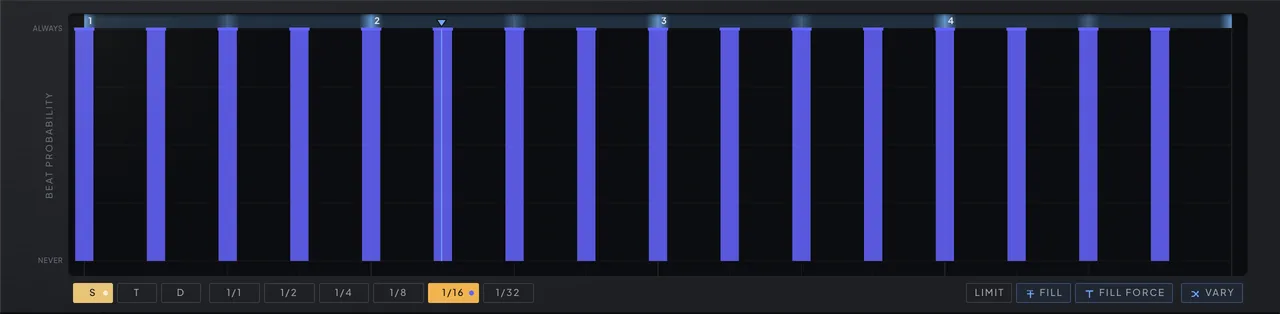
Sixteen sixteenth-note slots at full chance is an ordinary step sequencer: the same bar, forever.
On the Beats tab the grid reads BEAT PROBABILITY down its left edge, and every slot holds a chance from 0 to 127. Fill the sixteenth row and you have the bass line every step sequencer plays — tight, correct, and identical on every pass.
Nothing is wrong with it. It is just finished.
Put dice on beat one
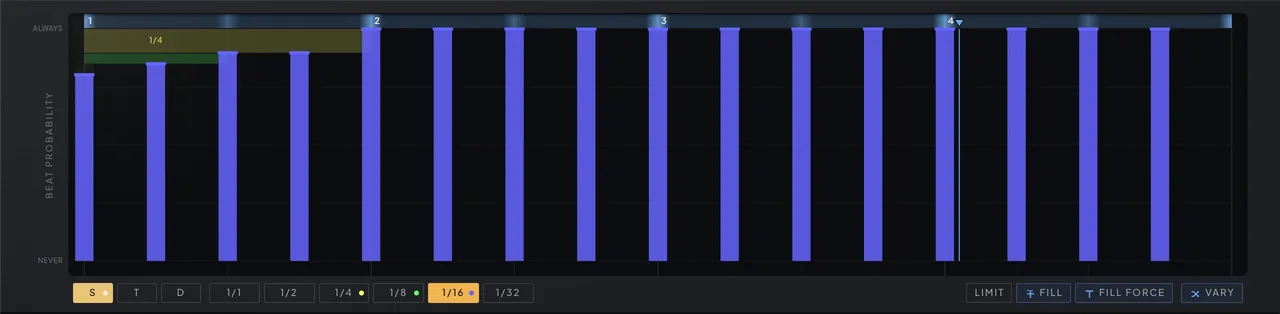
Three slots want the same moment. One weighted draw decides, and the winner rings for its whole length.
A moment’s budget is 127 points. Give the sixteenth on beat one 102 of them (80%), the quarter note 13 (10%) and the eighth 6 (5%), and the six points left over are a rest. Every bar, one draw picks a winner; it plays its full length and quiets every slot it overlaps.
Most bars open the way you drew them. Some hold the downbeat for a whole beat. One in twenty, the bar opens with a breath. That is not randomness bolted onto a pattern — it is the pattern.
Draw the spine
A second map ranks every position in the bar. The rest of the instrument reads it.
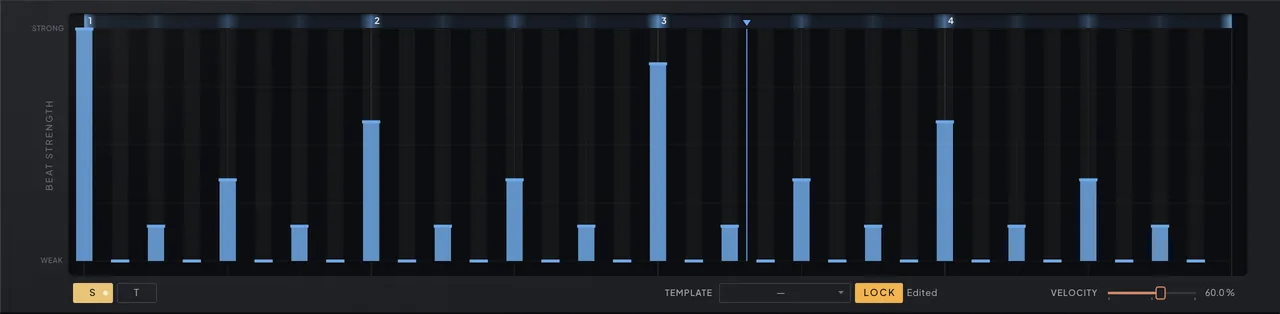
Switch to the Strength tab and the grid reads BEAT STRENGTH. Paint beat one strongest, beat three next, two and four behind them, the offbeats faint. Eight Strength templates start you off.
Six systems read the map: which note the pool picks, whether the octave jumps, where the length, position and velocity modifiers work, and a NOTE STRENGTH route that pushes one chosen parameter harder on the beats that matter. Loudness comes last, and only as far as the VELOCITY slider hands the map over.
Tell each note where it is welcome
Every note in the pool carries a chance, a strength preference and a length preference.
The root is always there. Add the fifth and let it prefer strong beats. Add the root an octave down, prefer strong beats and long notes, and the bar’s held moments drop low the way a bass player’s would. Add the ninth at a quarter of the chance, prefer weak beats and short notes, and it mostly slips in between — a tenth as likely on a downbeat, a tenth as likely to ring long.
A note that prefers strong beats is boosted up to double on accents and cut to a tenth on ghosts: favored, never forced. Seventeen scales keep every choice inside the key.


Hang a fill off the last beat
A beat link forces its target whenever the source wins its draw. A target at zero exists only as a consequence.
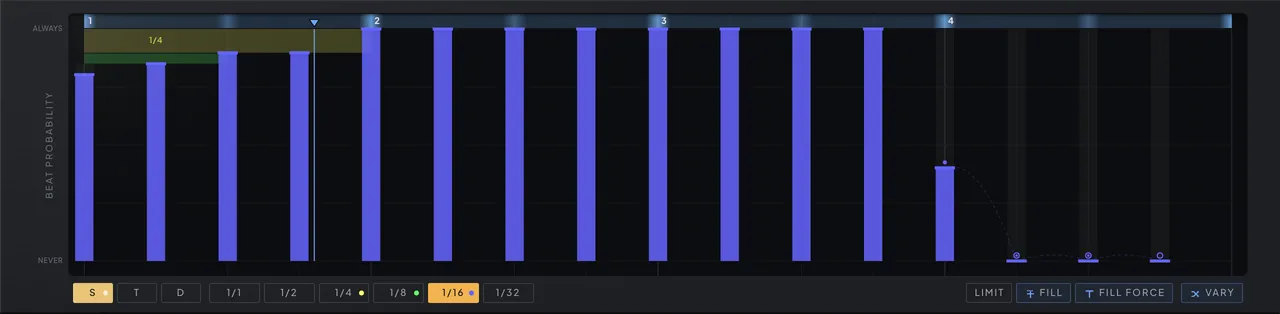
Give the thirteenth sixteenth a 40% chance, zero the three after it, and chain them: 13 to 14, 14 to 15, 15 to 16. When beat 13 wins, the whole run plays; when it loses, none of it does. The fill arrives whole in some bars and never in pieces.
Links chain as far as you like — restraint is what keeps them groove-shaped — and pushing Length past full with Legato open turns the same chain into a slide. To slide just one hit, tie it instead: the tied beat holds its whole slot, and a hit landing where that slot ends glides in without a new attack.
Let the weak notes breathe
Humanize by length, not by smearing the beats that matter.
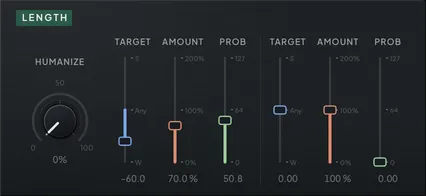
Shifting strong notes off the grid is how a machine imitates a player. A player does something else: the downbeat lands, and the notes in between vary in how long they hold. Aim a LENGTH modifier at Weak with a 40% probability and the ghosts clip short by up to the amount you set, differently every bar, while the accents stay put.
Then a touch of swing; then, if you still want it, a POSITION modifier for the weak notes only. Shifts happen after every decision is made, so they never change which slot won or which strength cell a note read.
Play it from the keys
One law for the keys, under every page.
One key plays the phrase: hold it — or let LATCH hold it — and the phrase plays, transposed so your note is the root; lift it and it stops. Change key legato and it re-roots without restarting.
With your DAW stopped, a key starts the phrase from step 1. With it playing, the DAW owns time and a key joins the bar in progress — press anywhere in the song and the phrase is already in time.
Keys struck together are the pool: each key a candidate, how hard you struck it that note’s chance — an arpeggio with a memory for your voicing rather than a pattern of its own. Keys join and leave the chord while it stands, and the last finger plays the phrase from itself. Switch Velocity Lock off first; it ships on.
Send it somewhere else
Every note it rolls leaves the plug-in as MIDI, with the velocity the generator gave it.
Pull Phaseburn One’s own output down and it is a groove generator for anything on another track: your sampler, your drum machine, the synth you already love. VST3, CLAP and AU all send it.
It sends one note at a time and only what the sequencer plays — your own playing is not echoed through — and the standalone app, having no host to send to, sends none. Host support for plug-in MIDI output varies, so check your host’s routing.
Let GENERATE write the first draft
127 rhythmic figures in eight families, rules you can read, no AI.
Turn the Figure dial: 127 rhythmic figures in eight families, with Home at 0 holding the groove your patch already plays. Busyness walks a figure from its few defining notes out to the ghost notes; Variation sets how much of the bar is left to the dice; Ties slides beats into the next one. Every dial rewrites the groove the moment it moves, inside the bar that is playing, on explicit rules: no model, no training data, nothing learned from anyone else’s music. Vary rolls another take of the same figure, and Undo walks back up to 32 steps.
It writes the groove and nothing else — swing and lengths stay where you set them — and everything above still applies: the dice, the Strength map, the pool, the links. GENERATE is the first draft. The groove is yours.

Read the chapters
Every claim on this page traces to the manual — the same manual that ships inside the plugin.
Own it forever
One payment, a perpetual, DRM-free license: activate once, verified offline forever, on up to 3 of your machines. The demo is free to try — registering lifts its limits: the periodic dip, and the watermark that keeps you from bouncing with it.
€149 one-time · VAT included
Card, PayPal, Apple Pay or Google Pay — secure checkout by Paddle, the license key arrives by email instantly