
Choose the kind of rhythm you want, say how busy and how loose it should be, and the bar plays it while you turn — a bassline that repeats like a bassline, with its variations exactly where you allowed them. That is GENERATE, and there is no AI behind it: no model, no training data, nothing learned from other people’s music. Every bar is built on the spot from written-out rules — a rhythmic figure with a fixed skeleton and named spots where it may change — and ordinary dice decide only what those rules leave open. Turn the looseness off and the bar plays the same rhythm every pass; turn it up and you decide how much the dice get.
The GENERATE panel

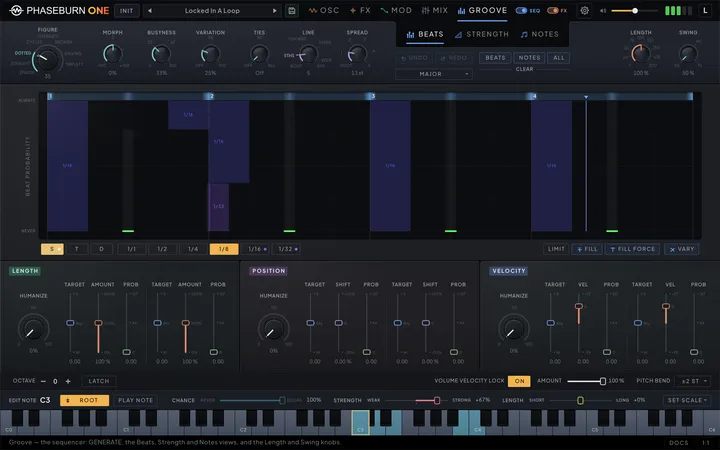
Aim and listen at once: every control on the panel rewrites the groove the moment it moves, and you hear the change inside the bar that is playing. The GENERATE card sits at the left of the band across the top of the Groove page and stays the same on all three views — Beats, Strength and Notes — so you can turn a dial while you watch the grid or the notes it writes.
Left to right, the big Figure dial chooses the rhythm: Home, the patch’s own groove, at 0, then 127 rhythmic figures. Morph turns it a fine step toward either neighbour. Busyness sets how many hits the bar spends, Variation how much of it is left to the dice, and Ties how many beats slide into the next one. The last two dials, in a colour of their own, are the pitch side: Line, how the bassline moves around its root, and Spread, how many keys the voicing may use. Rest the pointer on the Figure or the Line dial and the help bar names what it plays.
Under the Beats · Strength · Notes switcher, centred below the GROOVE tab, sits the action row: Undo and Redo with the Scale menu beneath them, and the Beats, Notes and All buttons over a CLEAR legend. Clear Beats empties the beat grid with its links and ties, Clear Notes takes the note pool back to its root, and Clear All does both; none of them touches the strength map, and each is one Undo step.
A change never cuts the note that is sounding: the notes already played stay, and the rest of the bar plays the new groove. Every gesture — a dial turn from press to release, a pick, a click — is one Undo step; Ties is the exception, a host parameter whose undo belongs to your DAW. GENERATE writes the groove and nothing else: swing, note length and the LENGTH, VELOCITY and POSITION modules stay where you put them.
The panel’s settings are saved with the instance, so a reopened project shows the card as you left it, and a preset you save carries the Line, the Scale, Busyness, Variation, Spread, Ties and the dice with it. Every preset load puts the Figure dial on Home, so a load plays exactly the groove it brought (see Home is the groove the patch holds (Chapter 8 — Generate)).
GENERATE writes one bar for one line, always as a full 4/4 bar, because that is what the grid is. In a host running an odd meter the bar is masked rather than stretched: a 3/4 or 6/8 project plays the first three quarters of what GENERATE wrote and never reaches the last one, where the end fills live. See One bar, one page (Chapter 7 — The Sequencer).
Figures
Pick the rhythm by its character, not by a style name. A Figure is a recipe: a skeleton that defines it, busier layers that enter in a fixed order, the hits that carry the weight, and a short list of named glitch spots where it may change. The Figure dial holds 127 of them in eight families — Sparse, Straight, Dotted, Cycles, Offbeats, Broken, Driving and Triplets — read clockwise, each family’s name on the tick where it starts. Every family runs from sparse to busy, and neighbours share material, so a slow turn sounds like one figure growing. Sparse holds the fifteen Figures beside Home; every other family is sixteen long and starts on a multiple of 16 — Straight at 16, Dotted at 32, on to Triplets at 112. The family that plays is lit; click a family’s name to land on its first Figure. Every Figure is listed at the end of this chapter, family by family.
The dial stops on whole Figures. Hold Shift while you drag and it also stops on the three quarter steps between two of them. There the bar is spliced beat by beat: a quarter of the way over, beat 2 plays the next Figure; halfway, beats 2 and 4; three quarters, beats 2, 3 and 4. The change arrives as an alternating seam, never a crossfade, and every note still belongs to one Figure or the other. The number under the dial is the position — 27 is a Figure, 27.5 halfway to the next — and you can type into it: a number, or “home”. Double-click returns the dial to Home. In the help bar the Figure reads by name and family, followed by Edited or From preset once the groove is no longer just what the dials describe, and as “A → B · 2 of 4” between two Figures.
Morph, beside it, is a fine hand on the same dial. Turn it right toward the next Figure, left toward the previous one, a quarter step at a time; its readout says how far, as a percent. Release it on the neighbour itself and that Figure becomes the new centre, so Morph springs back to 0 for the next step. From Home it turns toward Figure 1 only, and from Figure 1 a full turn left lands on Home, where it reads “Home”.
The lists at the end count sixteenths as drummers do — 1 e and a — so the and-of-2 is the eighth after beat 2, and the a-of-2 is the last sixteenth before beat 3. Each describes the Figure at the default Busyness; busier settings add its further layers.
Home is the groove the patch holds
Load a preset and the bar plays exactly what it brought — then reshape it with the knobs you use on any Figure. Position 0 on the Figure dial is Home: the groove the patch holds. After INIT that is an empty grid; after loading a preset or a sequence it is the beats, links, ties and strength map the load brought. Every load puts the dial on Home, and a fresh instance opens on Home over its startup preset. Turn to any Figure and back to 0, and the patch’s own groove returns.
Home answers the knobs the way a Figure does. At the Busyness and Variation the patch loaded with, it plays exactly as loaded; turn Busyness away and back, and the loaded groove returns note for note. Below the loaded Busyness its hits leave weakest first; above it, extra notes join on the plain beat positions, never inside a note the groove holds. A Home loaded below a third of Busyness keeps its hits as Busyness drops and only gains extras above the loaded setting. At or below the loaded Variation it plays as loaded; above it, Variation opens fills, pickups and doubles and loosens the weaker hits. After INIT, Home stays empty at every setting.
The three quarter steps between 0 and 1 blend Home into Figure 1, beat by beat, the way two Figures blend; only 0 itself is Home. Edits you make at Home are kept like edits on a Figure (see Figures remember your edits (Chapter 8 — Generate)), and a strength map you locked stays through the trip to a Figure and back.
Where the dial sits when you save decides what the next load calls Home. Save on a whole Figure, and the preset reloads with that Figure — your edits on it included — as its Home, reshaping exactly like that Figure; a strength map you held there with Lock comes back as Home’s own, at every setting. Save at Home, and an edited or reshaped Home comes back with its edits and its settings. Save anywhere else, between two Figures for instance, and the next load reads Home from the saved groove, exact at the saved settings.
A MIDI controller or automation that lands the Figure on 0 plays Home: an automation lane that drops to 0 every fourth bar plays the patch’s own groove on that bar.
Figures remember your edits
Make a Figure yours without giving up the rest of the dial. Edit the beats, links, ties or the strength map on Figure 9, turn the dial to 30 and back, and your Figure 9 comes back. Each Figure keeps its own edits, in this preset, at its own position; nothing else on the dial changes.
The knobs keep working on your version by the Figure’s own rules. At the Busyness and Variation where you made the edit it plays exactly what you drew; away from them your edits follow the Figure’s law. A note you deleted stays silent at every setting, a note you made stronger or weaker keeps that share and still loosens with Variation, and a menu of alternatives you balanced keeps its balance. Notes you add play from the Busyness you drew them at — lower Busyness past that point and they leave, raise it and they return — and a note drawn on the instant of one of the Figure’s own hits comes and goes with that hit. A note you lengthened keeps your length at every Busyness, and generated notes that would start inside it stay quiet, except those that were already sounding beside it when you drew it.
Between two Figures each beat plays the version of the Figure that owns it, and an edit made there goes to the Figure whose beat you edited. Vary on an edited Figure gives another take of your version, edits included; a take is not an edit, but edit the take and it is kept. Clear Beats leaves the Figure empty in this preset at every setting. Draw on it at the same knob settings and the drawing becomes that Figure’s own groove: it thins as Busyness drops and grows as it rises, and a drawing made below a third of Busyness keeps its hits and only grows. The first edit at other settings ends the drawing; from then on edits are kept exactly where they were made. Fill Force fills the division as your own notes, and below the Busyness you pressed it at, the weakest positions leave first. On the Strength tab, Lock keeps the map you see; with it off, each Figure plays its own map, edited or stamped.
Undo puts a Figure back as it was before the edit, one step at a time, and reloading the preset brings back the Figures it was saved with — those are the ways back. Your versions are saved with the preset and with the project, and a sound-only (KEEP SEQ) load keeps them. Automation or a controller that leaves an edited Figure and comes back plays your edit again.
Automate and learn the Figure
Let the arrangement change the figure for you. The Figure dial is a host parameter, Groove Figure: your DAW can automate it, and its right-click menu offers MIDI learn. Its value runs in quarter steps from Home to the last Figure — whole numbers are Figures, the quarters the blends between them — so a 7-bit controller value n lands on Figure n, 0 is Home, and on a hardware controller each run of sixteen values is one family. Your DAW shows the Figure by name, “Home” at 0 and “A > B 2/4” between two. An automation lane that steps once a bar, every two bars or every beat changes the pattern on those boundaries. The Figure is meant for slow movement: the pattern changes at most once per sixteenth note, and a value hovering on the line between two steps does not flicker between them.
A controller learned on the Morph knob moves the Figure differently: relatively, from where the Figure stands when you start turning the hardware knob. Half the knob’s travel moves the Figure one Figure along, in quarter steps, and there is no soft takeover — the Figure follows the knob from the first move. Busyness, Variation, Line and Spread take MIDI Learn and MIDI Forget from their right-click menus too, with no Set to default and no modulation entries. They follow the controller about 20 times a second, with the editor open or closed, and always land on its last value; a controller move adds no Undo step. With Soft Takeover on in the cog menu, the hardware knob takes over once it passes the dial’s position.
A Figure change is computed beside the audio and lands a few milliseconds after the source moves. A note that starts inside that moment still plays the previous Figure, so the first note of a change synced to the bar can come from the old pattern. Moving the Figure by automation or MIDI rewrites the groove exactly as turning the dial does, and reaches your edited versions too.
Loading a preset or reopening a project never rewrites the groove it brought. Every sequence load sets the Figure to Home, so automation that moves the Figure while a load waits for its bar line is overwritten when the load lands. With Soft Takeover on in the cog menu, a hardware knob mapped to the Figure picks up at Home after a load and must pass through it before it moves the Figure (see MIDI learn (Chapter 10 — MIDI & Your DAW)). The Ties knob is a host parameter in the same way (see Ties (Chapter 8 — Generate)).
Busyness and Variation
Set how much happens, then how much of it is left to chance — two separate questions with two separate knobs. Both rewrite the bar the moment they move, and both keep the same dice: a knob position always writes the same groove, and only Vary rolls new dice.
Busyness walks a figure’s four tiers. Fully left is the identity cell alone: the few notes that make the figure recognisable. A third of the way up — the default — the skeleton is complete. Two thirds adds the subdivisions, and fully right adds the ghosts, written as the shortest notes of the figure’s grid so they read as ghosts by their shortness even with the Strength VELOCITY slider at zero. Between those points the next tier’s hits enter one at a time, in the figure’s own order, each at full chance. Every position of the knob is a definite bar, never a fog of middling probabilities, and every step adds at least one note you can hear. When a busier tier puts a hit inside a longer note, the longer note moves to the longest row that ends in time — a dotted eighth becomes an eighth, a dotted quarter an eighth — so the line stays one note at a time.
Variation decides how much of that bar the dice may touch. At Off nothing is open: every hit plays at full chance, every other slot is empty, and the bar plays the same rhythm every pass. Turning it up opens the figure’s glitch spots in the figure’s order — a split into two linked sixteenths, a hold onto a longer note, a thirty-second double, a rest, a pickup, a drag, an end fill into the next downbeat. The default, a quarter of the way up, opens the first spot that applies. A spot whose hit is not in at the current Busyness is skipped and the next one takes its place.
An open spot starts at one bar in eight and grows toward its ceiling as the knob reaches the top: splits, doubles, pickups and alternative figures up to every other bar; holds, rests and early hits up to one bar in three; drags, rolls and end fills up to one bar in four — a fill about every fourth bar at the top, a phrase end on average. Most Sparse Figures and a few others carry a rarer end fill that stays at one bar in eight. Past halfway the ghosts start to rest now and then, and past three quarters the subdivisions do too, up to half the time at full Variation. The identity cell and the skeleton only ever change through their own named spots.
Variation also loosens the pitch roles. At Off the roots land on the strong hits at least nine times in ten; as the knob rises, the movement pitches are allowed onto more of them (see The pitch side (Chapter 8 — Generate)). Both knobs work on Home and on your edited Figures as well, from the settings they were made at.
Ties
Let a line slur without drawing every tie by hand. Ties sets how many beats of the groove tie into the next one. A tied beat holds until the next hit starts, and that hit slides in without a new attack; into a different pitch the slide takes the Legato time, or 60 ms with Legato at Off, and into the same pitch the note simply holds (see Glide and legato (Chapter 2 — Oscillators)). At Off only the ties you drew on the Beats tab play. Turning it up ties more beats in a fixed musical order — the likely beats before the chancy ones, the weaker landings before the strong ones, spread across the bar — so the strongest beats keep their attack longest. At All every beat that can tie does, and the bar’s last beat holds to the bar line: a tie never crosses into the next bar. A beat that starts inside a longer beat that always plays is not a candidate.
The knob is a layer, never an overwrite: it adds ties on top of the ones you drew and never removes or changes one of yours. It is deterministic and nested — the same groove at the same setting always ties the same beats, and turning it up only ever adds ties. It follows whatever groove is on deck: a Figure change, Morph, Busyness, Variation, Vary, a return to Home, a hand edit or a Strength edit changes which beats can tie and in what order, and the same setting then ties the same share of them. A move that changes the number of ties re-renders the bar in progress the way a tie you draw does: the sounding note and the notes already played stay, and later notes take the new ties.
On the Beats tab a beat tied by the knob draws a dashed arc, and resting on it names the beats it slides into. The tie pill under a slot has a third state, tied by the knob; press it to tie that slot yourself.
Ties is a host parameter, Groove Ties: automatable, MIDI-learnable from the knob’s right-click menu. Its undo is your DAW’s; the Groove page’s Undo skips it. An automated Ties knob takes effect at most once every 10 ms, so an offline bounce and a real-time pass may place a change at slightly different moments.
Three planes from one figure
Every Figure writes three things that agree with each other, because they come from the same figure at the same settings.
The rhythm is the beat grid: the hits that are in, at full chance; the open spots as small menus, loose hits or low-chance fill heads with linked tails behind them; everything else at zero. The strength map (see Strength and dynamics (Chapter 7 — The Sequencer)) carries the figure’s strong hits at the top — the first at full strength, the others just below — every other hit at the bottom, and the linked tails of a split or a double at their head’s value, so a ratchet stays in its head’s register. Cells no hit uses take the figure’s background template squeezed into the middle of the range, so a note you add later inherits a middle weight rather than a strong or a weak one by accident. No hit cell ever sits in the middle. The pitch is the note pool: the line’s strong pitches prefer the strong cells, its movement pitches the weak ones.
The strength map belongs to GENERATE until you claim it. On the Strength tab, under the grid, Lock keeps your map: while it is on, the Figure dial, the knobs and Vary never rewrite it; while it is off, each Figure plays its own map. Drawing on the map and picking a template both turn Lock on by themselves. Beside it a caption says where the map came from — From groove, the template’s name, Edited, From preset or Empty. A preset load brings its map unlocked and reading From preset, so the next Figure may stamp its own; INIT empties it. Under Lock the notes steer by whatever map you locked; the Even template, flat by design, steers nothing.
The Template menu paints one of eight clean metric maps — Downbeats, Backbeat, Offbeat, Half-Time, Three-Three-Two, Dotted Quarters, Triplet and Even. The strength map is not loudness on its own: the VELOCITY slider beside Lock is what hands it to velocity.
The pitch side
Give the rhythm a bassline that lands its root on the strong hits and moves on the weak ones. Three controls shape it: the Line dial (see Lines (Chapter 8 — Generate)), the Spread dial beside it, and the Scale menu under Undo and Redo. Every Line except Any puts the root on the strong hits and its own pitches on the weak ones; Busyness sets how many of those pitches are in, and Variation how firmly each keeps to its role.
Scale is the pitch material: seventeen scales, from Major, Minor and the modes to both pentatonics, Blues, Whole Tone, Chromatic, Japanese, Arabic and Hungarian. Picking one re-voices the pool at once. The menu also follows the notes you edit: after you add, change or remove a note, set the root or clear the notes, it checks the pool. If every note still sits inside the chosen scale, the scale stays. Otherwise, if the notes are exactly one scale, or fit inside exactly one, the menu names it — a Major pool whose seventh you lower to the flat seventh reads Mixolydian; failing both, its face reads Custom Scale. Only note names count, not octave or chance, and the root always counts. Custom Scale is a reading, never a menu item, and a chosen Chromatic is never left by an edit. Undo brings the previous scale back with the note edit. The new name changes nothing you hear: GENERATE keeps voicing in the scale it was voicing in until you pick a Scale, or pick a Line while the menu names a real scale. An older preset saved with Auto reads its notes once on load and shows the scale they make, or Custom Scale.
Spread sets how many keys the voicing may use, from 1 to 60: five octaves from the root.
A plain drag moves one key at a time, with no stops on the way; hold Shift for a finer drag.
The readout reads Root at 1 key, 1 oct to 5 oct at 12, 24, 36, 48 and 60 keys, and
the count in semitones between them, as in 13 st. The default is 13: the root, the eleven
keys above it and the octave above, so a fresh instance plays the Line up to and including that
octave. To set it by typing, click the readout. A number on its own means octaves: 2 is
2 oct and 1.5 is 18 keys; 13, 13 st, 1 oct and root read as written. The window
always holds the root and grows in a fixed order that belongs to the Line: first toward the
Line’s own notes, in the order the Line writes them and only in the direction a note needs (a
Line that steps down grows downward first), then the octave above, the octave below, two
above and two below. Inside the window the Line’s written notes play as written, with their own
chance and accent, and every note’s pitch class also sounds in each other octave the window
holds. A C E G Line at 12 keys plays C E G; 13 adds the C above, 17 its E, 20 its G, and 29
the G below the root. A written note outside the window stays silent, but its pitch class
still fills the octaves inside. A copy is quieter the farther it sits from home — 70 % of its
source’s chance one octave away, 50 % two octaves away — and copies below lean toward the
strong beats, copies above toward the weak ones. A copy that would leave the playable range is
dropped. Spread re-voices only when the key count changes. A project or preset saved with an
earlier Spread (octave steps before 0.4.0, or the 0.4.0 semitone span) loads on the key count
whose notes differ least from what it played.
A held key transposes the pool to itself; a chord you hold replaces the pool, so the line has no say while the chord is held (see What your keys do (Chapter 10 — MIDI & Your DAW)).
Lines
Choose how the bass moves around its root by turning one dial. The Line dial holds 28 Lines in six families, from the most rooted to the freest: Root & Octaves, Fifths & Fourths, Chords & Colours, Dark & Tense, Neighbours & Steps, and Wide & Free. Its ticks mark the families — ROOT, 5THS, CHORDS, an unnamed tick for Dark & Tense, STEPS and WIDE — with the current one lit, and ANY marks the last Line; click a word to jump there. The readout is the Line’s number, and you can type a number or a Line’s name. Root and Fifth is the default, and a Line pick re-voices the pool at once.
Every Line except Any puts the root on the strong hits; what differs is what the weak hits get. A Line lets its pitches in by Busyness: the first alone below a third of Busyness, the first two from a third, all of them from two thirds, each later one at a lower chance. Where a scale lacks a tone a Line asks for, the nearest tone it has stands in. Every Line is listed in the next section.
Every Line, family by family
Find the movement you hear in your head, then dial its number. Each Line names what the weak hits get, in the order Busyness lets them in, with the root on the strong hits throughout (Any excepted). The families run from the most rooted to the freest, the order of the Line dial.
- Root & Octaves. Root — the root alone; only Spread adds its octaves, and Set Root on the note-edit row moves it. Octaves — the octave above, then below. Octave Down — the octave below, then above. Octave Up — the octave above, then two above.
- Fifths & Fourths. Root and Fifth — the fifth above, the fifth an octave down, then the octave above. Fifth Below — the fifth an octave down, the fifth above, then the octave below. Octave and Fifth — the octave, the fifth, then the fifth over the octave. Root and Fourth — the fourth above, the fourth an octave down, then the octave above. Stacked Fifths — the fifth and the ninth together, then the fourth an octave down, then the octave. Stacked Fourths — the fourth and the seventh together, then the third over the octave, then the fifth an octave down.
- Chords & Colours. Root and Third — the third in two octaves, then the octave, then the third an octave down. Triad — the third and the fifth together, then the octave, then the third over the octave. Chord Tones — the third, the fifth, then the seventh. Root and Seventh — the seventh an octave down, the seventh above, then the octave. Fifth and Seventh — the seventh, the fifth, then the octave. Root and Ninth — the ninth, the octave, then the fifth.
- Dark & Tense. Sixth and Fifth — the sixth, the fifth, then the sixth an octave down. Tritone — the tritone above, the octave, then the tritone below. Semitone Above — the semitone above, the octave, then the semitone over the octave. These two keep their intervals in every scale.
- Neighbours & Steps. Chromatic Neighbours — the semitone below, the semitone above, then the fifth. Neighbour Tones — the scale step below, the step above, then the fifth. Scale Steps — one step either side, then two, then three. Steps Down — one, two, then three steps below. Steps Up — one, two, then three steps above. Pentatonic Riff — pitches in pairs: in a scale with a minor third, the third and fourth, the fifth and seventh, then the octave and the seventh an octave down; otherwise the second and third, the fifth and sixth, then the octave and the sixth an octave down.
- Wide & Free. Wide — the octave, a colour tone above it (the third, or the seventh when the dice choose it), then the fifth above the octave. Wide Leaps — the fifth below and the fifth over the octave together, then two octaves up, then the octave below. Any — every scale degree at an even chance, with no strength steering at all.
Your note edits survive the knobs
Edit the notes yourself and keep turning the dials: your edits stay. Add a note, remove one, or change a note’s chance, strength or length on the Notes tab, then turn Busyness, Variation, Spread, the Figure dial or Morph, or press Vary: the edit is kept, and at the settings where you made it the pool is exactly what you set.
Busyness thins the melody as well as the rhythm. A note you add plays from the Busyness you added it at, or earlier by its own chance: at 45 % chance or more it plays at every Busyness, at 25 % or more from a third of Busyness, anything lower from two thirds. Turn Busyness down and the less likely notes leave first; turn it back and they return exactly.
Line, Scale and Spread keep your edits. A Line pick puts GENERATE’s voicing back under them: notes you added stay, a note you removed stays out wherever the new Line would play it, and the values you set stay set. A Scale pick re-voices GENERATE’s voicing in the new scale; on a pool a preset brought, or the degrees Set Scale laid out, it moves each note to the same role in the new scale — a minor third becomes the major third — and picking the earlier scale again gives the original back exactly. Notes you added keep their pitch. Spread copies your notes across its window too. An edit made while the pool shows no Spread copies belongs to the note, and its copies follow it; an edit made on a copy, or while copies show, changes that one key. On a pool that holds only the root and none of your notes, a Scale pick or a Spread change brings GENERATE’s voicing in.
Clear Notes and Set Scale start a fresh pool and clear every earlier edit: Clear Notes leaves the root alone, Set Scale lays out the scale’s degrees. Busyness and Variation leave that pool as it was laid out; notes you then draw on it follow Busyness like any note you add.
A preset’s own pool loads exactly as saved and then answers the knobs from the settings it loaded at: Busyness thins it, less likely notes first, Variation widens or narrows its strength lean, Spread adds octave copies and a Scale pick moves its notes by role. A preset whose notes are GENERATE’s own voicing, saved without a note edit, follows the Figure, Busyness, Variation, Morph and Vary from the first move. The pool is one per patch: going to Home and back leaves it as it is. Undo returns the pool to how the gesture found it, and reloading the preset brings back the pool it was saved with.
Vary and undo
Keep the figure, change the take, and walk back out of anything that went the wrong way. Vary sits in the row beneath the Beats grid, after Limit, Fill and Fill Force. It is another take of the same figure at the current dials: a different choice of which glitch spots are open — the same number of them, deliberately out of order — with their weights and the end fill’s flavour rolled again. It also swaps which of a partly entered tier’s hits play, keeping their count. With Variation at Off there are no dice to roll, and the button dims. Vary re-stamps the strength map unless Lock is on. On an edited Figure it varies your version, and editing a take keeps it; at Home it varies the groove the patch holds and keeps the result like an edit.
Vary also works on patterns you drew yourself, or whenever the grid no longer comes from a figure. It first reads the grid back into regions: slots at full chance stay solid, a cluster of alternatives at one start time becomes a menu, everything else becomes loose material, and your beat links are kept. Only the negotiable layer moves, and on such a grid Vary never touches the strength map.
Undo and Redo, under the view switcher, are what make leaning on any dial safe. They walk one 32-step history shared by all three views. Each gesture is one step: a Figure, Morph, Busyness, Variation, Line or Spread turn from press to release, a Scale pick, Vary, Fill and Fill Force, the three Clear buttons, a lane drag, a link or tie edit, a note edit, a template pick, a Lock toggle and a strength drag. A step restores only what that action changed — beat chances, links and ties, the strength map with its lock and caption, the pool with its edits — and a Figure, Busyness, Variation or Vary step includes the pool. Undo an edit made on a Figure the dial has since left, moved by a controller or automation, and the dial goes back to that Figure with it. Redo steps forward again through what Undo took back; any new edit clears it. The Ties knob is the one exception: its undo is your DAW’s. A controller learned on Morph, Busyness, Variation, Line or Spread is not an edit either: its moves add no Undo step.
Undo greys out when there is nothing left to step back to, and the history is dropped whenever the pattern is replaced from outside — a preset load, INIT or your DAW restoring the project — so Undo never pulls an older groove into the patch you just opened. Turn a dial until a bar lands, then step back to the one you liked.
The Sparse family
Start from almost nothing: one held root, then two or three hits with room for everything else around them. The Sparse family sits at 1 to 15 on the Figure dial, right after Home at 0, and runs from one note to three.
- 1 · Root on One — One held root on the downbeat; the rest of the bar breathes.
- 2 · Beat Three Hold — The downbeat left to the kick; one held note enters on 3.
- 3 · Long Tones — Two held roots, a half note each: the drone bar.
- 4 · One and Three — Detached quarters on 1 and 3; beats 2 and 4 stay open.
- 5 · Pushed Three — Root on 1, then beat 3 anticipated on the and-of-2 and held through it.
- 6 · Sparse — A hit on 1 and an answer on the and-of-3.
- 7 · Held Anticipation — A held root, then the and-of-4 anticipates the next downbeat.
- 8 · Held Pickup — Half a bar of held root, then one sixteenth pickup into the next bar.
- 9 · Long Short Short — A held root, then two quarters on 3 and 4: long–short–short.
- 10 · Short Short Long — Two quarters, then a half note held through 3 and 4: short–short–long.
- 11 · Half-Time — Root on 1, the push on the and-of-2, the hit on 3.
- 12 · Dotted Quarters — The bar-level 3+3+2: three dotted quarters.
- 13 · One and Four — A held 1, then 4 and the and-of-4 pushing into the next bar.
- 14 · Two and Four — The downbeat empty; the bass answers on 2, the and-of-3 and 4.
- 15 · Late Answers — Root on 1, then two late answers: the and-of-3 and the and-of-4.
The Straight family
Lock the bass to the grid: quarters and eighths on the beats and the ands, from three quarter notes up to a bar of eighths with pickups and runs. The Straight family sits at 16 to 31 on the Figure dial.
- 16 · Three Beats — Quarters on 1, 2 and 3; beat 4 is left open for a fill.
- 17 · Four on the Floor — Four quarters on the beats.
- 18 · Pickup Pulse — Root on 1 and 3 with a sixteenth pickup into each.
- 19 · Push Pulse — Root on 1 and 3, an eighth push before each (the and-of-2, the and- of-4).
- 20 · Half-Bar Pairs — An eighth pair on 1 and on 3; beats 2 and 4 rest.
- 21 · Quarters and Push — Quarters on the beats; beat 4 splits so the and-of-4 pushes into the bar.
- 22 · Quarters into Eighths — Quarters for half a bar, then eighths: the pulse doubles on beat 3.
- 23 · Beat and Pair — A quarter on 1 and 3, an eighth pair on 2 and 4: dum, da-da.
- 24 · Eighth Pairs — An eighth pair on 1 and 3, single eighths on 2 and 4: dum-da dum.
- 25 · Eighths into Quarters — Eighths for half a bar, then quarters on 3 and 4: the pulse halves.
- 26 · Eighths and Hold — Six eighths that land on a held 4.
- 27 · Straight Eighths — Eight eighths on the beats and ands.
- 28 · Pumping Eighths — Short on the beat, long on the and: the octave-pump eighth line.
- 29 · Skip Pulse — A skip on every beat, the beat and its a: dotted eighth + sixteenth on 1 and 4, eighth + sixteenth on 2 and 3.
- 30 · Eighths and Pickup — Straight eighths plus the last sixteenth: a pickup into every bar.
- 31 · Eighths into a Run — Eighths for three beats, then four sixteenths run into the next bar.
The Dotted family
Bend the bar into threes: dotted notes and the 3+3+2 grouping called the tresillo, the clave and the busier cinquillo, in eighths across the bar or in sixteenths within it. The Dotted family sits at 32 to 47 on the Figure dial.
- 32 · Held Pushes — Root, a dotted push held over 3, the 4, a held push into the bar.
- 33 · Bar Tresillo Split — The bar-wide 3+3+2 in eighths, its last two split into a pair.
- 34 · Tresillo and Hold — A 3+3+2 in sixteenths on beats 1–2, then one note held through the second half.
- 35 · Tresillo and Answer — A 3+3+2 first half, then two plain quarters: call and answer.
- 36 · Quarters and Tresillo — Two plain quarters, then a 3+3+2 in sixteenths: the answer before the call.
- 37 · Tresillo and Push — A 3+3+2 in sixteenths, beat 3 held, then the and-of-4 pushes into the bar.
- 38 · Delayed Clave — The clave with its third stroke a sixteenth late: more pull before the answer.
- 39 · Dotted Cascade — Six dotted eighths crossing the beats.
- 40 · Dotted Chain Resolved — Four dotted eighths, then two eighths settle the bar: 3+3+3+3+2+2.
- 41 · Three-Three-Two — 3+3+2 in sixteenths, twice per bar.
- 42 · Three Two Three — 3+2+3 in sixteenths, twice per bar: the gap sits mid-group.
- 43 · Two Three Three — 2+3+3 in sixteenths, twice per bar: the reversed tresillo, the gap comes late.
- 44 · Cinquillo and Hold — A cinquillo on beats 1–2, then a held note: the busy call, the long answer.
- 45 · Filled Tresillo — The 3+3+2 with beat 2 filled in: long, short, two eighths, per half bar.
- 46 · Tresillo Pickups — 3+3+1+1 twice: each tresillo’s last two split into a sixteenth pickup pair.
- 47 · Cinquillo — 2+1+2+1+2 in sixteenths, twice per bar: the tresillo’s busy cousin.
The Cycles family
Let the line drift against the beat: hits spread as evenly over the bar’s sixteen sixteenths as they will go, and short cells of three, five, six or seven sixteenths that loop across the beat until the bar pulls them home. The Cycles family sits at 48 to 63 on the Figure dial.
- 48 · Every Seventh — A note every seven sixteenths from the downbeat: three strokes drifting against the beat.
- 49 · Three Spread — Three hits spread as evenly as sixteenths allow: 5+5+6.
- 50 · Every Fifth — A note every five sixteenths: four strokes against the beat, the last a pickup.
- 51 · Long Short in Threes — A long–short cell three eighths long, looping against the beat.
- 52 · Five Spread — Five hits spread over the bar: four dotted eighths and a held 4 (3+3+3+3+4).
- 53 · Five Spread Turned — The five-spread started on its 3+3+4: a long bell pattern with the gap mid-bar.
- 54 · Eighth Pairs in Threes — Two eighths and a rest, looping every three eighths: the pair keeps shifting.
- 55 · Seven-Step Cycle — Three notes and a gap, seven sixteenths long: the run restarts off the beat.
- 56 · Five-Step Cycle — Two notes in every five sixteenths: a short loop drifting across the beat.
- 57 · Seven Spread — Seven hits spread over the bar (3+2+2+3+2+2+2): a rolling odd- grouped line.
- 58 · Six-Step Cycle — A 3+2+1 cell six sixteenths long, looping over dotted quarters: the bar heard in threes.
- 59 · Nine Spread — Nine hits spread over the bar: eighths with two sixteenth skips, a rolling sequence line.
- 60 · Five-Step Run — Three notes in every five sixteenths: a tumbling loop against the beat.
- 61 · Three-Step Pairs — Two sixteenths and a rest, three sixteenths long: the pair cycles round the beat.
- 62 · Three-Step Skips — Long–short in sixteenths (2+1), looping every three: the line skips across the beat.
- 63 · Thirteen Spread — Thirteen of sixteen sixteenths, the three gaps spread evenly: a roll that breathes.
The Offbeats family
Move the weight off the beat: the ands, the sixteenths just after the beat, pushes and anticipations, often leaving the downbeat to the drums. The Offbeats family sits at 64 to 79 on the Figure dial.
- 64 · Push Stabs — Two short stabs on the and-of-2 and the and-of-4; the downbeats stay empty.
- 65 · Root and Pushes — Root on 1, then pushes on the and-of-2 and the and-of-4; beat 3 stays empty.
- 66 · Tied Offbeats — Offbeats on the and-of-1, the and-of-2 tied over beat 3, and the and-of-4.
- 67 · Stumble — Root on 1 and 3, the answer a sixteenth late on the e-of-2 and e-of-4.
- 68 · After Every Beat — A sixteenth right after every beat: the bass ducks the kick and answers it.
- 69 · Offbeat — The four ands; the downbeats stay empty at every setting.
- 70 · Offbeat and Pickup — The four ands, plus a last-sixteenth pickup into the next bar.
- 71 · Offbeat Cascade — Hits a dotted eighth apart from the and-of-1: and-of-1, e-of-2, 3, a-of-3, and-of-4.
- 72 · Offbeat Bounce — Root on 1, then every and: the bounce.
- 73 · Syncopated — Dotted pushes on 1, the a-of-1 and the and-of-2, then the and-of-3 and 4.
- 74 · Sixteenth Pushes — Root on 1, then the a of every beat: a bar of anticipations.
- 75 · Double Push — Root on 1 and 3, each preceded by a sixteenth pair on the and-a: da- da-DUM.
- 76 · Stumble and Pickup — Root on 1 and 3, late answers, then pickups into 3 and 1.
- 77 · Bounce and Pickup — Root on 1, every and, then a sixteenth pickup: the bounce rolling into the bar.
- 78 · Offbeat Pairs — A sixteenth pair on every and-a: the galloping offbeat line around the kick.
- 79 · Late Pairs — The e and the and after every beat: two notes tucked between the kicks.
The Broken family
Break a line on purpose: a skipped kick, a roll and then silence, a call answered in the second half of the bar, a beat cut out of a run. The Broken family sits at 80 to 95 on the Figure dial.
- 80 · Early Skip — Root on 1, a skip on the a-of-1, then the and-of-3: a broken kick line.
- 81 · Skipped Kick — Root on 1, the skip on the a-of-2, then the and-of-3.
- 82 · Skipped Kick Push — The skipped kick line, plus the and-of-4 pushing into the next bar.
- 83 · Kick Pairs — An eighth pair on 1, a sixteenth pair on the and-a of 3.
- 84 · Stop on Three — Eighths for two beats, a quarter on 3, then silence: the line stops dead.
- 85 · Run and Hold — Four sixteenths on beat 1, then one note held through the second half.
- 86 · Root and Roll — A held root, silence, then four sixteenths roll into the next bar.
- 87 · Call and Answer — A downbeat call on beats 1–2, an offbeat answer on 3–4.
- 88 · Missing Three — Straight eighths with beat 3 dropped: the hole is the groove.
- 89 · Straight Then Tresillo — Straight eighths on beats 1–2, a 3+3+2 answer on beats 3–4.
- 90 · Ghosted Skip — The kick line on 1 and the and-of-3, wrapped in quiet ghost sixteenths.
- 91 · Broken Gallop — Gallops on 1 and 3, single offbeats between: half the gallop knocked out.
- 92 · Roll and Rest — Eight sixteenths, then half a bar of silence: a call left unanswered.
- 93 · Rolls on Two and Four — Sixteenth runs on beats 2 and 4; beats 1 and 3 left to the kick.
- 94 · Hold and Roll — Half a bar of held root, then eight sixteenths answer it.
- 95 · Skipped Beat Roll — Running sixteenths that skip beat 3 entirely: the roll catches its breath.
The Driving family
Keep the bar moving: steady sixteenths, gallops and thirty-second ratchets, from a stutter on every beat to a bar that never stops rolling. The Driving family sits at 96 to 111 on the Figure dial.
- 96 · Ratchet Quarters — A 32nd ratchet on every beat: four on the floor, stuttered.
- 97 · Offbeat Ratchets — A 32nd ratchet on every and: the offbeat line, stuttered.
- 98 · Ratchet Eighths — Eighths on the beats, a 32nd ratchet on every and.
- 99 · Sixteenth Pairs — A sixteenth pair on every beat, rest on the and.
- 100 · Rolls on One and Three — Four sixteenths on beats 1 and 3, rests on 2 and 4.
- 101 · Dotted Sixteenths — Dotted sixteenths chained from 1, a breath, then beat 4 where the chain re-aligns.
- 102 · Offbeat Sixteenths — The eight offbeat sixteenths (every e and a); beats 1 and 3 come in only as ghosts.
- 103 · Gapped Sixteenths — Sixteenths with gaps punched in, accents off the beat: the squelchy sequencer line.
- 104 · Gallop — Eighth + two sixteenths on every beat.
- 105 · Gallop Turnaround — Reverse gallops on beats 1–2, gallops on 3–4: the run turns around mid-bar.
- 106 · Reverse Gallop — Two sixteenths + eighth on every beat: the gallop backwards.
- 107 · Hiccup Sixteenths — 1-e-·-a on every beat: sixteenths with the and left out.
- 108 · Three After the Beat — The three sixteenths after every beat, the beat left to the kick: the rolling line.
- 109 · Sixteenths and Breath — Fifteen sixteenths; the last one rests so the next downbeat lands clean.
- 110 · Driving Sixteenths — Every sixteenth, with 32nd ratchets at full Busyness.
- 111 · Ratchet Run — Running sixteenths whose last beat turns into 32nd ratchets: the roll into the bar.
The Triplets family
Change the grid itself: shuffles, triplets and sextuplets on the triplet grid, from three notes across the bar to a run of triplet sixteenths. The Triplets family sits at 112 to 127 on the Figure dial.
- 112 · Half-Note Triplets — Three even notes across the bar: half-note triplets, three against four.
- 113 · Shuffle Beats — A short note on every beat; Busyness swings in the triplet pickups.
- 114 · Half Shuffle — The shuffle cell on beats 1 and 3 only; beats 2 and 4 rest.
- 115 · Shuffled Pickups — Root on 1 and 3, each with a swung triplet pickup.
- 116 · Shuffled Offbeats — The swung and of every beat; the downbeats stay empty.
- 117 · Quarter Triplets — Six even notes per bar: quarter-note triplets, the classic three over two.
- 118 · Twelve-Pulse Bell — The seven-stroke bell pattern of twelve pulses, long and short strokes over the triplet grid.
- 119 · Sextuplet Pickups — A short note on every beat, each with a triplet-sixteenth grace just before.
- 120 · Triplet Shuffle — First and third triplet of every beat.
- 121 · Triplet Pairs — First and second triplet of every beat: a pair on the beat, the third rests.
- 122 · Offbeat Triplets — Second and third triplet of every beat; the beats come in only at busier settings, 1 and 3 as ghosts.
- 123 · Beats and Triplet Roll — Short notes on beats 1–3, then beat 4 rolls in triplet sixteenths.
- 124 · Triplet Eighths — All twelve triplet eighths, with triplet-sixteenth ratchets at full Busyness.
- 125 · Shuffled Gallop — A triplet and two quick triplet sixteenths on every beat: the gallop, swung.
- 126 · Shuffled Sixteenths — Swung sixteenths on the triplet grid: every eighth splits long–short (2:1).
- 127 · Sextuplet Run — Five triplet sixteenths per beat, a breath before each beat: the sextuplet arpeggio run.