
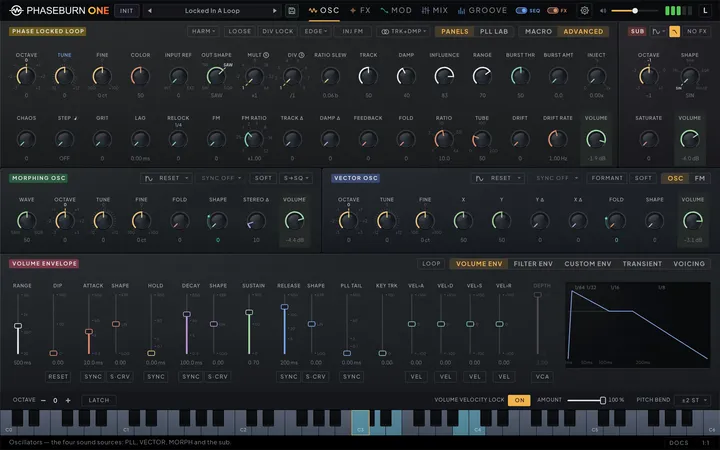
Everything you hear from Phaseburn One starts with four sources: the Phase-Locked Loop (PLL) that gives the instrument its voice, a VECTOR phase-shaping oscillator, the MORPH oscillator with its twelve waveform families, and a sub. This chapter walks through each one — what it is for, how to play it, and every control it exposes.
Four sources, one voice
Pick the sources you need, balance them with four volume knobs, and the instrument plays them as a single line. All four live on the OSC tab — a section each for the PLL, VECTOR, MORPH and the sub — and every section ends in its own volume knob. Their outputs sum into one voice path, and the entire processing budget goes into making that voice deep rather than eight shallow ones — though the voice is optionally paraphonic: each source can leave the written note behind (see Oscillator independence below).
Each source has a distinct job. The PLL is the lead character — a feedback circuit whose struggle to stay in tune is the tone itself, covered in the sections that follow. VECTOR is the sculptor: two knobs bend a wave from soft to snarling, with a formant mode for vowel-like resonances and an FM tab where the other three sources bend its phase. MORPH is the conventionalist, holding every classic waveform and a few less classic ones on a single morphing knob. The sub is the anchor: low-end weight with shape and saturation controls, and routing that keeps it clean when the rest of the patch gets violent.
Blending is direct: raise the volume of what you want, pull down what you don’t. The volume knobs top out at unity, so the balance you set is the level every cable from that source starts from, and the same four volumes reappear as channel faders on the Mixer tab. There, each pitched source also gets a PAN knob — a constant-power stereo balance that is bit-transparent at centre and a modulation destination in its own right, so a source can sit off to one side or swing across the field under an LFO. Stereo character itself comes from the pitched sources — the PLL, VECTOR and MORPH each run independent left and right engines, so width is built at the point of generation instead of being pasted on afterwards. Turn a pitched source’s width all the way down and it is exactly mono, not nearly mono — the right channel becomes a copy of the left, and the return is click-free — so the mono fold-down of a narrow patch is the patch itself. The sub is the exception: it is mono, feeding both channels equally with no pan, which keeps the low end centered where it belongs.
The tables at the end of each section in this chapter list every parameter with its range and default; the same data, compact and complete, lives in the full parameter index (Chapter 12 — Reference). Prose in this chapter deliberately avoids repeating numbers the tables already carry.
The Phase-Locked Loop
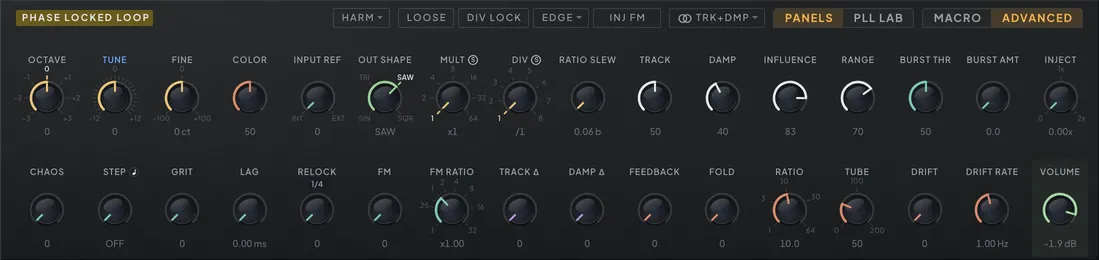
Make a note lock solid and weighty, then loosen the loop until the pitch has to fight its way to every note. The Phase-Locked Loop (PLL) is Phaseburn One’s main voice, and the fight is the sound.
A phase-locked loop comes from radio engineering. One oscillator listens to a reference signal, measures how far its phase has drifted, and corrects itself continuously. In every textbook application the loop exists to erase that error as fast and as invisibly as possible. Phaseburn One is built on the opposite idea: the error is the interesting part. An ordinary oscillator jumps to a new pitch instantly and perfectly. A loop has to get there — it notices it is wrong, accelerates, brakes, overshoots, corrects again — and that whole struggle happens at audio rate, in the waveform itself. Engineers spend careers suppressing this behavior. Here it has knobs.
Keep the loop tight and it locks: solid pitch with analog character, because the correction never fully rests — a live feedback process breathes under the tone. Loosen it and the chase becomes audible: the oscillator glides toward each note, overshoots, rings around the target before settling. Fast lines turn into sirens; held notes with the loop barely holding on turn into growls.
Three knobs are the core, and they map directly onto the physics:
TRACK sets how fast the oscillator chases the reference. High values snap to the note; low values drag, so every interval becomes a glide the loop has to earn. Push TRACK high enough and it overtracks — the loop overshoots in bursts.
DAMP sets how hard the correction brakes. Heavy damping eases into the target pitch. Light damping arrives too fast, overshoots, and rings — a pitch that wobbles around the note before it lands.
INFLUENCE sets how much the reference pulls at all. Back it off and the oscillator only half-believes the note you played; the loop drifts, leans, and finds its own way there.
One move skips the chase. A transient (Chapter 4 — Modulation) Sweep on the PLL moves the reference and the oscillator’s own centre together, so the drop plays exactly as the Sweep draws it, and TRACK and DAMP shape only whatever chase is left over. For a slow drop that overshoots and rings into the note, route an envelope or a step lane to the reference’s OCTAVE or TUNE instead: that moves the target alone, and the loop has to follow it.
On the full panel none of these are macros over hidden parameters — they are the loop’s actual coefficients, scaled to musical ranges. (The MACRO view, the next section, is the one place the module does offer macros, and even there they drive these same knobs.) The reference the loop chases is an oscillator of its own, and you can move the target: transpose it with the octave and tune controls, or detune it slightly with the fine control so the lock leans and slowly beats. OCTAVE reaches three octaves down from whatever you play, and TUNE all the way down adds a fourth, which on a low note takes the reference under hearing — territory with its own rules, described at the end of Pushing the loop below.
FEEDBACK, on the advanced row beside FOLD, bends the loop’s own output back into that reference pitch. At zero the reference is clean. Turn it up and the oscillator’s own waveform stretches and squeezes the reference’s period at audio rate — at full, up to two octaves above the note and most of an octave below it — so the lock has to keep re-finding it: a growl first, then a restless lock that never quite settles. The note itself stays in tune: the wave adds as much time to one half of the cycle as it takes from the other, so the pitch you hear is the one you played, at any setting, on any note (with the FM knob at zero — deep FM moves the reference on its own). The knob moves smoothly over a sounding note and is a modulation destination, listed beside the reference’s octave and tune, so an envelope or a slow LFO on it makes a note that fights harder the longer it is held. It is also one of the knobs the COLOR macro drives (see the next section).
MACRO view
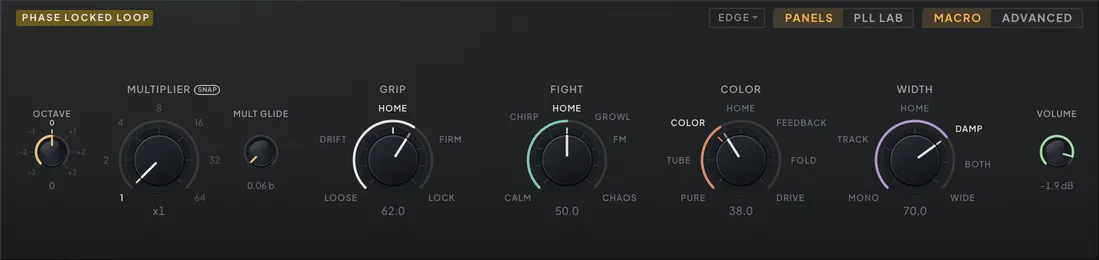
Play the loop with four dials instead of twenty. At the far end of the PLL header sits a MACRO / ADVANCED switch — the lens the module is looked at through, and the loop opens on MACRO. There the two knob rows are gone and five large dials stand in their place: MULTIPLIER, and the four macros GRIP, FIGHT, COLOR and WIDTH. OCTAVE, MULT GLIDE and VOLUME keep their ordinary size beside them, and the detector selector stays in the header — the detector is the loop’s circuit, not one of its settings.
MULTIPLIER is the full panel’s MULT knob, enlarged: the same ×1 to ×64 travel and the same S badge, so the stops you learn in one view are the stops in the other. No macro takes it over, because the ratio is a musical choice rather than a character. MULT GLIDE beside it is the full panel’s RATIO SLEW — the same length of time for any move, an octave or five.
The four macros are the character. Each one sweeps a curated path through the parameters it owns: a run of settings tuned by ear, with the dial travelling between them, so every position on a macro is a place somebody stopped at rather than an average of the two ends. Switches flip where they sit on the path, which means a macro can change the loop’s wiring as it turns and not only its numbers. Every parameter a macro owns is a control on the ADVANCED lens, so whatever a dial does you can watch it happen — and undo it by hand.
GRIP — how hard the loop holds the note. TRACK, DAMP, INFLUENCE and RANGE move together along it, and DIV LOCK and LOOSE flip where the path puts them. One end is a loop that barely believes you, the other is one that clamps down.
FIGHT — how much is thrown at the loop. BURST’s threshold and amount, INJECT’s amount with its INJ FM / INJ LOCK choice, the FM operator’s depth and ratio, CHAOS and RELOCK. The burst threshold rides as bite — how far below TRACK the threshold sits — so overtrack keeps biting the same way wherever GRIP has left TRACK, instead of going quiet every time GRIP moves.
COLOR — the coloration stage as one travel. It moves the COLOR knob, FOLD, TUBE and FEEDBACK together. The color mode and RATIO stay where the patch set them, so the same dial colors a HARM patch with its partial and a SAT patch with its drive. Below HOME the path takes the stage apart: first COLOR, the color stage and the tube both at full; then TUBE, the tube alone with the color stage clean; and PURE at the bottom, the bare loop with nothing added. Above HOME it pushes: FEEDBACK adds the loop’s own feedback at full on top of full color and tube, FOLD trades that feedback for the fold-back clang at full, and DRIVE at the top throws everything in at once — the TUBE dial past 100 %, all the way to 200 %, the feedback at full and the clang at half. Coloration has its own section further down this chapter; COLOR is that whole block on one dial.
WIDTH — how far apart the two loops are. It drives whichever stereo pair the loop is set to (see Stereo from the loop below). Under the default pair, Track + Damp, that is TRACK Δ and DAMP Δ, one flavour on each side of HOME: TRACK below it tempers the two loops’ tracking alone, DAMP above it their damping, then BOTH together and WIDE with both offsets at 70 %; MONO at the bottom collapses the pair. Every landmark is the same amount of temper on every patch: WIDE is 70 % wherever GRIP has left TRACK and DAMP. The stereo image here is two loops behaving differently rather than a widener, so each loop stops at the ends of TRACK’s and DAMP’s own ranges — with GRIP parked near either extreme the pair spreads to the side that still has room. Under Phase + Detune the same dial moves PHASE and DETUNE along the same curve, each by the same share of its own knob’s travel, and the TRACK and DAMP landmarks read PHASE and DETUNE. The pair itself is picked on the ADVANCED lens.
What the macros leave alone. DIV, TUNE, FINE, INPUT REF, OUT SHAPE, the color mode, RATIO, STEP, GRIT, LAG, DRIFT and DRIFT RATE keep whatever the preset set for them. They have no dial in the MACRO view; switch to ADVANCED to change them, and switch back.
Your sound lives at twelve o’clock. Every macro opens straight up, on the landmark marked HOME, and handing the loop to the macros never changes what you hear: the patch as it stands is grafted onto that position. Choosing the lens is not what hands it over — MACRO and ADVANCED only decide which controls you are looking at, and a patch you merely look at is a patch you have not touched. Moving a dial is the hand-over — or pointing a modulation route at one, below — and from that moment the layer is driving. Turning a dial morphs from your sound into the curated path — down one way, up the other — and turning it back to HOME brings the patch back, exactly. Load any preset and the same thing happens: the dials re-centre and the loaded sound becomes the new HOME. The other scale words are the path’s landmarks; the one nearest the pointer lights up.
The lens is not the layer. Switching between MACRO and ADVANCED changes what you look at and nothing else — it neither starts nor stops the layer: the macros keep driving the loop and an LFO riding COLOR keeps sweeping. The knobs a macro owns follow it while it does. Turn a dial and you can watch which knobs move and how far, so the rows always read as the sound you are hearing rather than as the patch underneath it.
Touching one hands that macro back. The macro gives up the knobs it owns, holding the loop exactly as it stood, and your edit lands on top of that. Its dial returns to HOME, where your new sound becomes the sound it grafts. The other three carry on driving, on the readings you left them at — one edit in ADVANCED never stops a performance on the other three dials. The one exception is TRACK, which FIGHT reads to place its bite: a TRACK edit hands FIGHT back together with GRIP, and BURST THR stays exactly where it was.
Every hand counts as touching it. A MIDI knob you have learned to one of those controls, an automation lane, your host’s own parameter list: each hands its macro back the same way the mouse does, and the value you send lands the same way. So a hardware knob mapped to TRACK does something whichever lens is showing, and so does a lane you drew before you ever opened MACRO.
Dials go home only when something edited what they hold, or a modulation route pointed at a dial. A new sound arriving — a preset load, or a session your host restores — re-centres all four: every dial takes the new sound as its HOME. So does a route aimed at a dial while the macros were not yet driving. Nothing you hear moves in any of these cases.
Automation and modulation. The four macros are host parameters like any other and modulation destinations in their own right, so an LFO on COLOR sweeps the whole coloration path, and one on GRIP or FIGHT flips the switches that macro owns as it passes them. Routing a modulator at a dial is itself what hands the loop to the macros: you never have to touch the dial first. The four dials re-centre on HOME, where the patch sounds exactly as it stands, and the route moves its dial from there, so the route is heard the moment you make it, and a session saved with one plays it from the first note it reopens on. And because the layer stays engaged behind the ADVANCED lens, that LFO keeps working whichever view is showing. The other side of that deal: automating a parameter a macro owns hands that macro back rather than fighting it — the lane wins, that dial goes to HOME, and the other three carry on. Modulation routed to one of those parameters in the MOD matrix is the exception, and still applies on top of whatever the macro resolved: the macro sets the base, the modulator moves around it, and no modulator ever counts as an edit.
The layer belongs to the patch. Whether the macros are driving is saved with the preset, not with the window: a patch handed over to the macros comes back driving them in every format, with the editor closed and in an offline bounce — which is what makes an LFO or a mod sequencer routed at GRIP, FIGHT, COLOR or WIDTH a route you can rely on rather than one that only plays while the right panel is open. The preset also stores the values the macros were resolving, so anything that reads the file — another view, an older build — still gets the sound. The dials themselves always open at their rest positions: a preset is a place to explore from, not a dial diagram to restore.
Pushing the loop
Sirens, growls, interval chases and squelching acid lines all come out of the same handful of controls, because they are all the same circuit failing in different directions. No matter how hard you shove the loop, it always wants to come home — every excursion bends back toward the note you played. That gravity is what keeps the chaos playable.
MULT, DIV and DIV LOCK. The loop can track at a ratio of the reference instead of the note itself. MULT climbs in doublings, octave by octave; DIV divides. Together they set the ratio the loop chases — note × MULT ÷ DIV — and RATIO SLEW sets how long any move between ratios takes: an octave or five, the same length of time, so interval sweeps become something you perform rather than program.
Both ratio knobs carry an S badge, and both arrive with it lit. Snapped, they land only on the whole ratios above, one detent per drag step. Switch the badge off and the same knob sweeps everything in between — ×3, ×5.5, ÷2.75 — for ratios that beat against the note instead of consonating with it. Toggling the badge never moves the sound: it changes how the knob travels, not where the loop is, so you can find a ratio free-hand and then relight the badge to keep the dial on the detents.
Alone, MULT only ever reaches octaves, which the OCTAVE knob already does. DIV is what makes the ratio musical: it is the second divider of every hardware frequency synthesiser, and dividing by something that is not a power of two lands the loop on intervals no amount of MULT can reach. Divide by three and the oscillator drops a twelfth below the note; by five and by seven it descends the undertone series, the mirror image of the harmonic series and the reason organ builders bothered with subharmonics at all. Combine the two and the ratios turn into intervals: MULT 4 over DIV 3 is a perfect fourth above, 8 over 5 a minor sixth, 8 over 3 an octave and a fourth. Because the whole ratio is one number to the loop, DIV inherits everything MULT has — the glide, the modulation and the snap grid.
The DIV LOCK switch — a divider lock, and a different control from DIV — decides what “track at a ratio” means. Off, the loop chases the ratio the way it always has: the correction never finds a true resting point at the target interval, and the residue is a gritty shimmer of extra frequencies clustered around the note. On, a divider goes into the loop’s feedback path, and the oscillator genuinely locks to the ratio — MULT and DIV become an interval selector with the solid, glued quality of a true lock (on EDGE and XOR the ratio holds but keeps their grain), a slow hunting wobble when disturbed, and an audible swoop as it captures each new note. Ratios that are not whole harmonics need that lock to hold their tuning; without it they are a pitched fight rather than a note, which is its own instrument — and in the low register even a whole harmonic sits under the played pitch without it, which is why a new patch starts with DIV LOCK on. INIT plays the loop on the EDGE detector, locked at ×1, with BURST at zero and a saw-shaped output, and with the PLL strip’s highpass on (see the mixer chapter (Chapter 5 — Mixer & Patchbay)): a plain lock that every move in this section starts from.
Four detectors. The part of the loop that measures being wrong is the phase detector, and the detector selector picks its temperament. PD is a smooth analog-style comparator: it measures continuously and produces a rounded, elastic error — the misbehavior stays melodic. EDGE reacts only at signal edges, so the error arrives in abrupt decisions: locks are snappier, failures are harsher, and the same TRACK and DAMP settings turn noticeably more aggressive. XOR is the classic logic-gate comparator: it settles a quarter-cycle off-center and lets a fast ripple leak into the correction as a constant buzz, and because it hard-limits whatever reference it hears, it will happily lock onto odd harmonics instead of the note — a detector with opinions. S&H samples the loop’s position once per reference cycle and holds it, so the correction moves in steps: quiet and steady when the loop is relaxed, audibly hunting in staircase wobbles when TRACK and INFLUENCE push it — and with GRIT feeding the detector noise, the held value itself turns random, a pitch that stumbles around the note. A companion parameter, edge sensitivity, sets how small an edge still counts for the edge-triggered detectors — it has no panel control and is reachable only as a host automation parameter.
Switches that take modulation. DIV LOCK, the INJ LOCK / INJ FM switch and the detector are modulation destinations, so a step lane can throw the divider lock in on one beat and leave the loop to fight on the next. A route adds to what the button holds; a route on the detector walks through PD, EDGE, XOR and S&H, each taking an equal share of its travel. While a route drives one of them the control glows and shows the state the loop is actually running rather than the one you clicked, so the detector selector always names the detector in use. Routing itself is covered in the modulation chapter (Chapter 4 — Modulation).
The reference below hearing. Wind OCTAVE far enough down on a low note and the reference falls under the bottom of the audio range — a few cycles per second, then less than one. The loop keeps working; it stops being about pitch. Its edges become rhythm, and the controls you were using to tune a note now shape a pulse. PD compares phase continuously, so it simply follows the reference down: the oscillator sits on it, and with OUT SHAPE toward pulse the voice turns into a click train you play from the keyboard, or a drone you can beat against another voice. EDGE has nothing to measure between one edge and the next, so it ratchets — long still stretches broken by a fast chirp each time the reference crosses. XOR breaks into bursts. S&H holds its last measurement until the next edge arrives, which down here is a very long hold; below a couple of cycles per second it wanders rather than tracks, exactly as hardware sample-and-hold loops do. Nothing in the signal path strips this material out: sub-audio output moves woofers and pumps a limiter at the reference rate, so the master high-pass is worth switching on when a patch lives down there.
Patches saved before the reference could go this low keep the behavior they were written against, where it stopped at the bottom of hearing and the lowest OCTAVE settings on a bass note all sounded the same. The switch that carries that choice, PLL Ref Floor, has no panel control and is reachable from a host’s parameter list; setting it to FULL opens an older patch up. It also clears a tuning error the old limit caused — with the reference pressed against the bottom the loop’s hunt was cut off on one side only, which dragged the pitch of low EDGE patches sharp by as much as a third of an octave.
Injection, bursts, and the loop lab
Past the detectors and the lock, the loop takes passengers: signals fed into its correction path on purpose, a chaos drive that takes its stability away, and a rack of four ways to break the servo itself. This is where growls, whoops and glitches live.
BURST and INJECT. BURST is overtrack intensity: push TRACK above the threshold you set with BURST THR and the loop’s own overshoot feeds back into the correction as extra kick, scaled by BURST AMT — chirps, whoops and squeals that always resolve back to pitch. The kick is capped at one and a half times the pitch the loop is chasing, so a high BURST AMT no longer settles a low note sharp; a patch saved before the cap keeps the uncapped kick it was voiced with. The threshold works in every color mode, so it is always on the panel. INJECT feeds the reference straight into the correction path, from a subtle undertow of growl at the bottom of its range to controlled chaos at the top. A switch beside it picks what the injection is: INJ FM modulates the pitch with the reference waveform for sideband growl, while INJ LOCK is true injection locking — the reference captures the oscillator and holds it within a range set by the amount, so detune the reference and the tone bends, fights, then breaks free at the edge of the capture range and snaps back when you return. (It is a different lock from DIV LOCK — one couples the injection, the other divides the feedback path.) RANGE narrows the main loop’s own lock bandwidth — the chase, not the injection — so low settings hunt slowly toward the note like a worn analog circuit.
CHAOS. The loop normally settles at a stable equilibrium; CHAOS takes it away. The knob — first in the advanced row — overdrives the detector’s error curve until competing lock points appear, raises the loop gain past where the servo can settle, and slows the error smoothing so every correction arrives a little too late — while a slight keytracked wander keeps the fight seeded. Low settings ring the loop into a vibrato-like growl. The middle mode-hops between rival equilibria in period-doubled warbles. At the top the correction scribbles chaotically around the note without ever abandoning it, because everything still happens inside the loop’s own limits — RANGE, the integrator’s saturation and the detector all keep their say, so each detector breaks down with its own accent.
The color stage adds harmonics drawn from the loop’s core, with a mode menu picking the core flavor. HARM adds an upper partial that climbs with MULT — bright, glassy, sometimes gloriously rude. The COLOR knob, on the basic row between FINE and INPUT REF, is how much of it: over the first half of the dial the partial rises on top of the shaped wave, with both at equal strength in the middle; over the second half the shaped wave gives way, until at full only the partial is left. Below full, OUT SHAPE is still audible under it. SAT drives the output itself into saturation, from clean at zero to a soft square rasp at full, and there the COLOR knob is the drive. FOLD synthesizes a fold-back partial — the clang of a harmonic reflected off a virtual rate at RATIO times the note — with FOLD setting its level and RATIO choosing the inharmonic interval, which stays constant across the keyboard because the fold rate tracks the note. Every knob works in every mode: the fold-back pair layers onto HARM and SAT at FOLD’s level, and in FOLD mode the COLOR knob drives the carrier and the clang into saturation together, from clean at zero. The stage has no on/off switch: COLOR at zero is its bypass in every mode, and with FOLD at zero as well nothing of the stage is heard. If a host automation lane or a learned controller still holds the old COLOR switch off, COLOR, FOLD and RATIO grey out as they did before, and the host or the controller is where to turn it back on. The FM operator and HARM’s partial are tapered at the edge of the audio band, so the top of the keyboard rings cleanly instead of folding back into hash. An FM operator frequency-modulates the reference the loop chases, at a ratio of the pitch — the FM and FM RATIO knobs in the advanced row. An envelope-to-FM depth — for attacks that clang and then settle — exists as a host automation parameter only, with no panel control.
The loop lab. Four knobs break the servo itself — they follow CHAOS in the advanced row — each one a real defect of hardware loops pushed to musical extremes, each a modulation destination, and all of them at zero by default, where the loop is exactly the stock circuit. Each reads in the unit it actually sets: STEP and LAG in milliseconds, CHAOS, GRIT and RELOCK as a percentage of full throw. The whole row keeps one direction rule: clockwise is more or longer, never faster, and fully counter-clockwise is off. RELOCK on FREE, below, is the one control that also speeds up as it turns.
STEP samples-and-holds the whole correction, and the knob is how long it holds — half a millisecond at the shortest, a third of a second fully clockwise, and OFF at the bottom of the sweep, where the correction runs continuously. As the hold lengthens the pitch hunting stops being smooth and starts moving in discrete steps — robot chirps, bubbling glitch arps, gated glissandi. A small quarter-note switch beside the STEP caption changes what times those steps: dark, the hold is that millisecond value; lit, the dial itself becomes a tempo division from 1/128 to 4/1 (with OFF at the counter-clockwise stop), and a fresh hold is taken on every grid line, so the steps ride the song rather than the servo. Clicking the switch by hand carries the sound across the change — it seeds the division nearest the hold you had, or the hold nearest the division — while a host or learned-CC write of the same switch moves the switch and nothing else.
GRIT feeds noise into the phase detector upstream of the loop smoothing, so TRACK sets its color: analog fizz at low drive, a drunk wobble in the middle, a full random stumble at the top — every detector gets the trick the old noise reference reserved for S&H. LAG inserts a transport delay into the correction path, up to thirty milliseconds, so the loop steers by where the note was: metallic servo flutter at short settings, standing-wave hunting and time-smeared chases at long ones.
RELOCK opens and closes the loop in a cycle: while open the corrections freeze and the pitch sags away; at close the loop wakes to everything it missed and fights its way home — the capture swoop, the best sound a PLL makes, on demand. A small pill under its caption decides what drives that cycle. On FREE — the pill unlit — the one knob raises rate and depth together, from a slow breath up to twelve times a second. Pick a division instead and the cycle rides the tempo: the loop opens for the first 45 % of each division and fights its way home over the rest, which leaves the knob as the depth of the dive alone — how far the pitch is allowed to sag before the loop grabs it back. A new patch starts on 1/4 with that depth at zero, so the loop stays whole until you open it; at zero RELOCK is off in every mode.
What the synced grid follows. STEP and RELOCK divisions sit on the song grid a synced LFO uses. While the DAW plays — or an external MIDI clock drives the standalone — its playhead places that grid and a key moves nothing; with the transport stopped, the phrase you start from a key restarts it, and legato keys inside the phrase leave it running. A stereo PLL’s two loops share the grid while synced; unsynced, their STEP and RELOCK cycles run a little apart, as they always have.
Stereo from the loop
Spread the PLL across the field from inside the loop, with no widener anywhere in the chain. The PLL runs two complete loops, one per channel, and a stereo pair menu decides what makes them differ. It sits in the PLL header on the ADVANCED lens, just after the INJ LOCK / INJ FM switch — a stereo glyph beside TRK+DMP or PHS+DTN — and the pair it names takes the two stereo cells of the advanced row, between FM RATIO and FEEDBACK.
Track + Damp — the default, and the way the PLL has always spread — shows TRACK Δ and DAMP Δ. They temper the two loops apart: one side chases a little faster or brakes a little harder than the other, so the channels arrive at every note differently. The difference lives in how each side moves into and around a note, so the image moves with the playing, and this is the only pair under which DRIFT gives each side a wander of its own (see Coloration below).
Phase + Detune shows PHASE and DETUNE, two steadier kinds of width. PHASE shifts the right channel’s wave against the left, read in degrees: a still, wide image that does not move with the loop’s temper, and holds exactly on every detector as long as GRIT, CHAOS and free-running STEP and RELOCK sit at zero — the right loop runs those a little apart from the left, while synced STEP and RELOCK stay exact. DETUNE pulls the two loops apart in pitch — the left flat, the right sharp by the same amount — so the pair beats like a chorus while its centre stays in tune. The knob spends its first half on the first 12.5 cents, where most chorus lives, and keeps the rest of its travel for wide, seasick spreads. On EDGE and XOR a detuned pair also carries a slow roughness, a side effect of how those detectors lock at a fractional ratio.
Only the selected pair sounds. The other keeps its values, so switching back and forth is a fair comparison, and the switch glides rather than jumps. Turn the sounding pair to zero and, after a quarter of a second, the two loops fold back into one — an exactly mono PLL, reached without a click — while a route that only grazes zero does not flicker the image on and off. All four knobs are modulation destinations — PHASE and DETUNE as PLL Stereo Phase and PLL Stereo Detune, with quick-assign on either knob’s right-click menu — and the MACRO view’s WIDTH dial drives whichever pair is selected. A route on PHASE or DETUNE acts only under Phase + Detune; under Track + Damp it does nothing, just as the knobs do nothing there. A route on PHASE adds over its 0–180° travel, and a stepped source glides into place at the knob’s own pace, so a full-depth LFO stays smooth up to about 10 Hz and rounds into a triangle above that. A route on DETUNE adds cents per side — a full route is the knob’s whole 50 cents — on top of the knob, after the knob’s own glide, so it follows its source directly. In the PLL LAB the SERVO pad draws its two stereo dots only under Track + Damp, where the two loops genuinely have different tempers.
| Parameter | Range | Default | What it does |
|---|---|---|---|
| PLL FM Amount | 0 – 2 | 0 | FM depth on the loop's output oscillator — from gentle shimmer to clangorous sidebands. |
| PLL FM Ratio Float | x0.10 – x32 | x1 | The FM modulator's frequency as a multiple of the pitch — whole numbers stay harmonic, fractions clang. |
| PLL Track Speed | 0 – 1 | 0.5 | How fast the loop chases the reference — low drags and glides, mid locks solid, high overtracks into bursts. |
| PLL Damping | 0 – 1 | 0.5 | How hard the correction brakes — low overshoots and rings around the pitch, high settles smoothly. |
| PLL Multiplier | x1 – x64 | x1 | Locks the loop onto a multiple of the reference, ×1 to ×64 — continuous, so ×3 and ×5.5 are reachable with SNAP off. |
| PLL Mult Snap | Off / On | On | SNAP for MULT — constrains the knob to the whole doublings ×1 … ×64. Toggling it never moves the ratio, only how the knob travels. |
| PLL Divider | /1 – /8 | /1 | Divides the loop ratio, ÷1 to ÷8, so MULT ÷ DIV reaches intervals octaves cannot — undertones below, fourths and sixths above. |
| PLL Divide Snap | Off / On | On | SNAP for DIV — constrains the knob to the whole divisors ÷1 … ÷8. Toggling it never moves the ratio, only how the knob travels. |
| PLL Color Mode | HARM · SAT · FOLD | HARM | Color flavor: HARM adds a bright upper partial, SAT drives into warm saturation, FOLD synthesizes a keytracked fold-back clang. The COLOR macro leaves it where the patch set it. |
| PLL Fold Amount | 0 – 1 | 0 | Level of the synthesized fold-back clang — layers onto any color mode, not just FOLD. |
| PLL Fold Ratio | 1.0 – 64.0 | 10.0 | Virtual fold rate as a multiple of the note pitch — which inharmonic interval the clang lands on, constant across the keyboard. |
| PLL Divider Lock | Off / On | On | DIV LOCK — a divider in the feedback path makes MULT and DIV intervals the loop genuinely locks to. A modulation target: a positive push lights it; while lit, a route of −50 % or deeper switches it off. |
| PLL Detector | PD · EDGE · XOR · S&H | EDGE | How the loop measures being wrong: PD is smooth, EDGE snaps, XOR buzzes, S&H holds and hunts in steps. A modulation target; a route steps through the four evenly. |
| PLL Ratio Slew Time | 0 – 1 | 0 | Glide length for MULT and DIV changes, in beats — from a sixteenth-note snap to a slow eight-beat sweep. |
| PLL Ref Octave | -3 · -2 · -1 · 0 · 1 · 2 · 3 | 0 | Octave shift for the reference oscillator — the loop chases the transposed target. Three down, or four with TUNE at -12, takes it under hearing on low notes, where edges become rhythm rather than pitch. |
| PLL Ref Tune | -12 … 12 (25 steps) | 0 | Semitone offset for the reference — sets fixed intervals for the loop to chase. |
| PLL Ref Fine | -100 ct – +100 ct | +0 ct | Fine detune of the reference; small offsets make the lock lean and slowly beat. |
| PLL Chaos | 0 % – 100 % | 0 % | Drives the loop past stability — wobble, then mode-hopping warbles, then bounded chaotic scribble that still gravitates to the note. |
| PLL Feedback | 0 – 1 | 0 | Feedback — the loop's own output bent back into its reference pitch. 0 is clean; turning it up adds growl and makes the lock restless. The COLOR macro drives it. |
| PLL Influence | 0.0000 – 1.0000 | 0.1408 | How strongly the reference pulls — low lets the pitch drift and find its own way to the note. Under DIV LOCK it is stiffness: the loop still holds at the bottom, and its gain rises as you turn it up. |
| PLL Volume | -inf dB – 0.0 dB | -6.0 dB | PLL level in the oscillator mix. |
| PLL Pan | L100 – R100 | C | Stereo balance of the PLL voice — constant-power, transparent at centre, and a modulation destination. |
| PLL Stereo Damp Δ | 0 – 0.5 | 0 | Splits damping between L and R so each channel rings differently — stereo width from the loop itself. |
| PLL Glide | 0.0 – 5000.0 | 0.0 | Always-on portamento: how long pitch takes to reach each new note, up to 5 s — per octave under the RATE curve, the whole move under TIME, the time constant under EXP (the curve button under the slider). That curve is the law Legato follows too. |
| PLL Burst Threshold | 0 – 1 | 0 | Error level that trips a burst — lower thresholds make the loop panic sooner. |
| PLL Burst Amount | 0 – 20 | 0 | How hard the loop is kicked when the error trips the threshold — chirps, whoops and squeals. |
| PLL Color | 0 – 1 | 0.5 | COLOR — how much the coloring stage does; at 0 it leaves the wave clean in every mode, FOLD's clang aside. In HARM the partial rises over the shaped wave to the middle, then the wave gives way until only the partial is left at full; in SAT it is the drive; in FOLD it pushes the clang and carrier into saturation together. The COLOR macro drives it. |
| PLL Range | 0 – 1 | 0.5 | Lock bandwidth — low hunts slowly toward the note like a worn analog circuit, high locks fast. |
| PLL Stereo Track Δ | 0 – 0.5 | 0 | Splits track speed between L and R — the channels arrive at each note at different times. |
| PLL Stereo Phase | 0° – 180° | 0° | Runs the right channel's wave ahead of the left, up to half a cycle — a steady, still wide image. Shown with the PHASE + DETUNE pair, and a modulation destination (PLL Stereo Phase) heard only there; a stepped route glides into place. |
| PLL Stereo Pair | Track + Damp · Phase + Detune | Track + Damp | Which pair the two stereo knobs drive: TRACK Δ + DAMP Δ (the two loops tempered apart) or PHASE + DETUNE (a still offset and in-tune beating). |
| PLL Stereo Detune | 0 ct – ±50.0 ct | 0 ct | Detunes the two loops apart, left down and right up, with the pitch centre in tune — chorus-like beating. The first half of the knob covers 12.5 cents. A modulation destination (PLL Stereo Detune), adding cents per side, heard only with the PHASE + DETUNE pair. |
| PLL Precision | Off / On | TIGHT | LOOSE — lit, the loop runs the legacy math: baggier chases, narrower hunting swing. Dark (the default) is the strict, faster-locking loop. Hosts show it as PLL Precision. |
| PLL Injection Amount | 0 – 2 | 0.00246875 | Injects the reference straight into the correction path — a subtle undertow of growl at the bottom of the range, controlled chaos at the top. |
| PLL Injection Mode | Off / On | Off | INJ FM / INJ LOCK — true injection locking instead of FM: the reference captures the pitch within the amount's range. A modulation target: a positive push lights it; while lit, a route of −50 % or deeper switches it off. |
| PLL Out Shape | 0 – 1 | 0.6666667 | Morphs the loop's output from sine through triangle and saw to square — brighter as it rises. |
| PLL Step | Off – 333 ms | Off | Sample-and-holds the loop correction — pitch hunting turns into discrete steps: chirps, glitch arps, gated glissandi. Clockwise is a longer hold, 0.5 ms to a third of a second; fully counter-clockwise is off. |
| PLL Grit | 0 % – 100 % | 0 % | Noise into the phase detector, colored by TRACK — analog fizz at low drive, drunk wobble, full random stumble at the top. |
| PLL Lag | 0.00 ms – 30.0 ms | 0.00 ms | Transport delay in the correction path — the loop steers by where the note was: servo flutter short, time-smeared hunting long. The readout is the delay's reach, 0 to 30 ms; the correction sits fully on the delayed path from half travel up. |
| PLL Relock | 0 % – 100 % | 0 % | Cyclically opens the loop and lets it recapture — pitch sags while open, then swoops home. With a division on its badge the knob is the depth of the dive and the cycle rides the tempo; on FREE one knob raises rate and depth together. |
| PLL Step Sync | Off / On | Off | Locks STEP's hold length to a tempo division instead of milliseconds. The free STEP value and any modulation on it are ignored while lit. |
| PLL Step Division | Off … 1/128 (19 steps) | Off | STEP's hold length as a tempo division, 1/128 to 4/1, with OFF below the shortest. Used while the STEP sync badge is lit. |
| PLL Relock Division | Free … 1/128 (19 steps) | 1/4 | RELOCK's time source: FREE, or a tempo division from 1/128 to 4/1 that the open-and-recapture cycle locks to. |
| PLL Macro Grip | 0 – 1 | 0.5 | How hard the loop holds the note — one tuned path through TRACK, DAMP, INFLUENCE, RANGE and the DIV LOCK and LOOSE switches. The GRIP dial of the PLL's MACRO view. |
| PLL Macro Fight | 0 – 1 | 0.5 | How much is thrown at the loop — one tuned path through BURST, INJECT, the FM operator, CHAOS and RELOCK. The FIGHT dial of the PLL's MACRO view. |
| PLL Macro Color | 0 – 1 | 0.5 | The coloration stage on one dial, moving COLOR, FOLD, TUBE and FEEDBACK. HOME is your patch; below it COLOR (color and tube at full), TUBE (the tube alone) and PURE (the bare loop); above it FEEDBACK (full color and tube with the loop's feedback), FOLD (the fold-back clang instead) and DRIVE (everything, the TUBE dial past 100 % to 200 %). The COLOR dial of the PLL's MACRO view. |
| PLL Macro Width | 0 – 1 | 0.5 | How wide the loop plays — the selected stereo pair (TRACK Δ + DAMP Δ, or PHASE + DETUNE), the same way on every patch. The WIDTH dial of the PLL's MACRO view. |
| PLL Tail | 0.0 ms – 5000.0 ms | 0.0 ms | Lets the PLL ring past release — extra fade time after the shared envelope has closed. Flip SYNC to set it as a note division instead. |
| PLL Tail Sync | Off / On | Off | Locks the PLL tail to the host tempo — the fade length follows a note division instead of a time in milliseconds. |
| PLL Tail Div | 1/1 … 1/128 (18 steps) | 1/8 | The note division the PLL tail rings for when SYNC is on. |
| PLL Input Ref | 0 – 1 | 0 | INPUT REF — blends the PLL's own reference against whatever is patched into PLL REF: at INT the loop is untouched, toward EXT it chases the incoming signal. A modulation target. |
| PLL Pitchbend | Off / On | On | Lets the pitch wheel bend the PLL oscillator; off, it holds the played pitch while the others bend. On by default. |
| PLL Key Tracking | Off / On | On | Lets the PLL follow the keys; off, it holds a C3 (Octave, Tune and Fine on top) as a fixed layer while the others play the notes. On by default. |
PLL Lab
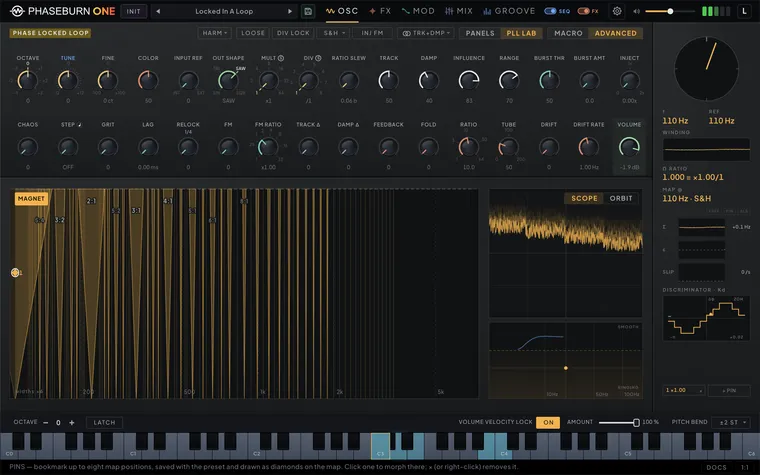
Stop steering the loop by ear alone — look at it. At the far end of the PLL header sits a PANELS | PLL LAB strip; switch views and both PLL knob rows stay put while the rest of the page becomes a live chart of the loop itself: the LOCK MAP, a phase-error scope with the servo pad, and a telemetry column.
The LOCK MAP plots the loop’s ratio across and the coupling — INFLUENCE — upward. The amber wedges are Arnold tongues: the regions where a pushed oscillator gives in and locks to a whole-number ratio, the broadest labeled p:q, the simple ratios labeled even where their tongues run narrow. Between the tongues lie the slip regions, where the loop keeps losing whole cycles and the loss is audible as sidebands; most of the growl in this chapter lives there. The picture is computed, not painted: tongue positions come from number theory, their widths from phase-locked-loop theory calibrated against this exact oscillator, and the map redraws instantly when you touch a knob that reshapes it. The detector redraws the world — S&H is the classic-tongues detector, near-textbook wedges; EDGE runs genuinely chaotic territory that theory can only sketch, so its wedges draw dashed and the map says so. Some detector families lock in bands too narrow to draw at all; the map then magnifies every tongue by one common factor and owns up in the corner — widths ×N — so the proportions stay honest while the picture stays playable. Zones whose pitch leaves the audible band dim out, iso-pitch guides cross the wedges so you always know how high you are, and the band beyond MULT’s reach at the current DIVIDE stays shaded, with the reason on the help line.
And the map is a control surface. Dragging on it turns MULT and INFLUENCE as real host gestures your DAW records. A hollow ring is what you asked for; the amber dot, trailing a comet, is what the loop measurably does — under modulation the dot visibly leaves the ring, and a faint rectangle outlines how far your modulation can push it. With MAGNET lit the drag leans toward the computed rationals — 3:2, 5:4 — not the knob’s octave grid, because the tongues live between the octaves; switch it off and the drag is free (MULT’s S badge quantizes the knob only, never the map); Shift is fine motion; hold Alt and the cursor latches onto the nearest tongue wall and rides it — coupling swept along the boundary where lock gives way. The map always frames exactly what a drag can reach — MULTIPLIER’s six octaves, slid along the axis by DIVIDE — so the cursor is never off the picture; the view glides rather than jumps when DIVIDE moves it. PINS bookmark up to eight positions as numbered diamonds on the map; click one and the sound morphs there in a short glide, × removes it. Pins — along with the MAGNET and scope choices — save with your preset, so a patch ships its own map of sweet spots.
The map under DIV LOCK. Switch DIV LOCK on and the divider makes every ratio hold, so there are no tongues left to find, and the map crossfades into a second world. The whole field glows amber as lock territory, brighter toward the top and never dark at the bottom: up is still INFLUENCE, but now it reads as stiffness — the loop’s gain rises with it, and even at the bottom the loop holds. Across the glow runs an off-white lattice of pure intervals, the simplest drawn boldest — octaves, then fifths and fourths, then thirds, then a fainter rest — and every ratio MULT’s snapped detents reach at the current DIVIDE is always among them. The lattice is intonation, not physics: a scale to aim at, never a picture of where locks begin. MAGNET leans the drag toward a line, and Alt holds one interval at any distance while you ride the coupling up and down; while you drag, the help line names the nearest interval and how many cents the ratio sits from it. On S&H one flat line crosses the field: the sampled loop’s stability bound, above which it stops settling and hunts — the glow ends under it and a faint hatch marks the band above. With BITE on, the line errs on the safe side: at very low DAMP it can sit near the bottom of the map although the loop still settles well above it. An amber DIV LOCK lamp in the map’s corner says which world you are looking at, and the map follows the loop itself, not only the switch: a modulated GRIP that swings the loop in and out of the lock swings the map with it, once the new state has held for a quarter of a second. EDGE and XOR hold every ratio here too, but they keep their ripple — a lock with their grain in it, not a clean one.
The lab under the macros. The lab never locks you out. While the macro layer is driving the loop — from your first move of a macro dial, or from a patch saved that way — an off-white GRIP lamp marks what GRIP holds: the map, whose height is INFLUENCE, and the SERVO pad. Touch either anyway: a drag or a pin click behaves exactly like touching an ADVANCED knob — GRIP hands those controls back, its dial goes home, nothing jumps, and from there the chart is yours. + PIN only bookmarks the point the loop is running, GRIP’s resolved coupling included, and leaves GRIP where it is. Pins work the same in both lenses. Everything the lab draws follows what the loop is running, which the macros resolve every block, so the lab reads the same whichever lens the section wears, and what it measures comes from the running engine, never from the knobs.
Reading the loop
The loop’s life shows as motion, not flickering numbers. The STROBE wheel turns the loop’s phase difference into a pointer the way a strobe tuner does: frozen means locked; rotating means slipping, and the rotation speed is the slip rate; jitter is chaos; watch it settle after a note-on and you are watching capture happen. Under it, the measured frequency and reference hold steady enough to read, and the WINDING ribbon draws the measured ratio’s last few seconds against the dashed knob target — a RATIO SLEW glide or a sequencer riding DIVIDE reads as travel, echoed by a chevron crossing the map’s bottom edge.
The phosphor PHASE ERROR θe scope traces the correction gap over time — steady ramps count slips one lost cycle at a time, hash is chaos — and its ORBIT view replots the same signal against its own motion, a phase portrait: a closed ring while beating, a scribble filling the box in chaos. What a lock looks like depends on the detector. On PD the scope goes flat and the orbit shrinks to a dot. S&H does the same at low and mid references; on high notes a fine latch jitter shows, growing with the note, which is not a slip. EDGE corrects once per cycle, so even a held lock keeps a steady ripple that the scope enlarges to its full height — a lock reads as one steady shape repeating, never the ramps of a slipping loop, and never flat. XOR buzzes at twice the reference at full height, locked or not; its lock shows only in where that buzz is centred. The SERVO pad charts the loop’s temperament: TRACK across, DAMP upward, with the critical-damping line drawn and a live step-response curve showing how your settings approach a new pitch; two dots appear when TRACK Δ and DAMP Δ split the channels into genuinely different tempers — under the Track + Damp pair only. Drag the pad and you are turning TRACK and DAMP together. With LOOSE on, an amber LOOSE lamp sits on the pad and its damping chart — the ringing zone, the critical line, the bandwidth grid and the step response — steps aside, because the loose loop runs on other constants; the operating point still follows TRACK and DAMP, and a drag still sets both.
VITALS ribbons the loop filter’s internals: Σ is the integrator — the correction the servo is applying right now — between its ±Loop Limit rails, with a PIN lamp when it saturates (a pinned integrator is why a pitch parks off-center); ε is the working error; SLIP counts slips per second — that number is the spacing of the sidebands you hear. FREE blinks with RELOCK’s freewheel window at its true rate, and ALS warns when the ratio is high enough that the slip counter itself aliases. The DISCRIMINATOR draws the active detector’s transfer curve — the S-curve a bench PLL analyzer would show. Turn CHAOS up and the curve folds before your eyes until extra equilibria appear — filled dots stable, hollow unstable — which is the mechanism of the gurgle, not a metaphor for it; GRIT wraps the curve in its noise band, and a dot rides the curve at the strobe angle. Ω RATIO spells the target as ×MULT over DIVIDE; MAP @ records the reference and detector the chart is drawn for. With no note sounding, the strobe parks and the scope asks you to PLAY A NOTE.
Locking the loop to something else
Everything above assumes the PLL is chasing its own internal reference. It does not have to. The patchbay has a PLL REF jack, and whatever you patch into it becomes what the loop tries to lock to instead — including audio arriving from the host, whether Phaseburn is inserted on an audio track or fed from another track’s send. The INPUT REF knob — on the PLL section’s main row, just before OUT SHAPE — blends between the two: at INT the loop is exactly as described above, and toward EXT it hands the reference over. It is a modulation destination like everything else on that row, and it glides rather than steps, so an LFO or an envelope can open the loop to the outside world and close it again mid-note.
This is not pitch tracking, and it is more interesting than pitch tracking. The note you play still decides where the loop sits; the reference pulls it around within the capture range. Every control you already know becomes a way of shaping how the oscillator reacts to the incoming signal — how hard it grabs, how far it can be dragged, how it recovers:
- Feed a drum loop and open RELOCK and BURST. The pitch lurches on every transient and resolves back, so you get a tuned follower locked to the groove without a clock anywhere in the patch.
- Feed a bass line or a vocal, switch DIV LOCK on and bring MULT up. The loop locks a harmonic of the input rather than the input itself.
- Play deliberately against the incoming pitch. The servo cannot decide, and you get beating, chirping and slow chaotic wandering — the sound of a loop failing, which is the reason to have it.
- Switch the detector to XOR. It multiplies the input and the oscillator square together, which is ring modulation bound to the source’s rhythm.
Level matters. The comparator only registers an edge once the reference crosses ±0.02 — about −34 dBFS — so a quiet reference never triggers a lock at all. The level is the cable’s own gain in the ROUTING panel: every cable into PLL REF goes up to 4× (+12 dB) and the loop hears their sum; a sum around −6 dBFS keeps about 28 dB of margin over the comparator and stays inside the loop’s soft bound. No meter reads the sum itself: with one source patched, its strip meter on the Mixer (highpass off) shows the level its cable starts from, and each doubling of the cable adds 6 dB; for anything else, turn the cable up until the loop holds its lock. AUDIO IN’s own fader trims the input before everything it feeds, PLL REF included, with +12 dB above unity; the input is soft-clipped above −3 dBFS, so pushing it hard costs character rather than stability.
And silence stops it. With INPUT REF toward EXT and AUDIO IN patched into PLL REF, the oscillator falls quiet when the input does, and picks back up on the next thing that arrives — so a gated vocal, a sparse drum loop or a track that simply stops leaves silence behind rather than a drone.
This is not something the loop does by itself, which is why it is worth knowing about. The reference is a frequency input: it steers the oscillator, it does not feed it. Take the reference away and the oscillator keeps running, so the instrument does two things. Each loop times its own comparator’s edges, and when an edge goes missing it holds the pitch it was playing — the mean of the reference’s last cycle — and resumes at the next edge; a reference that is quiet, noisy or an octave under the loop is not missing while it sounds, only one whose edges stop. And it closes the oscillator down: the gate shuts 150 ms after the last usable edge, then fades over 10 ms. A patch saved before this law keeps the loop it was voiced with, and there each detector idles differently on a dead reference and drags the pitch somewhere of its own until the gate closes.
Two things decide how much say that has, and both can switch it off completely. INPUT REF is the depth — at INT the loop is keytracked, a silent input is none of its business, and nothing is gated; halfway, a dead input can only take half the level away. And it only counts AUDIO IN’s share of the reference: a loop steered by MORPH, by a filter or by an effect return is locking perfectly well with no audio coming in at all, so it is left alone. Patch both and you get the balance between them.
The threshold sits at −60 dBFS with a little hysteresis, well under the ±0.02 the comparator needs, so it only closes on material that could never have locked anyway; it stays under the edge timer as a floor. 150 ms is long enough that the gaps between syllables or the tail of a decaying note do not chop it up.
The detector matters here. XOR, S&H and EDGE all read the incoming waveform directly. PD compares phase against a signal the input does not carry, so it keeps following the played note and never holds — useful when you want part of the loop anchored.
PLL REF takes every output on the panel. Not just AUDIO IN: the four oscillators, both filters, every effect, and the four feedback taps can all be cabled into it. Patch MORPH, VECTOR or SUB and you have cross-modulation with no host routing at all — one oscillator steering the loop. Patch PLL into its own reference and the loop chases itself, which is what an analog PLL patched back into its own comparator does. Patch a delay feedback tap and the loop locks to what is circulating inside the delay rather than to what comes out of it.
There is no way to hurt anything doing this. The reference is summed behind its sources, so no patch can form a loop the engine has to reject, and the sum is bounded before it reaches the comparator — the PLL’s output level does not follow its reference level, so the gain never runs away however many cables you open.
What does vary is how far behind. The oscillators and PLL OUT are computed inside the voice, so they arrive one sample late — exactly how patching one analog oscillator into another’s reference input behaves. Everything downstream of the voice — the filters, the effects, the feedback taps — is computed after it, so it arrives one buffer late: a few milliseconds, set by your host’s buffer size. The loop still locks; a constant delay in a reference is a phase offset. What it costs is edge: RELOCK and BURST react a buffer behind the transient that set them off, so an effects return is a looser, laggier reference than a direct one. Smaller buffers tighten it.
Coloration
Perfect stability is a digital habit; the coloration stage is where you break it. It applies its character to the PLL voice — the core of the instrument — rather than politely post-processing the mix, which is why its knobs — DRIFT, DRIFT RATE and TUBE — live in the PLL section of the Oscillators tab rather than next to the filter.
The PLL’s COLOR knob is not one of them: it belongs to the loop’s color stage and sits on the basic row between FINE and INPUT REF — the knob earlier versions labeled SATURATE. The stage has no on/off switch. COLOR at zero is its bypass in every mode, and with FOLD at zero as well nothing of the stage is heard. Turning it up adds what the mode menu picks: in HARM an upper partial that climbs with MULT, in SAT drive on the output itself, in FOLD saturation of the carrier and the fold-back clang together. FOLD sets that clang’s level and RATIO its interval, in every mode. All three modes are explained in Injection, bursts, and the loop lab (Chapter 2 — Oscillators), and the COLOR macro, which moves the knob together with FOLD, TUBE and FEEDBACK through seven landmarks, in MACRO view (Chapter 2 — Oscillators).
DRIFT lets the pitch wander. It applies a slow wobble to the PLL’s reference — the pitch the loop chases. Low amounts read as an aged oscillator that no longer quite trusts its tuning; higher amounts become an audible, seasick waver. DRIFT RATE sets how fast the wander moves. When the PLL is spread by the Track + Damp pair (raise TRACK Δ or DAMP Δ — see Stereo from the loop above), the right channel’s loop gets its own wander at a slightly different speed from a different starting point, so the two sides slip against each other and the stereo image slowly leans. Under Phase + Detune, and on a mono PLL, both channels share one wander, which keeps a PHASE offset exact and a DETUNE interval true. Because the wobble goes through the loop rather than around it, the PLL’s own tracking behavior — lag, damping, overshoot — shapes the drift on its way to the output, which is why it feels like a machine misbehaving rather than an LFO on pitch.
TUBE is the matching wear on the amplitude side: soft-clip saturation on the PLL voice’s output. Low settings round the peaks and thicken the tone; pushed hard it compresses the waveform’s edges into a denser, warmer growl, and the dial keeps going past 100 into outright crush. DRIFT and TUBE are both live modulation destinations, so an LFO or step modulator can make the mess itself move — see the modulation chapter (Chapter 4 — Modulation).
| Parameter | Range | Default | What it does |
|---|---|---|---|
| Drift Amount | 0 – 1 | 0 | Slow sine wobble on the PLL reference; the knob sits in the PLL section, not the FX tab. The channels drift apart only while TRACK Δ or DAMP Δ splits the loops. |
| Drift Rate | 0.01 – 5.00 | 0.50 | Speed of the drift wander (Drift Rate, PLL section); the right channel runs 1.1× the left's rate while TRACK Δ or DAMP Δ splits the loops. |
| Tube Drive | 0 – 2 | 0.5 | Soft-clip saturation on the PLL voice output, past 100 it leans into heavy crush; Tube knob in the PLL section of Sound → Oscillators. |
The VECTOR oscillator
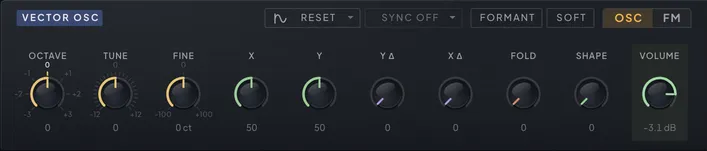
Two knobs take one wave from soft and hollow to snarling — and the same two knobs can park a vowel-like resonance on any harmonic you choose. That is VECTOR — vector phase shaping, a technique published by Kleimola, Lazzarini, Timoney and Välimäki in 2011, implemented here in double precision.
Instead of filtering a bright wave or crossfading between stored shapes, VECTOR bends the phase that reads the waveform. Picture the wave’s single cycle being traced by a clock hand: X and Y grab that clock hand and bend its path through one inflection point. X places the bend horizontally — how early or late in the cycle the distortion strikes — and Y sets its depth, which is the main timbre sweep. Low X with moderate Y is smooth and rounded; high X with low Y turns aggressive. Because you are shaping phase rather than amplitude, the sweep has a vocal, resonant quality that a filter sweep does not.
Formant mode. The FORMANT switch extends Y’s reach into true formant synthesis: the resonant peak locks onto a harmonic of the note, and sweeping Y walks it up the harmonic series. Peaks are strongest when they sit exactly on a harmonic, so slow Y sweeps produce the stepped, vowel-like character of a voice changing shape. Melodies keep their formants in tune because the peaks are multiples of the fundamental. Flip FORMANT on a sounding note and the two shapes crossfade, so the switch never clicks.
Stereo divergence. X Δ and Y Δ split the two channels’ bend around the panel values: the left channel shifts down by the offset, the right channel up. Both channels run at the same pitch, so the width is the two sides being shaped differently — width generated by the shaping itself, not by delay or detune, and for pads the VECTOR section’s quietest strength. The split keeps its full width right up to the ends of X and Y, easing the pair inward near an end instead of squashing one side against it, and with FORMANT on, Y Δ gives about the width it gives the plain shape. Bring both Δ knobs back to zero — and the FM tab’s WIDTH, while stereo modulators feed it — by hand or by a modulator, and after about a quarter of a second VECTOR is exactly mono again, with no click; a modulator grazing zero does not flicker it.
The header. Left to right it carries the Start Phase and Sync menus (each has its own section below), the FORMANT switch, the SHAPE curve menu and the OSC | FM tabs. The knobs described here are the OSC tab; FM has its own section next.
A sine-based wavefolder (FOLD) and a waveshaper (SHAPE, with Soft, Hard and Fold curves) stack on top for saturation and buzz. Soft and Hard start at the clean wave and only get louder and denser as SHAPE rises — Soft eases in over the bottom quarter of the dial, Hard over the bottom eighth — so there is no quiet spot near zero and an LFO swinging through zero does not pulse the level. Fold folds both halves of the wave the same way, mirrored rather than flipped, so the negative half no longer jumps across the full range at its peak. At extreme X and Y settings the engine leans on its own alias suppression rather than on a global oversampling control: the source rate is capped at 2x (see Engine settings (Chapter 12 — Reference)), and the stages that need more than that — the ladder filter, the distortion, the sub saturator — oversample internally. Leave headroom under the folder and the mode stays clean.
Like MORPH, the VECTOR section carries OCTAVE, TUNE and FINE: the octave, the interval in semitones and the cents either side of it, which is what you reach for when stacking VECTOR against another source and you want beating rather than a chord. With Sync on, the same three set the sync ratio instead.
| Parameter | Range | Default | What it does |
|---|---|---|---|
| Vector X | 0 – 1 | 0.5 | Horizontal position of the phase bend — higher X distorts the phase harder for a fiercer, brighter tone. |
| Vector Y | 0 – 1 | 0.5 | Depth of the phase bend — the main timbre sweep; with FORMANT on it chooses the formant harmonic. |
| Vector Stereo Y Δ | 0 – 0.3 | 0 | Gives L and R different Y values — the channels shape apart for width. With X Δ, Y Δ and the FM tab's Width at 0, VECTOR is exactly mono. |
| Vector Volume | -inf dB – 0.0 dB | -inf dB | VECTOR level in the oscillator mix. |
| Vector Pan | L100 – R100 | C | Stereo balance of the VECTOR oscillator — constant-power, transparent at centre, and a modulation destination. |
| Vector Octave | -3 · -2 · -1 · 0 · 1 · 2 · 3 | 0 | Octave transpose for the VECTOR oscillator; under Sync it sets the sync ratio instead, while the pitch follows the note or the SUB. |
| Vector Tune | -12 … 12 (25 steps) | 0 | Semitone offset for the VECTOR oscillator; under Sync it sets the sync ratio instead — sweep it for the classic sync sound. |
| Vector Fine | -100 ct – +100 ct | +0 ct | Fine detune within a semitone — slow beating against the other sources; under Sync it fine-tunes the sync ratio. |
| Vector Fold | 0 – 1 | 0 | Sine-based wavefolder on the VECTOR output — folds peaks back into buzzing harmonics. |
| Vector Stereo X Δ | 0 – 0.3 | 0 | Gives L and R different X values — stereo divergence from a single oscillator. |
| Vector Shape Type | Soft · Hard · Fold | Soft | Waveshaper curve used by Shape: Soft, Hard or Fold — each clips with a different edge. |
| Vector Shape Amount | 0 – 1 | 0 | Drives the selected waveshaper for extra saturation on top of the phase shaping. |
| Vector Formant | Off / On | Off | Extends Y into formant territory — resonant, vowel-like peaks parked on harmonics. |
| Vector Sync | Off · Note · Sub | Off | Syncs VECTOR to the note or the SUB, by HARD restart or the gentler REVERSE, from one menu; VECTOR's Octave, Tune and Fine then set the ratio. |
| Vector Sync Type | Hard · Reverse | Hard | HARD restarts VECTOR on every master cycle; REVERSE turns the wave round instead — gentler. Picked in the Sync menu, kept while Sync is Off. |
| Vector Start Phase | Quarter · Free · Reset · Random | Reset | Where VECTOR's wave starts on a note: QUARTER (the original), FREE (runs on), RESET (the same point every time) or RANDOM (varies, layers aligned). |
| Vector Pitchbend | Off / On | On | Lets the pitch wheel bend the VECTOR oscillator; off, it holds the played pitch while the others bend. On by default. |
| Vector Key Tracking | Off / On | On | Lets the VECTOR oscillator follow the keys; off, it holds a C3 (Octave, Tune and Fine on top) as a fixed layer while the others play the notes. On by default. |
VECTOR FM: the other sources bend its phase
Turn VECTOR into an FM voice without leaving the page: MORPH, the sub and the PLL can each bend its phase. The FM tab in the VECTOR header swaps the OSC knobs for the FM controls. It is a view only: the instance remembers it, and loading a preset in the editor opens OSC again.
MORPH, SUB and PLL each set how hard that source bends VECTOR: MORPH in unison for brassy FM, tuned off the note for clangorous, bell-like sidebands; the sub, at or below the note, for a growl rooted under it; the PLL for sidebands that swoop as the loop locks and slips. Each source bends VECTOR with its own sound, taken before its volume, so its level can sit at zero and it still modulates — a MORPH you never hear makes a pure FM operator. A source that SKIP takes out of a note gives no FM on that note either (see Oscillator independence).
Each of the three has a TONE knob beside it — MORPH TONE, SUB TONE, PLL TONE: a low-pass on that modulator, counted in the modulator’s own harmonics rather than in hertz, so a setting sounds alike on every key. The dial reads that harmonic count as a plain number, marked PURE at the bottom, WARM where a new patch starts and BRIGHT at the top: PURE keeps the FM close to a sine modulator’s clean sidebands, BRIGHT lets the modulator’s full edge through for dense spectra. Tone shapes only the FM — the modulator’s own sound in the mix is untouched.
FEEDBACK feeds VECTOR’s output back into its own phase, the single-operator move that edges the wave toward a saw; its travel stops short of where feedback breaks into noise. FILTER ENV lets the filter envelope shape all the depths at once. Right of centre they follow the envelope — fully up, the FM lives only while the envelope is up, for attacks that clang and settle; left of centre the movement inverts, so the FM grows as the envelope falls. The amounts stay the ceiling either way, and the envelope runs for this even with both filters off. WIDTH makes the FM stereo when its modulators are — a MORPH spread with STEREO Δ, or a stereo PLL — widening both sides at equal level, while everything below about one and a half times the note stays one mono image on both sides. Use it at either end: in between it beats against a detuned source, and with mono modulators it does nothing. VOLUME is VECTOR’s own, shared with the OSC tab.
However deep the FM goes, VECTOR stays on its pitch, and high notes stay clean because the depths share one budget that keeps the sidebands inside the audible range. The amounts, Tones, FEEDBACK, WIDTH and FILTER ENV (listed as Vector FM Filter Env) are all modulation destinations — a Tone route glides across the knob’s four octaves without stepping, even from a fast LFO — and velocity reaches the FM through a route from the VELOCITY module (Chapter 4 — Modulation) rather than a knob of its own.
| Parameter | Range | Default | What it does |
|---|---|---|---|
| Vector FM Morph | 0 % – 100 % | 0 % | How hard MORPH bends VECTOR's phase — from a warm edge to brassy, bell-like sidebands. Works even with MORPH's level at 0. A modulation destination. |
| Vector FM Morph Tone | ×1.0 – ×16.0 | ×4.0 | Lowpass on the MORPH modulator, tracking MORPH's pitch so every key sounds alike: PURE keeps the fundamental, BRIGHT reaches the 16th harmonic. A modulation destination. |
| Vector FM Sub | 0 % – 100 % | 0 % | How hard the SUB bends VECTOR's phase — a growl rooted under the note. Works even with the SUB's level at 0. A modulation destination. |
| Vector FM Sub Tone | ×1.0 – ×16.0 | ×4.0 | Lowpass on the SUB modulator, tracking the SUB's pitch: PURE keeps just the fundamental for a round growl, BRIGHT reaches the 16th harmonic. A modulation destination. |
| Vector FM PLL | 0 % – 100 % | 0 % | How hard the PLL bends VECTOR's phase — sidebands that move as the loop locks and slips. Works even with the PLL's level at 0. A modulation destination. |
| Vector FM PLL Tone | ×1.0 – ×16.0 | ×4.0 | Lowpass on the PLL modulator, tracking the PLL's pitch: PURE tames the buzz of its sharper shapes, BRIGHT reaches the 16th harmonic. A modulation destination. |
| Vector FM Feedback | 0 % – 100 % | 0 % | VECTOR modulating its own phase — a pure tone grows a saw-like edge, then a dense buzz. A modulation destination. |
| Vector FM Width | 0 % – 100 % | 0 % | Makes the FM stereo: the right side is bent by the modulators' own right channels, the lows stay centred, mono modulators change nothing. A modulation destination. |
| Vector FM Filter Env | -100 % – +100 % | 0 % | FILTER ENV — lets the filter envelope shape the FM depth, never past the amounts: right of centre the attack is brightest, left of centre the reverse. A modulation destination. |
MORPH: twelve families on one knob
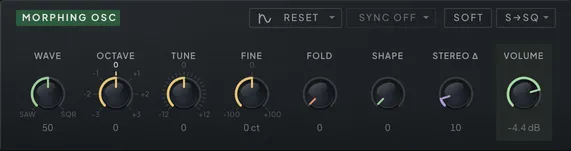
When a patch needs a saw that becomes a square, a vowel, a rising sync lead or a wall of detuned width, MORPH is where you go. It is the conventional-oscillator section — with the convention stretched: one knob, and a mode selector that decides which of twelve waveform families that knob travels through.
The six crossfade families blend their waveform pairs with equal-power crossfades, so perceived loudness stays even along the travel, and switching families mid-performance crossfades in a few milliseconds — no clicks, even with the knob under heavy modulation. The knob itself is a modulation destination, which is where this section gets fun.
The everyday crossfades. Saw to square, sine to saw, and triangle to square cover most bread-and-butter needs — pick the pair, set the knob, done. Saw-to-pulse narrows the pulse as it fades, turning increasingly nasal and resonant.
The sweeps. FULL runs five waveforms in a single travel — sine, triangle, half-rectified sine, saw, square — the complete gentle-to-bright range on one control, made for a slow LFO. RECT morphs sine through half- to full-rectified shapes: buzzy and organ-like, doubling in pitch at the top. HARM builds a saw additively, one harmonic at a time up to 64, and is inherently band-limited.
The performers. SYNC turns the knob — RATIO in this mode — into a hard-sync ratio: the classic rising harmonic sweep for leads, corrected at every sync point so it stays clean between whole ratios as well as on them. (To sync MORPH to the note or the sub instead, use the header’s Sync menu — see Sync below.) SWRM (Swarm) is a detuned unison saw of seven voices, each running free, so they drift and beat like a real stack. The knob, DETUNE in this mode, starts at a plain saw and brings the six side voices in as it widens the spread — about 8 cents a quarter of the way up, 30 at half, 68 at three quarters and 120 at the top — with the loudness even all the way. STEREO Δ spreads the seven voices across the field rather than splitting the channels’ pitch, so the mono fold-down is exactly the STEREO 0 sound. STRS quantizes a sine into coarse steps for digital, retro grit.
The voice. FMNT is real formant synthesis: a bank of vocal-tract resonances shapes the oscillator the way a mouth shapes the vocal folds, and those resonances stay fixed in frequency no matter what note you play — so a vowel keeps its identity up and down the keyboard, and vibrato or glide sweeps the harmonics through the standing formants exactly the way a singer’s does. The knob sweeps the vowel — A, E, I, O, U — for vocal pads and leads; with the PITCH switch on, the played note also shifts the vowel position — higher notes land on later vowels — and the knob offsets from there, stopping at the last vowel. Two controls appear only in this mode: BREATH mixes in aspiration noise shaped by the same resonances — from a hint of air to a whispered pad — and SIZE scales the whole vocal tract, from big and dark to small and bright. Both are modulation destinations, so an LFO on SIZE talks and a slow ramp on BREATH exhales.
The wavetable. SPCL walks a spectral table from plain harmonics through tilted, combed and resonant spectra.
Around the morphing core: FOLD and SHAPE are the same wavefolder and waveshaper tools as the VECTOR section. OCTAVE, TUNE and FINE set the octave, the interval and the cents — FINE is the control for the small detunes that thicken a stacked patch without pulling it out of key. Everywhere except Swarm, STEREO Δ detunes the left channel down and the right channel up for immediate width and slow chorus-like motion. At zero MORPH is exactly mono — the right channel is a copy of the left — and turning STEREO Δ back down returns it there without a click. The header holds the Start Phase and Sync menus, the SHAPE curve menu (the PITCH switch in formant mode) and the mode selector.
| Parameter | Range | Default | What it does |
|---|---|---|---|
| Morph Start Phase | Half · Free · Reset · Random | Reset | Where MORPH's wave starts on a note: HALF (the original), FREE (runs on), RESET (the same point every time) or RANDOM (varies, layers aligned). |
| Morph Volume | -inf dB – 0.0 dB | -inf dB | MORPH level in the oscillator mix. |
| Morph Pan | L100 – R100 | C | Stereo balance of the MORPH oscillator — constant-power, transparent at centre, and a modulation destination. |
| Morph Octave | -3 · -2 · -1 · 0 · 1 · 2 · 3 | 0 | Octave transpose for the MORPH oscillator; under Sync it sets the sync ratio instead, while the pitch follows the note or the SUB. |
| Morph Tune | -12 … 12 (25 steps) | 0 | Semitone offset for the MORPH oscillator; under Sync it sets the sync ratio instead — sweep it for the classic sync sound. |
| Morph Fine | -100 ct – +100 ct | +0 ct | Fine detune within a semitone for slow beating; under Sync it fine-tunes the sync ratio. |
| Morph Fold | 0 – 1 | 0 | Sine-based wavefolder on the MORPH output — buzzy folded harmonics. |
| Morph Shape Type | Soft · Hard · Fold | Soft | Waveshaper curve used by Shape: Soft, Hard or Fold. |
| Morph Shape Amount | 0 – 1 | 0 | Drives the selected waveshaper for extra saturation after the morph. |
| Morph Amount | 0 – 1 | 0 | The morph slider — sweeps through the family Mode picks, holding an even level all the way across. |
| Morph Mode | Saw → Square … Spectral (12 steps) | Saw → Square | Picks which of the twelve waveform families the morph slider travels through. |
| Morph Sync | Off · Note · Sub | Off | Syncs MORPH to the note or the SUB; its Octave, Tune and Fine set the ratio. Offered on Saw → Square, Sine → Saw, Saw → Pulse and Swarm. |
| Formant Pitch Track | Off · On | Off | The played note also slides the vowel — higher notes land on later vowels; the knob offsets from there. |
| Formant Breath | 0 – 100 | 0 | Aspiration noise shaped by the same vowel resonances — from a hint of air to a whispered pad. |
| Formant Size | -100 – 100 | 0 | Scales the whole vocal tract: big and dark below centre, small and bright above. |
| Morph Stereo Detune | 0 – 1 | 0 | Detunes L down and R up by up to 50 cents each — instant width and unison-style thickness. In Swarm it spreads the seven voices instead; at 0 MORPH is exactly mono. |
| Morph Pitchbend | Off / On | On | Lets the pitch wheel bend the MORPH oscillator; off, it holds the played pitch while the others bend. On by default. |
| Morph Key Tracking | Off / On | On | Lets the MORPH oscillator follow the keys; off, it holds a C3 (Octave, Tune and Fine on top) as a fixed layer while the others play the notes. On by default. |
Sync: VECTOR and MORPH lock to a master
Sweep a synced oscillator and it tears through its harmonics while the note stays put — the classic sync lead. VECTOR and MORPH each have a Sync menu in their header that ties the oscillator to every cycle of a master. With sync on, the oscillator’s own OCTAVE, TUNE and FINE stop setting the pitch you hear and set its ratio to the master instead: the sound stays on the master’s pitch, and moving those controls — or routing an envelope or an LFO to the oscillator’s Tune Wide destination — becomes the sweep.
Note syncs to a hidden oscillator at the played note. With OCTAVE, TUNE and FINE at zero it sounds exactly like no sync; raise them and the harmonics climb. Sub syncs to the sub oscillator instead, so the synced oscillator follows the sub’s pitch — an octave below the note at the default Sub Octave — and the sub keeps working as the master with its volume at zero.
VECTOR’s one menu offers Sync Off, Note / Hard, Note / Reverse, Sub / Hard and Sub / Reverse; closed, the button shortens Reverse to REV. Hard restarts the wave at every master cycle. Reverse turns the wave round instead of restarting it — a gentler, rounder sync. Picking Sync Off keeps the Hard or Reverse choice for next time.
MORPH’s menu reads Off, Note or Sub, and it works in four modes: Saw → Square, Sine → Saw, Saw → Pulse and Swarm, where each master cycle restarts all seven voices. In the other modes the menu is unavailable and the help bar says why — the SYNC mode, for one, is already a hard sync inside MORPH, with its knob as the ratio. With STEREO Δ up, a synced MORPH stays wide but stops beating, because both channels restart on the one master.
At whole ratios sync has nothing left to do: every master cycle lands on one of the oscillator’s own, so you hear the oscillator’s plain pitch and the master’s fundamental drops out. An octave up under Note does it, and so does Sub whenever the oscillator sits a whole number of octaves above the sub with TUNE and FINE at zero — the default settings included. Layer the sub underneath to keep the root, or sit between the whole ratios, where the sync sound lives.
Turning sync on while a note sounds, moving from Note to Sub, changing the Sub Octave under Sub sync and flipping Hard and Reverse all crossfade onto the new master in a few milliseconds, so none of them clicks. While Sync is on Sub, the oscillator’s Start Phase menu greys out — it starts where the sub starts. The Sync menus themselves are not modulation destinations; sweep the ratio instead.
The sub
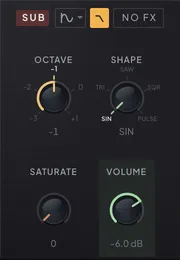
Anchor the low end with a source whose only job is weight. The sub tracks the played note at a whole-octave offset — the OCTAVE control mostly chooses how far down; 0 sits at the played pitch itself, and the top position lifts the sub an octave above it, an octave layer with the sub’s shapes and saturation rather than a floor. Like the other sources it is cabled into FILTER 1, so by default the filter shapes it along with everything else; when a screaming resonance sweep must not hollow out the foundation, the routing choices below keep the floor solid. The sub is also the sync master VECTOR and MORPH can follow (see Sync above), and it keeps that job with its volume at zero.
SHAPE morphs the sub’s waveform continuously through five stops: sine, triangle, saw, square, and a narrowing pulse. Leave it at sine for pure, invisible weight that a mix feels rather than hears; triangle and saw add just enough edge for the sub to read as a note, and square is the classic hollow foundation. Past square the pulse narrows continuously, down to a tenth of the cycle — reedy and nasal, with the energy moving up out of the fundamental. That last stretch is level-compensated, so the sub keeps its weight as the pulse thins instead of disappearing the moment you leave the square. On very high notes the shape gives way gradually to a pure sine, over three octaves from about 1.5 kHz of sub pitch at 48 kHz (the point scales with the sample rate); from a quarter of the sample rate up the sub is a sine whatever SHAPE says. That matters most at OCTAVE +1, where it keeps high sub notes clean instead of folding into false tones; bass and mid notes are untouched. SATURATE adds harmonics on top of whatever shape you chose — the practical effect is that the bass becomes audible on laptop speakers and earbuds, where the fundamental itself does not survive.
LOWPASS — the small falling-curve switch in the SUB section’s own header, the same glyph the mixer’s channel highpasses wear — is what keeps every one of those shapes a sub. It is a voicing filter that tracks the sub’s own fundamental, so whichever shape you pick, the energy above that fundamental sits at the same level. Off, the morph is a brightness control as much as a shape control: the narrow pulse carries roughly ten decibels more upper harmonic content than a saw, and the top of the dial reads as a buzz sitting on top of the mix rather than as low end. On, SHAPE picks character instead — saw, square and pulse differ in which harmonics they carry, not in how many. Weight does not move either way; the level compensation holds across the whole morph with the switch engaged.
Brightness then comes back from SATURATE rather than from SHAPE, and that is the more useful pairing: the lowpass sets a voicing floor the shape cannot climb over, and saturation adds harmonics on top of it, so what reaches small speakers is a bright sub instead of a thin one. The switch is on for new patches; a preset or project saved before this existed loads with the switch off, which keeps every sound you have already made exactly as you left it — turn it on to hear the difference, and it costs nothing at the sine end, where the filter has nothing to remove.
Routing is where the sub differs from the other three sources. On the patchbay the SUB → FILTER cable is the sub’s send into FILTER 1, with its own level like every other cable — pull it down to thin the sub out of the filtered path, or move it to FILTER 2 to give the low end a filter of its own. And a NO FX switch in the SUB section’s own header — the same control as the NO FX button on the mixer’s SUB strip and the patchbay’s SUB → OUT cable, all three mirrored, and listed as Sub FX Bypass in a host — routes the raw sub around the tone-shaping chain entirely when engaged, injecting it near the output: heavy coloration, distortion and character stages on top, untouched fundamental underneath. Because the direct injection happens after the master high-pass, NO FX is also how a sub survives aggressive low-end cleanup. It is the difference between a bass patch that gets dirty and a bass patch that gets dirty while the floor stays solid. The phase glyph ahead of the LOWPASS switch in the same header is the sub’s Start Phase menu, shown without its mode name to save room (see Start Phase below).
Presets and projects saved before the octave-up position arrived keep their octave. An automation lane recorded in a VST3 host, or a MIDI-learn mapping, on Sub Octave follows the knob’s travel instead, so a lane or mapping made before then now lands on different octaves — redraw it if the bass moves.
| Parameter | Range | Default | What it does |
|---|---|---|---|
| Sub Start Phase | Run · Free · Reset · Random | Reset | Where the SUB's wave starts on a note: RUN (the original — on from where it was), FREE, RESET or RANDOM. |
| Sub Volume | -inf dB – 0.0 dB | -inf dB | Sub level in the oscillator mix. |
| Sub Filter Route | off – 4.00 | 1.00 | Direct line for the sub into FILTER 1, faded out with FILTER 2's while the sub's NO FX switch is on; the level sets how much. |
| Sub Octave | -3 · -2 · -1 · 0 · 1 | -1 | The sub's octave against the played note: up to three octaves down, on the played pitch at 0, or one octave above at the top. |
| Sub Shape | 0 – 4 | 0 | Morphs the sub through sine, triangle, saw, square and a narrowing, level-compensated pulse. With LOWPASS on it picks character rather than brightness. On very high notes the shape gives way to a sine, so they stay clean. |
| Sub Lowpass | Off / On | On | A filter tracking the sub's own fundamental holds its harmonics at one level, so SHAPE picks character and SATURATE brings brightness back. Off in patches saved before it. |
| Sub Saturate | 0 – 1 | 0 | Saturates the sub — adds harmonics so the low end reads on small speakers; with LOWPASS on this is where brightness comes from. |
| Sub Pitchbend | Off / On | On | Lets the pitch wheel bend the sub oscillator; off, it holds the played pitch while the others bend. On by default. |
| Sub Key Tracking | Off / On | On | Lets the sub follow the keys; off, it holds a C3 (its Octave on top) as a fixed layer while the others play the notes. On by default. |
Start Phase: where each note begins
Make a bass hit the same way every time, or let a pad keep moving from note to note. VECTOR, MORPH and the sub each have a Start Phase menu that decides where that oscillator’s wave starts when a note begins. In the VECTOR and MORPH headers it is a phase glyph followed by the mode’s name; in the SUB header, where space is tight, it is the glyph alone. The PLL has none: its loop restarts as it always has, and the chase into each note is its attack.
Each menu holds four modes. The first is named for what that oscillator did before the menu existed, and it plays exactly that: QUARTER on VECTOR starts somewhere in the first quarter of the cycle, HALF on MORPH starts half a cycle in, and RUN on the sub never restarts at all — it runs on from wherever it was. Then:
- RESET starts the wave at the same point on every note — the rising zero crossing of what the oscillator actually puts out, after its own fixed filters — so a layered bass or a plucked lead hits with the same punch every time.
- FREE starts anywhere when a note begins from silence, then keeps running through overlapping notes, for pads that never quite repeat.
- RANDOM starts at a different point on every note, but every oscillator set to RANDOM moves by the same amount of time, so layered sources keep their relation while the attack varies.
New patches start all three on RESET. Presets and projects saved before these menus existed open on the first mode, so they sound as they always did.
A note struck while another is still sounding does not click on RESET or RANDOM: the jump to the new start crossfades over a quarter of that oscillator’s own period, a few milliseconds. The modes also keep VECTOR FM steady: when VECTOR and the MORPH or sub bending it are both on RESET, or both on RANDOM, every note starts them in the same relation, so the FM keeps the same timbre from note to note. In MORPH’s Swarm, RESET and HALF start the seven voices in the same pattern on every note, while FREE and RANDOM let them keep drifting.
While an oscillator’s Sync is set to Sub, its Start Phase menu greys out: the oscillator starts where the sub starts, so the sub’s own menu is the one that counts (see Sync above).
Glide and legato
Make lines slur, slide and breathe instead of stepping. Phaseburn One has two independent glide mechanisms, and knowing which one fires when is the whole trick. Both live in the PORTAMENTO group of the Voicing tab (OSC page, envelope panel), two sliders over their own switches, and the chart beside the tab draws how a one-octave step travels under each.
GLIDE is always-on portamento: every ordinary note-on slides, taking the time you set to reach the new pitch, up to five seconds. At zero, pitch changes are instant. The curve button under the slider picks the law every glide follows, Legato’s included — click it to step through RATE, TIME and EXP. RATE is a fixed speed, so the slider reads milliseconds per octave and a wide leap takes longer than a step; TIME gives every interval the time you set; EXP, where new patches start, closes in fast and settles onto the note, about two-thirds of the way there at the set time. Light SYNC beside the curve button and the slider turns into note values at the song tempo, 1/128 to 1/1 with triplets and dotted: the glide keeps its musical length when the tempo moves, and under EXP it has settled by the time the note value has passed. Flipping SYNC by hand keeps the glide about as long as it was — the nearest note value to the time, or the time the note value lasts. Presets and projects made before the curve existed open on RATE, the law they were voiced with; ones made before SYNC existed open free. On every curve the first note after a preset load starts on its own pitch instead of sliding in from wherever the last patch left off — at GLIDE zero too, so with Legato on, the first chord after a load lands in place instead of gliding up into it. Because the PLL is a loop chasing a reference, glide interacts musically with TRACK and DAMP — a slow glide with light damping arrives at the note, overshoots it, and rings, which no ordinary portamento does.
Legato is conditional: it fires only when notes overlap — a new note-on before the previous note-off. Light the LEGATO switch under its slider and an overlapping note does not retrigger the envelope; the sustain carries through and the pitch glides over the time the LEGATO slider sets, independent of GLIDE — one millisecond to five seconds, or, with its own SYNC lit, a note value at the song tempo. The slider dims while the switch is off but keeps its setting. Presets and projects keep their exact Legato times, but a host automation lane or a MIDI-learn mapping on Legato Time made before Legato reached five seconds lands on different times: the old one to 500 milliseconds is now the lower half of the travel, so a lane drawn at the top now plays five seconds — redraw it if a slide stretches. Each overlapping note still brings its own velocity with it; if you want a phrase to hold one loudness throughout, that is what Volume Velocity Lock (Chapter 10 — MIDI & Your DAW) is for.
The sequencer participates fully. When a step’s note length pushes past its beat division, consecutive sequenced notes overlap — and with legato mode on, they take the legato path automatically: no envelope retrigger, smooth glide. Shorter steps articulate normally. This means one sequence can mix tied, sliding passages and punchy re-attacks purely through the note-length lane.
A tie — drawn on the Beats tab, or added by GENERATE’s Ties knob — slurs its beat into the next hit with Legato on or off. Into a different pitch it slides over the Legato time, or over 60 ms with LEGATO off, always on the EXP curve whatever the curve button says; GLIDE never times a tie, and a tie into the same pitch simply holds (see Ties (Chapter 7 — The Sequencer)).
When several MIDI notes are held at once, the note-priority setting decides which one sounds: the most recent, the lowest, or the highest. It has no panel control — it is exposed to the host rather than drawn on the window — and low priority with legato gives the classic bass-player behavior: hold the root, hammer notes above it, and the line always falls back home when you release.
Oscillator independence
Pull paraphonic chords out of a single-voice instrument. Each of the four sources — PLL, VECTOR, MORPH and the sub — can independently sit out a note, play a different pitch than the one the voice was given, or ignore the pitch wheel. The Voicing tab of the OSC page’s envelope panel holds all of it, in four groups from left to right: Independence (the four source switches, then the SKIP and PARAPHONY sliders), Pitchbend, Key Tracking (next section) and Portamento (see Glide and legato above).
SKIP is a per-note probability that a source stays silent. When a note fires, every targeted oscillator rolls the dice separately: at moderate settings roughly half the sources sound on any given note, and the timbre thins and thickens from note to note. A four-source patch stops being one fused tone and becomes a small ensemble that does not always show up in full.
PARAPHONY (the control that used to read DRIFT) is a per-note probability that a source plays a different note — chosen from the same note pool, with the same chance-and-strength weighting, that drives the sequencer’s own note selection. At low values, an occasional source leans away from the line and adds interval color. At high values, each oscillator effectively walks its own melody: moving harmony out of one voice.
The four Independence switches decide which sources participate. Anything untargeted always plays the base note at full presence, so the usual move is to protect the anchor — leave the sub untargeted so the low end never gambles — and let the upper sources skip and drift above it. Both sliders are modulation destinations, so an LFO or step modulator can push a sequence from disciplined to scattered and back across a phrase.
The four Pitchbend switches are a separate decision about the same four sources: whether each one follows the pitch wheel. All four start on, so a patch bends as a whole until you say otherwise. Turn the sub’s off and the bass stays nailed to the played pitch while everything above it bends — the pedal-point move that is otherwise impossible in one voice; turn three off and the wheel becomes a detune control for the one that is left. Flipping a switch while a note is sounding glides over about 20 ms rather than stepping. The wheel keeps reaching everything else it always did whatever these switches say — the filters’ key-track, the transient click’s tone and the BitCrusher’s pitch-tracked decimation all still follow it. How far the wheel reaches is the Pitch Bend Range in the keyboard row, covered in the MIDI chapter (Chapter 10 — MIDI & Your DAW).
Skip and Paraphony are saved with the preset and roll fresh on every note, so no two passes through a sequence land identically — which is the point.
They roll on notes you play as well as notes the sequencer writes, whether or not the SEQ switch on the Groove tab is on — which is what lets a line you play from a keyboard split across the sources with Groove put away. On a key you play, PARAPHONY’s alternatives sit around that key: the note pool moved so that its root is the key — the notes a phrase played from it would use — so the shape follows your hand instead of sending oscillators into the pool’s own register. Hold a chord and the chord is the pool: the voice plays the key note priority picks, and a drifting oscillator lands on one of the other held notes — real paraphony from one voice. While the chord stands no oscillator stays on a key you lifted: lift a chord finger and only the oscillators that were sounding it re-roll, the others keep their notes, and which ones sit out does not change. Under a running phrase the sounding step is the one exception — its own note plays on to the end of the step even when it is the key you lifted, and a step a tie carried on, or a release ringing out between steps, keeps its oscillators as they were until the next step. The last finger plays the pool around itself again, weighed under a running phrase at the sounding step’s strength, so the pool’s strength biases hold. An alternative that would fall outside the MIDI range is no drift. SKIP, for its part, never silences a key you play directly: when every targeted oscillator would sit out, the first one that could play the key plays it, on the key itself — one you can hear, with its level up and Key Tracking on; a drone with Key Tracking off does not count. A sequencer step keeps its ghost rests: at high SKIP a step can still sit every targeted oscillator out. Clicking a note in the pool to audition it plays exactly that note on every oscillator.
Everything on the Voicing tab belongs to the sound, not the groove. A KEEP SEQ load brings Pitchbend, Key Tracking, Independence, Skip and Paraphony, Glide and Legato from the preset you pick, while the groove you are playing — its beats and the note pool Paraphony draws from — carries on.
Key tracking
The four Key Tracking switches on the Voicing tab decide whether each source follows the keys at all. All four start on. Turn one off and that oscillator stops listening to the notes: it holds a C3 — the pitch a C3 key plays in this preset, so the preset’s Octave carries it along, at once if you step the Octave while it sounds — with its own Octave, Tune and Fine on top, while the others play what you send. That is a drone or an effect layer inside one voice: a PLL pad that stays put while VECTOR, MORPH and the sub play the line, or a fixed-pitch sub under a melody. Set the held pitch with that oscillator’s Octave and Tune. Like the rest of the Voicing tab, these switches arrive with the sound on a KEEP SEQ load.
A held oscillator still answers everything that is not a note. Its Pitchbend switch alone decides whether the wheel bends it; the filters’ and envelopes’ key-track, the transient click’s tone, the BitCrusher’s pitch-tracked decimation and the vowel shift of MORPH’s formant PITCH switch keep following the played key; Skip can still sit it out when Independence targets it. Paraphony leaves it alone, since it has no note to drift from, and so do Groove’s octave randomisation and GENERATE’s Spread, which change the note the voice is given. An oscillator that syncs to a held master follows the master’s held pitch, and a held source feeding Vector FM or PLL REF is a fixed-pitch operator or reference — the FM ratio then moves with the key, the classic fixed-modulator sound. Flipping a switch while a note is sounding glides over about 20 ms rather than stepping.