

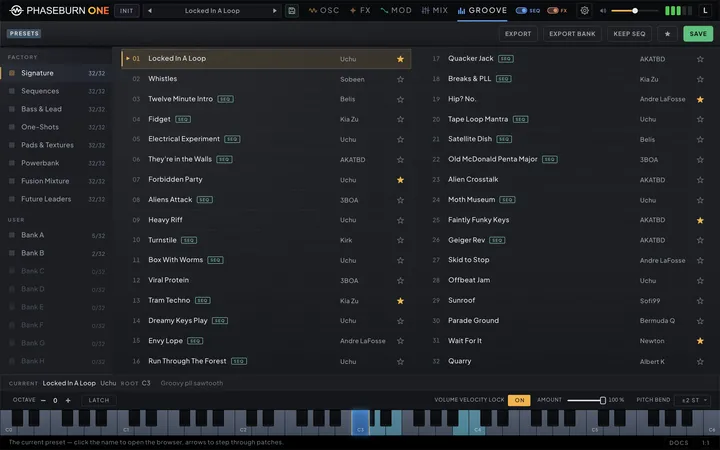
Presets are the fastest way into Phaseburn One, and a fast way back out of a blank page. The browser holds eight factory banks and eight user banks — A through H, 32 slots each. The factory library ships inside the build and grows with it: updates bring new and reorganized factory sounds, and the strongest user submissions ship in it, credited. This chapter covers the browser, saving your own work, recalling presets from your host, and sending yours in.
The browser
Click the preset name at the top of the window to open the browser — or step through presets in place with the prev/next arrows beside it, which move through every non-empty preset, factory then user, loading each. Down the left of the browser is a list in two groups: FACTORY, the built-in banks, and USER, the ones you fill yourself. Each bank shows how many of its 32 slots are in use, and a bank with nothing in it is drawn dimmed — dimmed, not disabled: an empty user bank is exactly where your next save goes, so the row still clicks and still selects, and brightens when it does. Pick a bank and its presets fill the main view as two columns — all 32 slots at once, no scrolling — and clicking any one loads it immediately, so browsing is just clicking down the list and listening.
The ★ button turns the list into your favorites: star the presets you keep coming back
to with the star on each row, and ★ gathers every one of them — from all eight factory banks
and all eight user banks — into a single list. It is a view across the library, not a filter
on the bank you happen to be looking at, so each row is labelled with where it lives (F·A03
for factory bank A slot 3, U·C11 for your own bank C). Columns stay sixteen rows tall, so
past 32 favorites the list grows sideways and scrolls horizontally rather than shrinking.
Past that point the strip along the bottom hands its space to a scroll bar for the list —
drag it, or click anywhere along it, to move sideways. Click any bank in the sidebar to come
back out.
Rows can carry three badges. A preset that carries its own groove is marked SEQ — that patch brings a sequence with it, not only a sound, so loading it hands the sequencer (Chapter 7 — The Sequencer) a pattern to play. The badge reads the beat grid, which is the only thing that actually fires notes: a patch whose grid is empty stays unbadged even though it still carries a note pool, because there is nothing there to play. A preset marked FX is built to process external audio: it is meant to be loaded on an audio track and used as an insert rather than played from the keyboard. The badge is the author’s own declaration — the Save dialog’s Insert effect checkbox, unticked unless you tick it. It is deliberately not read off the routing: a patch can borrow AUDIO IN for a moment of colour and still be an instrument, and every preset carries a Phase-Locked Loop (PLL) reference cable by default, so the cables say much less about intent than they look like they do. The factory presets built as inserts wear it; on your own presets it lights when you tick the box. A red VCA marks a preset that has handed its loudness floor to the volume envelope’s Depth slider — see The volume envelope (Chapter 4 — Modulation). At the bottom of Depth’s travel that is a patch which holds or drones rather than speaking once per note, so the badge is worth knowing about before you click: it will keep sounding after you let go of the key.
The arrow keys walk the list. Up and down step through the presets in front of you, left and right jump a column — and each step loads what it lands on, so browsing by ear is a matter of holding an arrow. Empty slots are stepped over: they are somewhere to save, not somewhere to audition. The keys stay inside the list you are looking at, so they never wander into another bank, and anything with its own keyboard — the Save dialog, a rename field, the manual — takes them back while it is open.
KEEP SEQ flips the SEQ behavior around for browsing: while it is lit, presets load their sound only, so the pattern you are playing carries on while you audition patches. The sound includes the whole of the OSC page’s Voicing tab: Independence, Skip, Paraphony, Pitchbend, Key Tracking and the Portamento group — Glide and Legato with their SYNC and curve settings — change with the patch, while the beats and the note pool stay. The step modulators the new sound brings join the bar in progress rather than restarting at step 1, so they stay in step with the pattern (a RETRIG lane restarts on its next note, as always). KEEP SEQ itself is remembered per instance and travels in your project file, so a session comes back the way you left it.
The strip along the bottom names the loaded preset — its title, author, its root and its description — so you always know where you are and where a hand belongs; hover any row and it previews that preset’s info instead, so you can read a description before committing to a click. Every factory preset is made to sound right played around C3, middle C: its root can be any note, but its main sound sits within reach of that key, so one hand position auditions the whole bank. A sound whose register is higher or lower is put there with the preset’s OCTAVE, the first control on the keyboard row at the foot of every page (above the roll on the Notes tab), so nobody has to guess where its author meant it to sit. INIT in the window’s top bar resets the engine to its default patch when you want to build from a known starting point rather than from someone else’s sound — a plain tone that plays as soon as you press a key, with every effect off and a root note already in the pool for the sequencer. It changes the sound, not where you are: the title keeps naming the slot you are working in, so pressing INIT and then SAVE writes back to the same place. Between the browser and favorites, finding a sound is a few seconds’ work, which is the point: the browser is a place to pass through on the way to playing.
Saving your own
When a sound is yours, keep it. SAVE opens a dialog that writes the current state into one of your USER banks — the same A-through-H layout as the factory side, 32 slots each. Pick the bank and slot, give the preset a Name and an Author (both required), add an optional Description for the footer, and save. If the slot is already taken the dialog warns you before it overwrites, so you will not lose a patch by accident. The top bar carries the same SAVE next to INIT, so a sound can be captured from any page without opening the browser — it points at the slot the current preset lives in, or at the first free user slot when you are on a factory sound. SAVE works from anywhere in the browser, the factory side included: press it while a factory preset is loaded and the same dialog copies that preset into a user slot, and when you are anywhere outside your own banks it offers the first free user slot rather than a slot you would have to overwrite. Clicking an empty slot does not open the dialog — it clears the engine back to the plain default, like INIT, with two differences: it respects KEEP SEQ, so a lit switch keeps the running pattern going while the sound resets, and the empty slot becomes the current one, so SAVE lands there, opening with an empty name field waiting for you.
UNDO SAVE catches the mistake that dialog cannot. When a save has just written over a filled slot, an UNDO SAVE button appears beside SAVE; press it and that slot goes back exactly as it was — sound, title, author and description. What it never touches is the sound you are working on: that stays loaded, and the preset header and the browser’s footer mark it Unsaved, so it is clear you are holding a patch that is no longer written anywhere. The offer is one level deep and short-lived by design: it withdraws the moment anything else writes to the library — including another copy of Phaseburn One on the same machine — and when the editor closes. Saving into an empty slot overwrote nothing, so it offers no undo.
If one preset in your library cannot be read, it costs that slot and nothing else. The slot shows as empty, opening the Presets page names what was skipped — the bank, the slot and the preset’s name — and every other preset loads and saves as usual. The unreadable preset is not thrown away: it stays in the library file exactly as it was saved and is written back unchanged on every save, until you save, import or remove that slot, or clear or import over its whole bank. The slot still counts as taken. SAVE from a factory preset never offers it as the free slot. The Save dialog lists it as name (unreadable) and warns before you save over it, and UNDO SAVE afterwards puts the kept preset back exactly as it was saved. Importing into it, Import bank and Clear bank ask before replacing it too. When you no longer want it, Remove in the slot’s menu clears it, and the slot becomes an ordinary free one. A later build that can read it, or a hand repair of the file, brings it back.
If the library file itself is damaged — the file is there but it is not a library the app can make sense of, or one of its banks is broken — the instrument stops writing rather than risk it. Every save, undo, remove, import and bank operation is refused with the same plain sentence, opening the Presets page says so before you try anything, and the file on disk is left byte for byte as it was. Move or repair the file and the block lifts on its own.
An empty slot has no mark of its own — it is known by the name it wears, which is why the title reads INIT while you sit on one, and why a preset may not be given one of those names. INIT, User 7, Init 28 and anything else a free slot is called are refused: a sound saved under one would be written and then read back as an empty slot everywhere, which looks exactly like having lost it. The dialog says so and waits for another name.
A saved preset captures the whole engine — every source, the filter, the effects and their routing, the modulation and every route it drives. If the sound includes a sequence, that travels with it and the preset shows the SEQ tag; recall it later and the groove comes back with the patch. The tempo does not travel: it belongs to the instrument, not the patch — in the Standalone app it is the keyboard strip’s own and is remembered between launches; under a DAW the host’s transport is the tempo — so a preset switch never moves it. Loading is deterministic: the engine restarts every free-running piece of the sound — the PLL loop’s chaos and lab state, the effects’ program memory, the parameter glides — from one canonical point, so a preset sounds the same on every recall, never colored by whatever played before it. A handful of things stay deliberately outside presets because they are instrument-wide settings, not sound: the oversampling and base rate, the SEQ and FX switches, KEEP SEQ, the output limiter, global volume, DRY/WET on the Mixer’s AUDIO IN strip, the pitch-bend range and the cog menu’s MIDI response — the input mode and Volume Velocity Lock with its Amount.
A preset’s name, author and description are only ever edited in the Save dialog. Load the preset, press SAVE, change what you want to change and write it back to the same slot — one place to edit a preset’s details, and no way to end up with a name that says one thing while the sound says another.
User banks are yours to reorganize, and most of it lives on the right mouse button. Right-click a preset in one of your banks for Import…, Export…, Init sound — which puts the default patch in the slot while keeping its name and details, so you can rebuild in place — and Remove, which empties the slot entirely. Right-click a bank in the sidebar for Rename bank…, Import bank…, Export bank… and Clear bank; a renamed bank shows your name in the sidebar in place of its letter, and the letter itself never changes, so nothing that points at the bank is disturbed. Factory banks have no menu: nothing there can be imported into, renamed or removed.
IMPORT and EXPORT in the header do the same job for the highlighted slot. Export works on any preset, factory or user — hand a patch to someone, back it up, or pull a factory sound out as a file — while import fills a user slot, with an overwrite warning if that slot is full. IMPORT and IMPORT BANK show only while you are on the user side, since there is nothing on the factory side to import into. That is also how a preset someone sends you gets into your library.
Whole banks travel the same way. EXPORT BANK writes the bank you are viewing — factory or user — into a single file, all 32 slots, and a bank you have named offers that name as the filename; IMPORT BANK replaces a user bank with such a file, after a confirmation when the bank is not empty. One file per bank makes backing up or swapping entire libraries a two-click job. Clear bank asks first too, and it is the one action with no file behind it — export the bank before you clear it if you want it back.
The factory banks
The factory side holds eight banks so the library can be organized by theme, and that library is not frozen: updates bring new and reorganized factory sounds, and shipped user submissions — credited to their authors — join it, which is exactly how the library grows. Treat the lineup your build carries as this build’s library rather than a fixed catalogue. Load a bank, click down the column, and keep what stops you.
Because the library moves, keep your own work on your own side of it. SAVE stays available while you browse the factory side: press it and the dialog copies the loaded factory preset — reworked into something of yours, or untouched — into one of your USER banks. User banks are your files, an installer leaves them alone, and a patch parked there rides through every update. EXPORT does the same job as a file, and EXPORT BANK does it for all 32 slots at once — that is the copy to keep if you also move between machines. Stars follow the sound: each preset carries an identity of its own, so reorganizing a bank between versions moves your star with the preset rather than leaving it on the slot. If a sound is retired from the library outright, its star goes with it instead of landing on a stranger. One caveat on that promise: a sound re-issued under a new name — curated across to another bank, say — is a new identity, so a star or a host recall pointing at the old one finds nothing rather than following it across. The sound is still there; the bookmark is what has to be made again.
Presets in your host
Phaseburn One’s presets also show up in your DAW, not only in the plugin’s own browser. In a host that supports CLAP preset discovery, the instrument publishes its whole factory and user library to the host, so you can browse and recall Phaseburn One patches from your DAW’s preset menu the same way you browse any plugin’s. Factory presets appear prefixed by their bank — Factory A and so on, then the preset’s name — and load the identical patch you would get from the browser inside the window.
Practically, that means two ways to reach the same sounds: the browser in the window, with favorites and the SEQ marker, or your host’s preset list, which some producers prefer for tagging and quick recall across projects. Either route loads the same preset. Hosts that do not implement preset discovery still have the full browser inside the plugin, so nothing is lost — this is an extra door, not the only one.
Whichever door a sound comes through — the window’s browser, the host’s preset list or a project reopening — your host ends up holding the loaded values. After a load from the host’s list or a reopened project, CLAP hosts re-read every parameter, and Logic and the other Audio Unit hosts read the loaded values rather than the ones from before it, so the host’s own parameter view and the automation you write next start from the sound you are actually hearing.
One thing to re-check after an update: a host remembers a factory preset by its place in the library, so a reorganized factory bank can leave that recall pointing at a different sound. Presets you saved into a user bank keep the place you gave them, and a project that stored the parameters themselves plays back the same either way.
Send us yours
Made something worth keeping? Send it in. Preset submissions are open, and they stay open — there is no closing date. The best of what arrives comes back to everyone as free downloadable banks, credited to the author by name, and a submitted preset can also ship as a factory preset. Submitting grants us the right to include it and creates no obligation on our side: inclusion is at our discretion, and nothing is owed for a submission. The form and the file spec live on /presets/submit.
If you are preparing a preset to share, check this before you export:
- Level it — click AUTO on the Mixer’s PRESET fader, then save. Shipped presets are brought to a consistent output level, and that one click lands yours at the factory reference. We may still adjust a shipped preset’s volume to sit right in the bank — the sound itself is never touched.
- Title-case the name — “Like That”, not “Like that” or “like that”.
- Keep names and descriptions clean — no trademarks (synths, artists, brands), nothing offensive. Wording that does not fit print may be trimmed or adjusted.
- One-shots: clear the sequence — do not just switch it off. Press Beats in the CLEAR group under the GROOVE page’s view switcher, then save.
- Effects: mark them FX — tick Insert effect in the save dialog so the preset wears the FX badge in the browser.
- Make it sound right around C3 — the root can be any note; what matters is that the preset’s main sound plays well around middle C, so whoever flips through the bank hears it as you meant it. If the sound belongs higher or lower, put it there with the preset’s Octave (at the left of the keyboard row under every page) rather than leaving the next player to guess; the browser shows the root with every preset, so nothing about pitch needs to go in the description.
What makes a preset shippable is not complexity — it is character. A sound that does one thing with conviction, named well and described in a line, is worth more to the bank than a patch with everything turned on. Export it from your user bank, share it as a file, and say what it is for. The factory bank you browse today is built exactly this way.